Attach Firefly
TM
2.5 to wheelchair
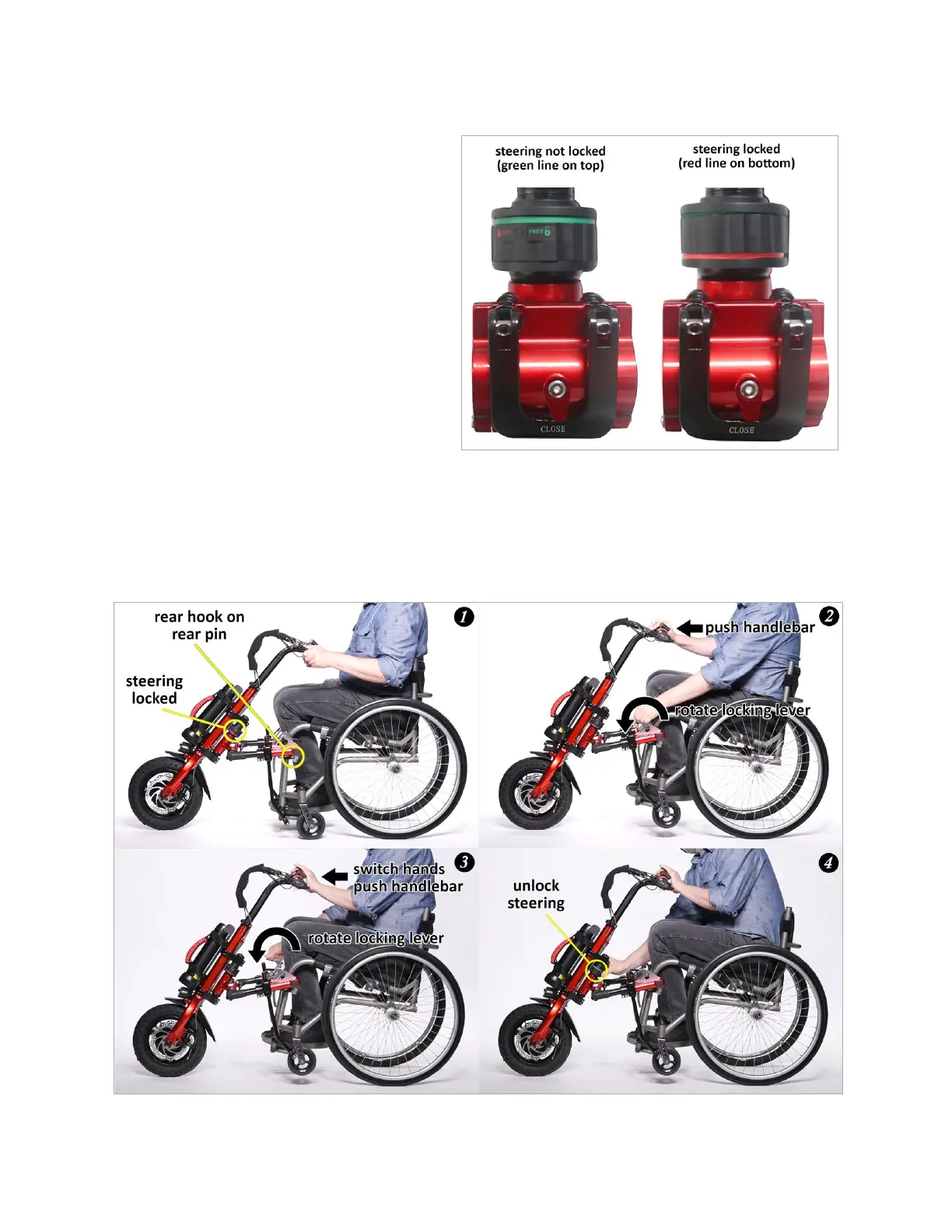
First apply the wheelchair's wheel locks. Next
lock the Firefly's steering by twisting the
headset clockwise until the line on the bottom
of the headset turns red. A red line on the
bottom of the headset means the steering is
locked, convenient for installing and storing the
Firefly. A green line on the top of the headset
means the steering is unlocked.
With the Firefly's steering locked, lift it by the
handlebars, and gently position the rear hooks
of the coupler plates so that they contact the
rear pins of the mounting clamps (1). Push the
middle of the handlebar forward with one hand
until the caster wheels lift fully off the ground,
then use the other hand to rotate the coupler plate's locking lever forward to a horizontal and locked
position (2). Now switch hands to hold the handlebar forward with the opposite hand and rotate the
second coupler plate's locking lever forward to a horizontal and locked position (3). Check that the green
curved line is visible on the inner surface of each coupler plate, showing that the hooks on the coupler
plates are fully closed and secure on the pins of the mounting clamps. Unlock the steering by twisting it
counterclockwise until the line on the top of the headset turns green (4).


 To Next Page