EasyManua.ls Logo

RiteAid deluxe automatic - Page 20

RiteAid deluxe automatic
60 pages
Print Icon
To Next Page IconTo Next Page
To Previous Page IconTo Previous Page
Loading...
5.8.
Setting
the
Medication
B-ér'n‘ih'de‘r"~é*""*
-
'
it"
'
I‘
*
This
instrument
allows
you
to
set
two
alarm
times
at
which
an
alarm
signal
will
then
be
triggered.
This
can
be
'a-useful
aid,
fOr
instance
as
a
reminder
to
take
medication
or
to
remind
you
to
take,
.
your
blood
pressure
at
the
same
time
each
day.
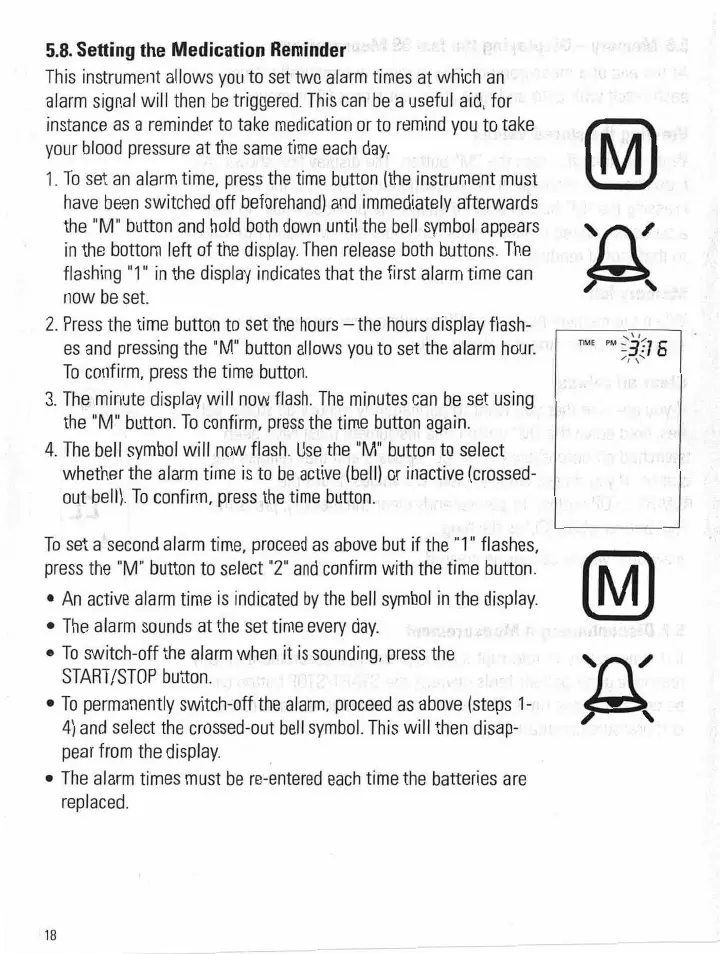
1.
To
set
an
alarm
time,
press
the
time
button
(the
instrument
must
have
been
switched
off
beforehandland
immediately
afterwards
_
the
"M"
button
and
hold
both
down
untilthe
bell
symbol
appears
in
the
bottom
left
of
the
display.
Then
release
both
buttons.
The
flashing
"1"
in
the
display
indicate-s
that
the
first
alarm
time
can
now
be
set.
2.
Press
the
time
button
to
set'th'e
hours
-theth'o'urs'
dis-play
flash—
.
;
es
and
pressing
the
"M"
button
allows
you
to
set
*the
alarm
hour.
To
confirm,
press
the
time
button.
3.
The
.minute
display
will
now
flash.
The
minutes
can
be
set
using;
the
"M"
button.
To
confirm
press
the
time
button
again.
4.
The
bell
symbol
will
now
flash.
Use
the
"M"
button
to
select
whether
the
alarm
time
is
to
be
active
lbelllgor
inactive
(crossed-
out'bell).
To
confirm,
press
the
time
button,
To
set-a7
second
alarm
time,
proceed
as
above
but
if
the
"l
"
flashes,
press
the
“M"
button
to
select
"2”
and
confirm
with
the
time
button.
0
An
active
alarm
time
is
indicated
by
the
bell
symbol
In
the
display.
0
The
alarm
sounds
at
the
set
time
every
day.
:0
To
switch—
off
the
alarm
when
it
is
sounding,
press
the
START/STOP
button.
0
To
permanently
switch-off
the
alarm,
proceed
as
above
(steps
1-
.
4)
and
select
the
crossed-
out
bell
symbol.
This
will
then
disap-
.
.
pear
from
the
display.
0
The
alarm
times
must
be
rea-entered
each
'time.
the
batteries
are
replaced.
'18.
We
“0‘3’5
.'.
II\_.\
I
\