RockCrusher™ Owner’s Manual Version 1.0 Dec. 01, 2010
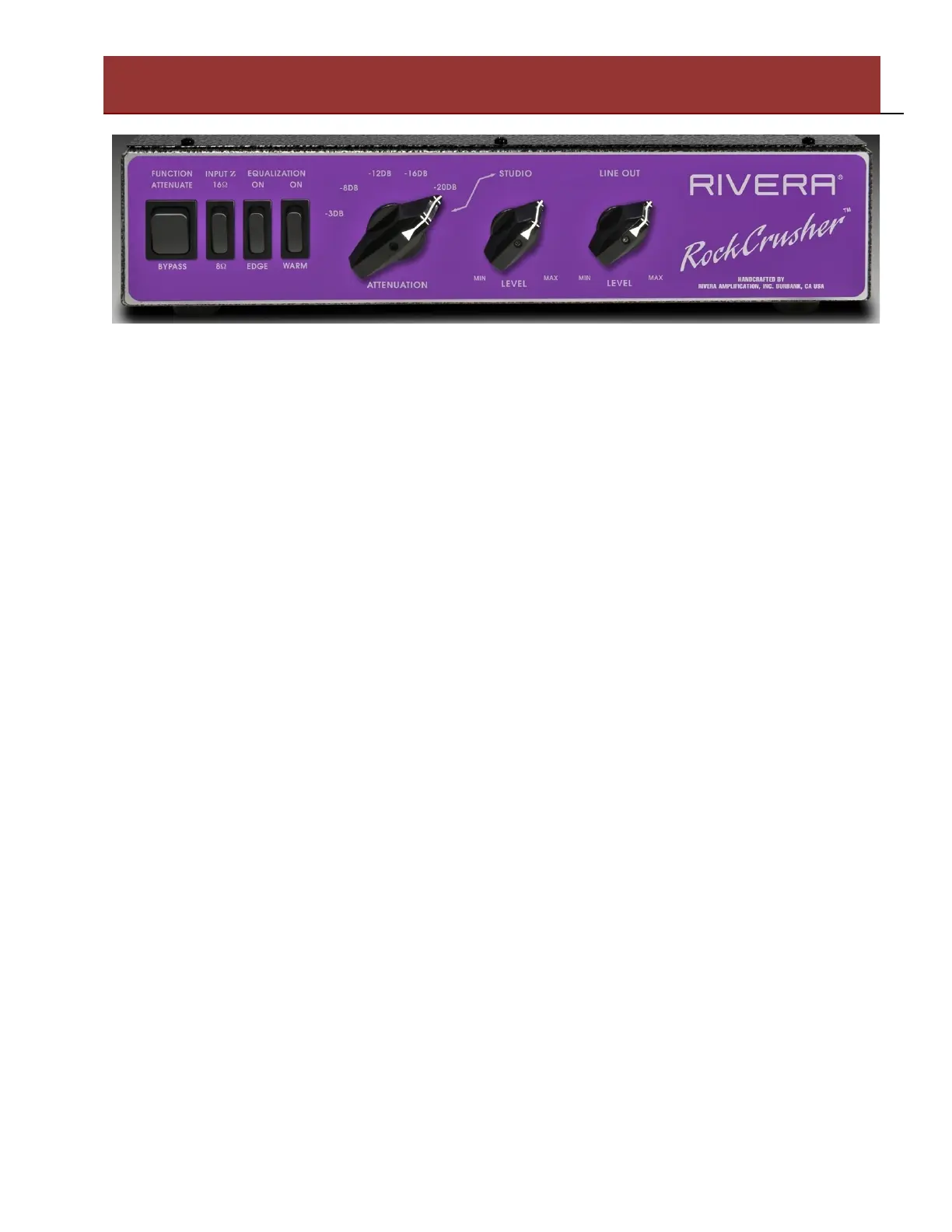
Function Switch: In the Bypass position, the RockCrusher is not loading the amplifier, and the
Speaker jacks on the rear panel of the RockCrusher are directly connected to the Amplifier Input jack.
Thus it is imperative to have speakers connected to the RockCrusher if it is used in the Bypass
position, otherwise an open load condition will exist and damage to your amplifier may result.
In the Attenuate position, the RockCrusher is now connected internally to the Amplifier Input, and
can function as a Load Box if no speakers are connected, or as an Attenuator if speakers are
connected to the RockCrusher.
Input Impedance (Z) Switch: Set this switch to match the setting or requirement of your amplifier
and the impedance of your speaker load. For example, with one 16 Ohm Speaker Cabinet, you would
set the RockCrusher to 16 Ohms, and your Amplifier to 16 Ohms. With two 16 Ohm Speaker
Cabinets, the Speaker Jacks are in parallel, so you would select 8 Ohms on the RockCrusher as well
as your amplifier. In Load Box mode, select which Impedance matches your amplifier. The 16 Ohm
position has the most power handling for the Load Box function, and is recommended for extended
Load Box use. Do not use the RockCrusher on amplifiers that are hard-wired for 2 or 4 ohms, or do
not have 8 or 16 Ohm Output impedance capability.
Equalization Edge and Warm Selectors: Use the Edge switch to add high-frequency brilliance to
the signal, and use the Warm switch to restore bottom end when the signal is attenuated.
Attenuation: Select the appropriate level you desire. The increments in dB values are for reference
only, and have been internally adjusted for a pleasing difference in level between the 6 Positions. In
the last position to the right, Studio is selected, and now the Studio Level control will function.
Studio Level: This function is only active when the Studio position is selected on the Attenuation
selector. It controls low levels and functions like a volume control, with a range that is perfect for
low-level playing, like in your home.
Line Out Level: For controlling the level of Balanced XLR and Unbalanced Line Output jacks on
the rear panel of the RockCrusher. Adjust this level to match the requirements of your equipment that
you have connected. It is preferable to utilize Line Level inputs with the RockCrusher, versus Mic
Level inputs. It is also advisable to connect an external equalizer (like a 10-Band Graphic) in between
the Line Output of the RockCrusher and the input of recording or PA gear.
Rear Panel Features and Functions
Rivera Amplification. Burbank, California, USA


 To Next Page
 Loading...