8 9
2. The Series and Parallel Operation
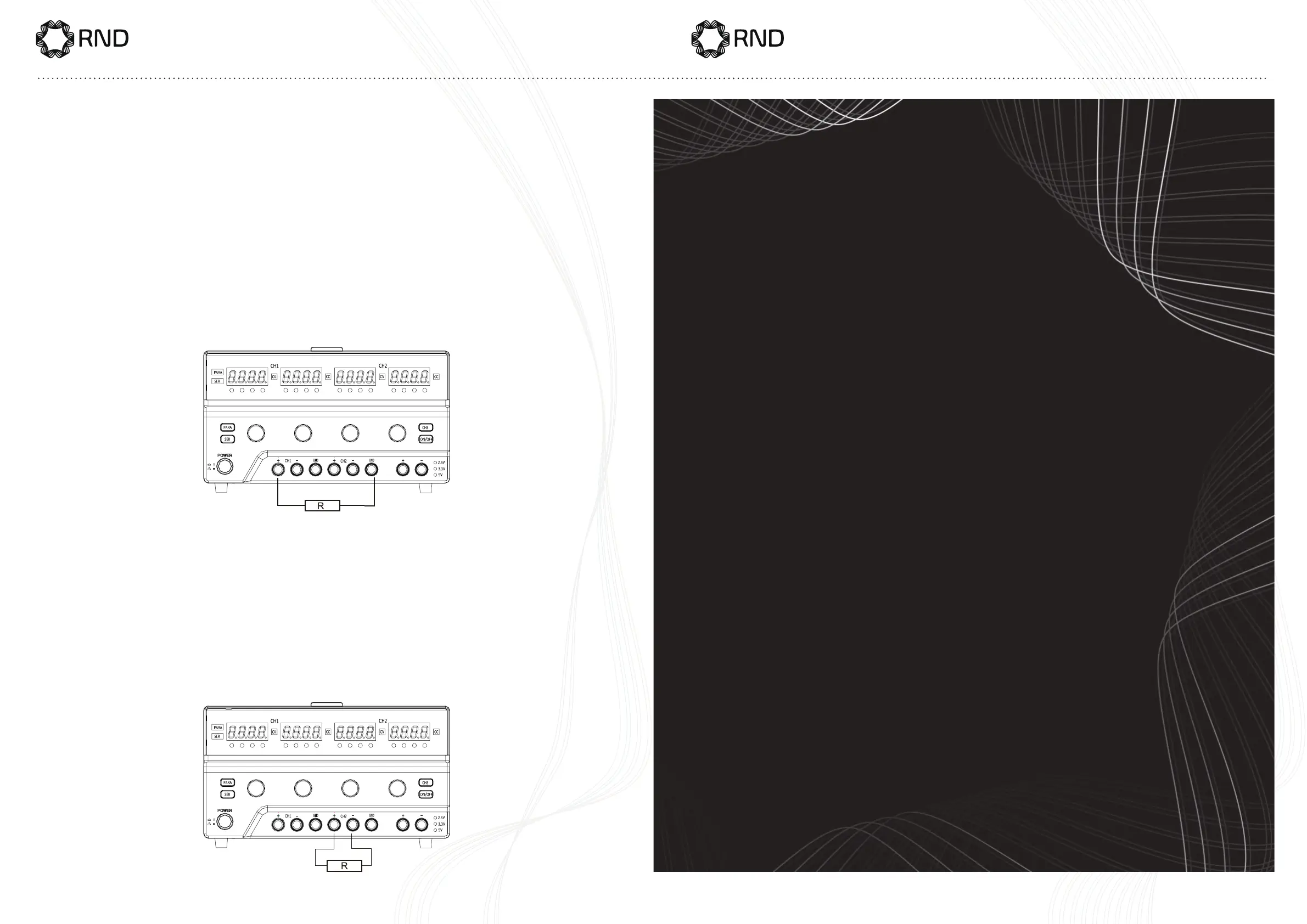
1. TheSeriesOperation:PressandholdthebuonSERfor1sec-
ondstobeintheseriesmode.WhentheSERindicatoronthedisplay
lights on, it means the power supply is in the series mode now. At this
mode, CH2 is the master operation while CHl is the slave operation,
whentheCH1operationisshielded.Atthistime,pressthebuonON/
OFFandthentheoutputcanbeturnedonoro.Andtheoutputcon-
nectionisasshowninthegure:
2. TheParallelOperation:PressandholdthebuonPARAfor1sec-
onds to be in the parallel mode. When the PARA indicator on the dis-
play lights on, it means the power supply is in the parallel mode now.
At this mode, CH2 is the master operation while CHl is the slave op-
eration, when the CH1 operation is shielded. At this time, press the
buonON/OFFandthentheoutputcanbeturnedonoro.Andthe
outputconnectionisasshowninthegure:



 To Next Page