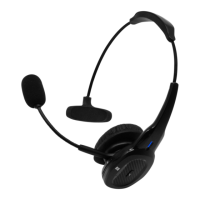
Need help?
Do you have a question about the ROAD KING RKING950 and is the answer not in the manual?
Press and hold the MFB for 3 seconds to turn the headset on or off.
In off status, press and hold MFB for 6 seconds until red and blue LEDs flash alternatively.
Short press MFB to play or pause music. Hold '+' or '-' to switch tracks.
Short press MFB to answer/end calls; long press to reject calls.
Short press volume buttons for adjustment. Press MFB to mute/unmute during calls.
Double press MFB for last number redial, hold MFB for 2 seconds for voice dialing.
Press and hold MFB to enter pairing mode; search 'RKING950' on your device to connect.
Pair one device, then pair the second. Re-enable the first device's Bluetooth to connect both.
Charge for approximately 3 hours until the red LED turns off. Periodically charge every two months.
Provides status information for power, pairing, standby, music, calls, and charging.
Details Bluetooth version, chip solution, frequency, battery, and dimensions.
The headset powers off automatically after 10 minutes of no Bluetooth connection.
The headset attempts to auto-connect. Re-pair if auto-connection fails.
Press and hold the MFB and mute button simultaneously to reset paired devices.
Try passcodes 0000, 8888, 1111, or 1234 if your device requires one.
The headset charges with DC 5V/500mAh via DC, AC, or USB port.
Read manual, avoid damage, keep away from liquids, heat, do not modify, use approved chargers, unplug when unused.
Device must not cause harmful interference and must accept any received interference.
One Year Limited Warranty covering defects in materials and workmanship.
The RoadKing RKING950 is a premium noise-canceling Bluetooth headset designed for clear audio and convenient communication. This owner's guide provides comprehensive instructions for its operation, pairing, charging, and maintenance, ensuring users can maximize their experience with the device.
The RKING950 functions primarily as a wireless headset for listening to music and making/receiving phone calls. Its core feature is premium noise-canceling, which enhances audio clarity by reducing ambient noise, making it suitable for use in various environments. The headset connects wirelessly via Bluetooth, offering freedom of movement and compatibility with a wide range of Bluetooth-enabled devices such as smartphones, tablets, and computers.
The headset is equipped with a Multi-Function Button (MFB) that serves multiple purposes, simplifying control. To power the device on or off, the MFB needs to be pressed and held for 3 seconds. For pairing, the MFB is held for 6 seconds from an off state until red and blue LEDs flash alternately, indicating pairing mode. Once paired, the MFB can be used to play or pause music with a short press. For phone calls, a short press of the MFB answers or ends an incoming call, while pressing and holding it rejects a call.
Volume control is managed via dedicated up/down buttons. A short press of these buttons increases or decreases the volume during music playback or a phone call. To switch between tracks, users can press and hold the "+" or "-" buttons. The headset also supports last number redial, activated by pressing the MFB twice in standby status. Voice dialing is initiated by pressing and holding the MFB for 2 seconds.
A unique feature of the RKING950 is its mute button. During a call, a short press of the mute button will mute the microphone, indicated by an audible prompt. Pressing it again will un-mute the microphone, restoring live audio transmission. The headset also includes a sound switch, which can be pressed and held during a call.
The RKING950 supports multi-point connection, allowing it to connect to two phones simultaneously. This feature is particularly useful for users who carry both a personal and a work phone, enabling seamless switching between devices without needing to re-pair. The pairing process for two devices involves first pairing with one device, temporarily disabling its Bluetooth, then pairing with the second device, and finally re-enabling Bluetooth on the first device to connect automatically.
The headset is designed for automatic power off when there is no Bluetooth connection for a 10-minute period, conserving battery life. Re-connection is also automated; once successfully paired, the RKING950 will automatically connect to the last paired device when in range. If automatic re-connection fails, users can manually re-pair the headset. For troubleshooting, the device offers a way to reset paired devices by simultaneously pressing and holding the MFB and the mute button.
Proper charging is crucial for the longevity of the RKING950. The headset indicates a low battery when the red light flashes, prompting immediate charging. A full charge typically takes approximately three hours. The red LED light will turn off once the battery is fully charged. The RKING950 uses a standard USB charging cable, which is included in the packing list along with a car charger. For extended periods of non-use, it is recommended to charge the headset periodically, specifically once every two months, to maintain battery health.
The LED indicator provides clear status updates:
The packing list includes the RKING950 Bluetooth Headset, a car charger, a Micro USB charging cable, a bag for storage, and a manual, providing all necessary accessories for immediate use and care.
Safety and general information guidelines are provided to ensure safe operation and extend the device's lifespan. Users are advised to read the manual carefully and follow all instructions. To prevent damage, the device should not be dropped from high places, exposed to humidity, water, or other liquids. It should also be kept away from heat sources like direct sunlight, radiators, or stoves, as extreme temperatures can cause explosions, degrade performance, or reduce battery life.
Modifying, repairing, or disassembling the device, especially the battery, will void the warranty. Heavy objects should not be placed on the device. Only the supplied and approved chargers should be used. In case of issues, users are directed to contact RoadKing for replacement or support. The device should be unplugged when not in use for long periods or during lightning storms. It's important to note that the battery may pose a risk of fire or chemical burn if mishandled.
The RKING950 comes with a 1-year limited warranty from RoadKing, covering defects in materials and workmanship under normal use. The warranty period starts from the day of retail sale and applies only to the original purchaser. It excludes damages from accidents, misuse, abuse, acts of God, operation outside specified parameters, modifications, attempted repairs, or damage from war or terrorist attacks. The warranty also excludes payment for lost time, loss of use, property damage, and incidental or consequential damages. Defective products should be returned to the dealer within 30 days or directly to RoadKing afterward. When returning products, shipping must be prepaid, and the package should include the product, all accessories, original dated receipt or invoice, a letter stating the defect, daytime phone number, and a physical address. Packages with PO Box addresses will not be processed. Users are advised to track their shipments, as RoadKing is not responsible for lost packages or damage incurred during shipment. Failure to provide dated proof of purchase will invalidate the warranty.
 General
| Connectivity Technology | Wired |
|---|---|
| Form Factor | Over-Ear |
| Impedance | 32 Ohms |
| Microphone | Yes |
| Driver Unit | 40 mm |
| Frequency Response | 20 Hz - 20 kHz |
| Microphone Type | Omnidirectional |
| Connection | 3.5mm |

 To Next Page