Your newly added instrument will be saved and set to standard tuning by default. For example, if
your instrument is a 6 string acoustic guitar, the tuning will be set to E2/A2/D3/G3/B3/E4. You can
easily change the tuning or create your own custom tunings. If you cannot find the instrument type
you would like to add, you can easily create a custom instrument using the Roadie Tuner mobile
app.
STEP 2: Start tuning
To begin tuning your instrument:
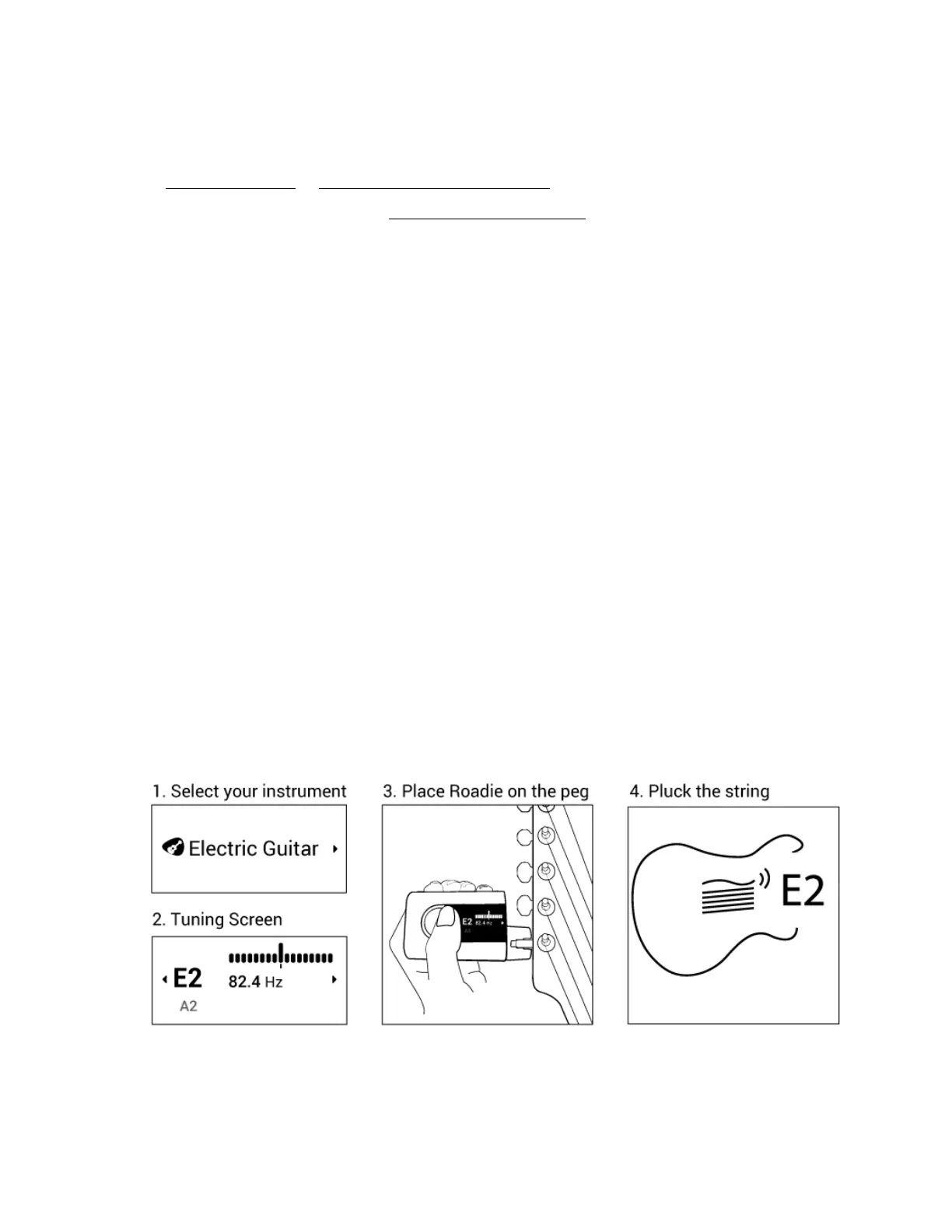
● Turn your Roadie on and enter the Tuner menu. Select an instrument from the list displayed on
the screen
● By default, Roadie will begin with the first tuning peg (the one closest to you). For example, if you
are tuning a 6 string guitar in standard, that would be E2. However, if you want to jump straight to
a particular string, you can use the navigation buttons (up and down) to change the selected note
● Place Roadie’s peg connector on the tuning peg of the note displayed on the screen
● Pluck the string. Roadie’s motor will rotate the peg. Wait until the rotation stops. Once Roadie
beeps, vibrates and the note turns green on the screen, that means the string is in tune.
Otherwise, keep plucking the string until this occurs
● Once in tune, the selection will automatically jump to the next note
● Turn off Roadie 3 by long-pressing the power button for 3 seconds



 To Next Page