The RoadKing RKING3000 is a premium mono Bluetooth® headset designed for clear communication and music playback. This user manual provides comprehensive instructions for its operation, pairing, and maintenance.
Function Description:
The RKING3000 is a mono Bluetooth headset, meaning it features a single earpiece, ideal for users who need to stay aware of their surroundings while on calls or listening to audio. It supports Bluetooth V5.0 for stable and efficient wireless connectivity. The headset is equipped with a Multi-Function Button (MFB) for various controls, including power on/off, pairing, play/pause, answering/ending/rejecting calls, and voice dial activation. Dedicated Volume + and Volume - buttons allow for easy adjustment of audio levels and skipping tracks. A mute button is also included for microphone control during calls. The headset supports connection with two devices simultaneously, allowing seamless switching between two paired phones for calls or music.
Important Technical Specifications:
- Bluetooth Version: V5.0
- Bluetooth Chip: CSR BC8615
- Operation Range: 32 feet
- Bluetooth Protocols: HSP, HFP, A2DP, AVRCP
- Decoding Mode: SBC
- Built-in Battery: 420mAh/3.7V
- Standby Time: 400 hours
- Headset Net Weight: 0.31 lbs
- Charging Time: Approximately 1.5 hours
- Play Time: Approximately 30 hours (at 70% volume)
- Talk Time: Approximately 30 hours (at 70% volume)
- Headset Dimension: 7.59" x 6.18" x 2.12"
Usage Features:
- Power On/Off: Press and hold the MFB for 3 seconds to power on, and 5 seconds to power off.
- Pairing: When off, press and hold the MFB for 5-7 seconds or double-click the MFB to enter pairing mode. The headset's LED will flash red and blue alternately. Search for "RK3000" on your phone's Bluetooth list to connect.
- Music Control: Click the MFB to play/pause music. Hold down Volume + to skip to the next song, and hold down Volume - to go back to the previous song.
- Call Management:
- Answer/End Call: Click the MFB.
- Reject Call: Hold down the MFB for 1 second.
- Last Number Redial: Double-click the MFB.
- Voice Dial: Hold down the MFB for 2 seconds.
- Audio Switch: During a call, hold down the MFB for 1 second to switch audio between the phone and headset.
- Volume Adjustment: Click Volume + to increase volume, and Volume - to decrease volume.
- Microphone Mute: Click the Mute button to mute the microphone during a call; click again to unmute.
- Multi-Device Connection:
- Connect the first phone and turn off its Bluetooth.
- Double-click the MFB to re-enter pairing mode (red & blue LEDs flash alternately).
- Turn on the second phone's Bluetooth, search for "RK3000", and connect.
- Turn the first phone's Bluetooth back on and reconnect to "RK3000". The headset will then be connected to both phones.
Note: Music can only be played from one phone at a time. Pause or close music on the previous phone to play from the other.
- LED Indicator: Provides visual cues for various states:
- Power On: Blue LED flashes 3 times.
- Power Off: Red LED flashes for 1 second.
- Pairing Mode: Red & blue LEDs flash alternately.
- Reconnection/Disconnected Standby: Blue LED flashes twice every 5 seconds.
- Connected Standby/Playing Music/Talking: Blue LED flashes once every 10 seconds.
- Charging: Red LED is normally on.
- Full Charge: Blue LED is normally on.
- Low Battery: Red LED flashes.
Maintenance Features:
- Charging: When the red light flashes, the battery is low. Charge immediately for approximately 1.5 hours. The red light will turn off, and a solid blue light will indicate a full charge.
- Storage Charging: If the RKING3000 is not in use, charge it at least once every two months to maintain battery health.
- Automatic Shutdown: The headset will automatically power off if there is no connection for more than 5 minutes in pairing mode, or when the battery is low.
- Resetting: If connection exceptions occur, plug in the charging cable to turn off and reset the headset.
- Clearing Pairing Records: When powered on, press and hold the Volume + and MFB buttons simultaneously. The purple indicator light will flash once, indicating that pairing records have been cleared. This can help resolve various connection issues.
- Charging Compatibility: The RKING3000 can be charged using a car charger, travel charger, or computer USB with a DC voltage of 5V and a current of more than 1A.
Troubleshooting (Notes and Q&A):
- Reconnection Failure: If the headset fails to reconnect to a previously paired phone, repair the phone to reconnect.
- Low Battery Alarm: A prompt will sound every 3 minutes when the headset battery is low until it is charged.
- Pairing Password: If a password is required for pairing, try "0000", "8888", "1111", or "1234".
Compliance:
This device complies with Part 15 of the FCC Rules, ensuring it does not cause harmful interference and accepts any interference received. Changes or modifications not expressly approved by the responsible party could void the user's authority to operate the equipment.
The RKING3000 package includes the Bluetooth headset, a Micro USB charging cable, a user manual, a car charger, a sponge microphone cover, and a drawstring bag for convenience.

 Need help?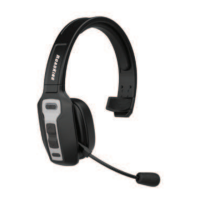

 To Next Page
 General