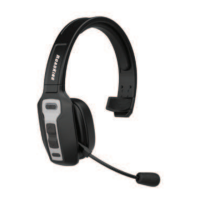
The RoadKing RKING4000 is a premium convertible Bluetooth® headset designed for hands-free communication and audio playback. This user manual provides comprehensive instructions for its operation, pairing, charging, and troubleshooting.
Function Description:
The RKING4000 is a versatile Bluetooth headset that allows users to make and receive calls, listen to music, and manage audio functions wirelessly. It features a multi-function button (MFB) for various controls, including power on/off, play/pause, redial, voice dial, answer/end/reject calls, and audio switching between the phone and headset. Volume control and track skipping are managed via dedicated volume buttons. The headset also supports three-way calling and microphone muting. Its convertible design suggests flexibility in how it can be worn or used, though specific details on the conversion are not provided in the overview.
Important Technical Specifications:
- Bluetooth Version: V5.0, ensuring a stable and efficient wireless connection.
- Bluetooth Chipset: QCC3024, indicating a high-quality audio processing unit.
- Operation Range: 32.8 feet (10 meters), providing ample freedom of movement.
- Bluetooth Protocols: Supports HSPv1.2, HFP v1.6, A2DP v1.3, and AVRCPv1.5. These protocols enable various functionalities such as headset profile, hands-free profile, advanced audio distribution profile (for high-quality stereo audio), and audio/video remote control profile (for controlling media playback).
- Charging Time: Approximately 2 hours for a full charge.
- Talking Time: About 33 hours (at 70% volume), offering extended call duration.
- Working Time: About 35 hours (at 70% volume), providing long usage for music and calls combined.
- Headset Net Weight: 0.49 lbs (approximately 222 grams), suggesting a relatively lightweight design for comfort.
- Headset Dimension: 7.77" x 6.63" x 2.69", indicating its physical size.
- Charging Port: Type-C®, a modern and reversible connector for convenient charging.
- Power Requirements for Charging: DC 5V current above 500mA.
Usage Features:
- Power On/Off: Press and hold the MFB for 2 seconds to power on, and 3 seconds to power off. Voice prompts confirm the action.
- Pairing Mode: When off, press and hold the MFB for 2 seconds. The red and blue LED lights will flash alternately, indicating pairing mode. To pair, turn on your phone's Bluetooth, search for "RK4000," and click to connect. A tone confirms successful pairing, and the LED blinks blue slowly.
- Multi-Device Connection: The headset can connect with two devices (Phone A and Phone B). To connect Phone A, power on the headset (MFB for 2 seconds), pair it, then turn off Phone A's Bluetooth. The headset will re-enter pairing mode. Then, pair Phone B. Finally, turn on Phone A's Bluetooth and reconnect. Music can only be played from one phone at a time, requiring pausing or closing music on the other phone.
- Call Management:
- Answer/End Call: Click the MFB.
- Reject Call: Press and hold the MFB for 1 second.
- Redial Last Call: Double-click the MFB.
- Voice Dial: Press and hold the MFB for 1 second.
- Audio Switch: During a call, hold the MFB for 2 seconds to switch audio between the phone and headset.
- Three-Way Calling:
- Answer new call and hang up current: Press MFB.
- Answer new call and put current on hold: Double-click MFB.
- Keep current call and reject new call: Press and hold MFB for 2 seconds.
- Switch between current and on-hold call: Double-click MFB.
- Music Control:
- Play/Pause: Press the MFB.
- Volume Up/Down: Click the Volume + or Volume - button.
- Next Song: Press and hold the Volume + button for 1 second.
- Previous Song: Press and hold the Volume - button for 1 second.
- Microphone Mute: Click the Mute button to mute/unmute the microphone during a call.
- LED Indicator: Provides visual cues for various states:
- Power on/off: Blue/Red LED flashes for 2 seconds.
- Pairing mode: Red & blue LEDs flash alternately.
- Connected standby/Playing music/Talking: Blue LED flashes once every 10 seconds.
- Delete paired record: Red & blue LEDs light up for 1 second.
- Charging: Red LED turns on.
- Full charge: Red LED turns off, blue LED turns on.
- Low battery: Red LED flashes.
- Voice Confirmation: The headset provides verbal confirmations for actions such as "Power on," "Pairing," "Paired," "Your headset is connected," "Your headset is disconnected," "Power off," "Mute on," and "Mute off."
Maintenance Features:
- Charging: When the red light blinks, the battery is low and requires immediate charging. A full charge takes about 2 hours, indicated by the red light turning off and the blue light turning on. The headset can be charged using a Type-C® charging cable connected to a USB charging port (car charger, travel charger, computer USB, etc.).
- Storage: If not in use, the RKING4000 should be charged at least once every two months to maintain battery health.
- Troubleshooting:
- Connection Failure: If the headset fails to automatically reconnect, manually connect to "RK4000" on your phone's Bluetooth settings.
- Deleting Paired Records: Press the MFB and Volume - button simultaneously for 5 seconds to clear pairing records. This requires re-pairing the device.
- Pairing Password: If a password is required, try 0000, 8888, 1111, or 1234.
- Power On/Connection Issues: Try a charging reset by plugging in the charging cable, then shutting down and restarting the headset. If issues persist, contact customer service.
- Automatic Power Off: The headset will power off automatically if there's no connection for over 10 minutes or if the battery voltage drops below 3.1V.
The package contents include the RKING4000 Bluetooth headset, a Type-C® charging cable, a user manual, a car charger, a sponge microphone cover, and a drawstring bag, providing a complete set for immediate use and protection. The product is backed by a ONE-YEAR LIMITED WARRANTY.

 Need help?

 To Next Page
 General