EasyManua.ls Logo

Roadstar MM-007 - User Manual

Roadstar MM-007
34 pages
Print Icon
To Next Page IconTo Next Page
Loading...
MM-007
PORTABLE ACTIVE SPEAKER SYSTEM WITH USB /
MICRO-SD MP3 PLAYBACK AND FM PLL RADIO.
Charge
Before start using the unit, connect the player with the adapter for charging the built-in
battery. You can also connect it to PC by USB cable connecting to the earphone jack to
charge. Suggest charge at least 3~5 hours.
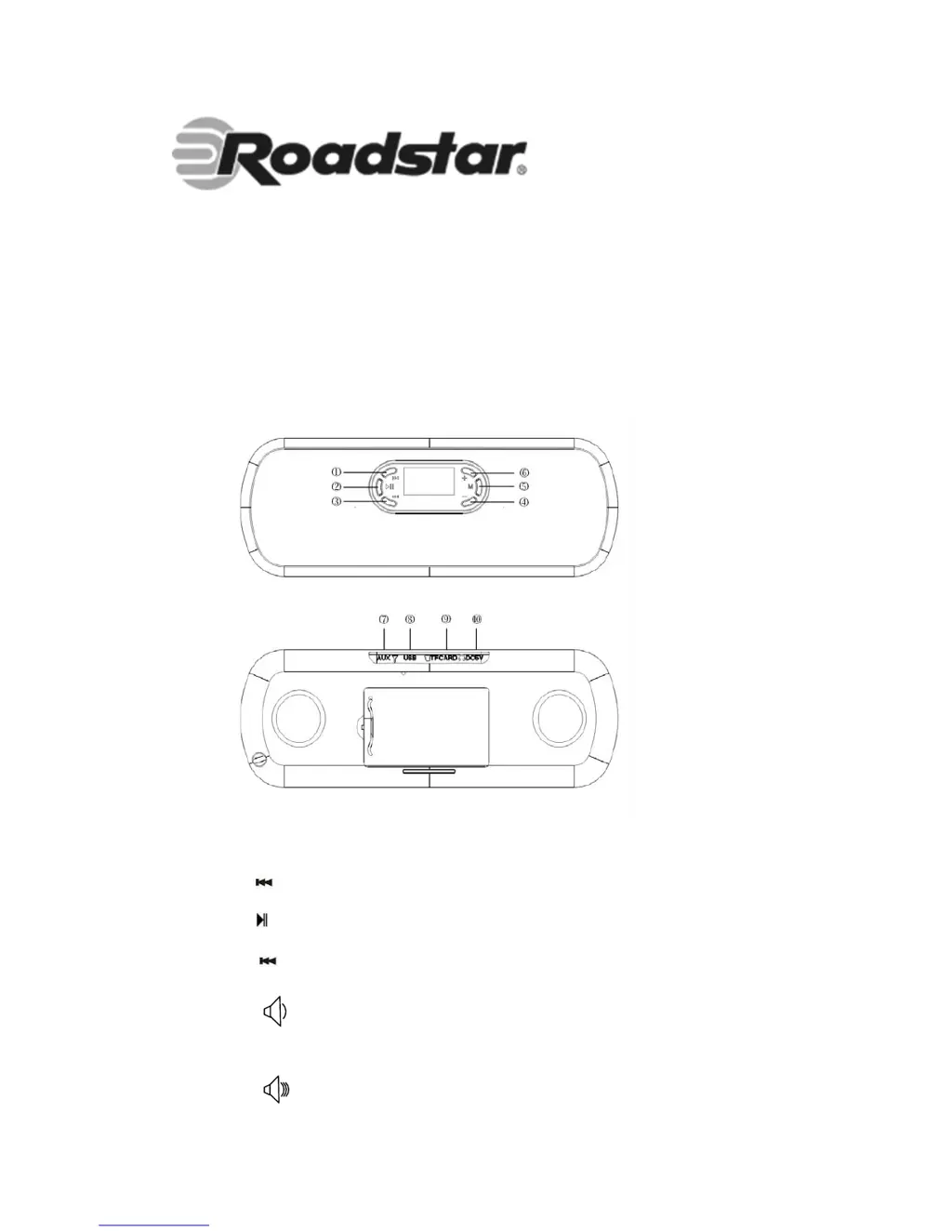
Exterior & Key Location
Buttons Location
1. “
Previous, fast backward
2.“
”: Power ON/OFF, Play/Pause/Stop
3. “
Previous, Fast Backward
4. “ Decrease volume
5. “M”: Confirm/Enter/Exit. Long press exit to the main menu
6. “ Increase volume

Questions and Answers

Summary

Device Charging and Exterior Overview

Charging Instructions

Connect the player to an adapter or PC for charging the built-in battery.

Exterior and Button Locations

Diagram identifying device ports and button functions.

Previous;Fast Backward Button

Navigate to the previous track or fast backward.

Power;Play;Pause;Stop Button

Control device power, playback, pause, and stop functions.

Next;Fast Forward Button

Navigate to the next track or fast forward.

Advanced Features and Modes

FM Radio Operation

Tune into FM radio stations and manage channels.

FM Radio Functions

Automatic Channel Search

Automatically scan and save available FM radio channels.

Troubleshooting and Specifications

Power Issues

Check battery installation and power supply.

No Sound Problems

Verify volume levels, connections, and earphone status.

Poor FM Signal

Adjust antenna position and check for environmental interference.

Summary

Device Charging and Exterior Overview

Charging Instructions

Connect the player to an adapter or PC for charging the built-in battery.

Exterior and Button Locations

Diagram identifying device ports and button functions.

Previous;Fast Backward Button

Navigate to the previous track or fast backward.

Power;Play;Pause;Stop Button

Control device power, playback, pause, and stop functions.

Next;Fast Forward Button

Navigate to the next track or fast forward.

Advanced Features and Modes

FM Radio Operation

Tune into FM radio stations and manage channels.

FM Radio Functions

Automatic Channel Search

Automatically scan and save available FM radio channels.

Troubleshooting and Specifications

Power Issues

Check battery installation and power supply.

No Sound Problems

Verify volume levels, connections, and earphone status.

Poor FM Signal

Adjust antenna position and check for environmental interference.

Roadstar MM-007 Specifications

General IconGeneral
BrandRoadstar
ModelMM-007
CategorySpeaker System
LanguageEnglish