5
3. Opening the package and inspecting the machine
When opening the machine, please make sure all the parts are included for proper operation, and check if there
is any damage caused by the transportation. Shall you nd any defects please do not plug in the machine,
make sure to contact the Robe distributor immediately.
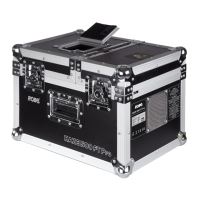
The following parts should be included when the FAZE 800 FT PRO machine shipped from the factory:
1. FAZE 800 FT PRO machine including the ight case.
2. One professional type cable, two meters long
3. One uid tank, 2.7 liter
4. User Manual
4. Assembling the machine
1. Open the package and carefully remove all PE and plastic bags
2. FAZE 800 FT PRO machine in a at surface and make sure no dust or other particles at the bottom of
the machine where the air comes in.
5. Operating the machine
1. Open the ight case in the front of the machine.
2. Remove the silver tank’s cap from the front panel of the machine and ll in the designated Robe fog uid
and put back the silver cap.Check again the liquid tube is properly connected and is not loosen due to trans-
portation.
Please pay special attention by replacing other brand name of fog uid may cause unsatisfactory fog output
and even caused human or animal health related issues or environmental pollution and corrosion the interior
parts of the Faze machine. Special attention is necessary that any damages caused by the other brand name
fog uid will not be covered by the warranty.
3. The professional cable has a special design of tenon at the plug to ensure the cable locking in with appro-
priate outlet. Please make sure the required and provided electricity voltage and the electricity outlet is a
ground connection.
4. There is no On / Off power switch design for the FAZE 800 FT PRO machine. When the power cord con-
nects to the electricity outlet, the machine will immediately start heating up and in the standby mode, during
this time the LCD panel will display “Warming Up”.
5. It requires about 100 seconds for Faze’s heating up. When the machine is ready during the Warming Up
session, the LCD display panel will change to “Ready To Faze”.
Operating Control Panel


 To Next Page