4
Operating your Bluetooth Speaker
‘Bluetooth pairing’ occurs when two Bluetooth enabled devices agree to
establish a connection and communicate with each other.
When a Bluetooth enabled device is in a ‘discoverable’ state other Bluetooth
devices can detect, pair with or connect to it.
Your Bluetooth speaker will fl ash its Bluetooth indicator light when it is
discoverable or when it is trying to connect to a previously paired Bluetooth
device. When a device is paired with and connects to your speaker, the
Bluetooth indicator light will remain lit.
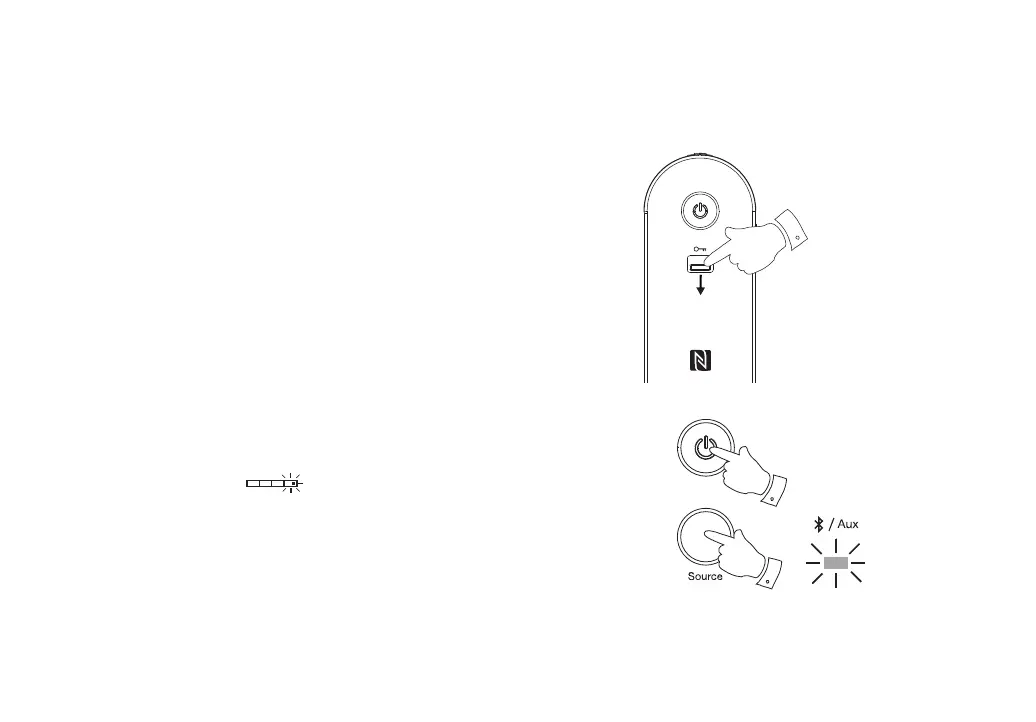
1. Ensure that the Lock switch on the right hand side of the speaker is
set to the unlock (Down) position. The lock function is used to prevent
unintentional operation of the speaker. When the lock switch is activated
(Up) position the speaker will not operate.
2. There are two ways to power on your Bluetooth speaker. Press and release
the Power On / Off button to switch on the speaker. Alternatively the
speaker can be powered on via NFC (see page 10 for further details).
3. The battery status indicator will light (white) to show that the
speaker is now switched on.
4. Press and release the Source button to select the Bluetooth mode (so
that the source indicator shows blue). When in Bluetooth mode your
speaker will show that it is ‘discoverable’ by fl ashing the indicator.
5. Using the Bluetooth settings of your phone, tablet or PC direct it to search
for ‘discoverable’ devices. After a few seconds, you should see a device
named ‘Roberts BluPad’.
1
2
4



 To Next Page