7
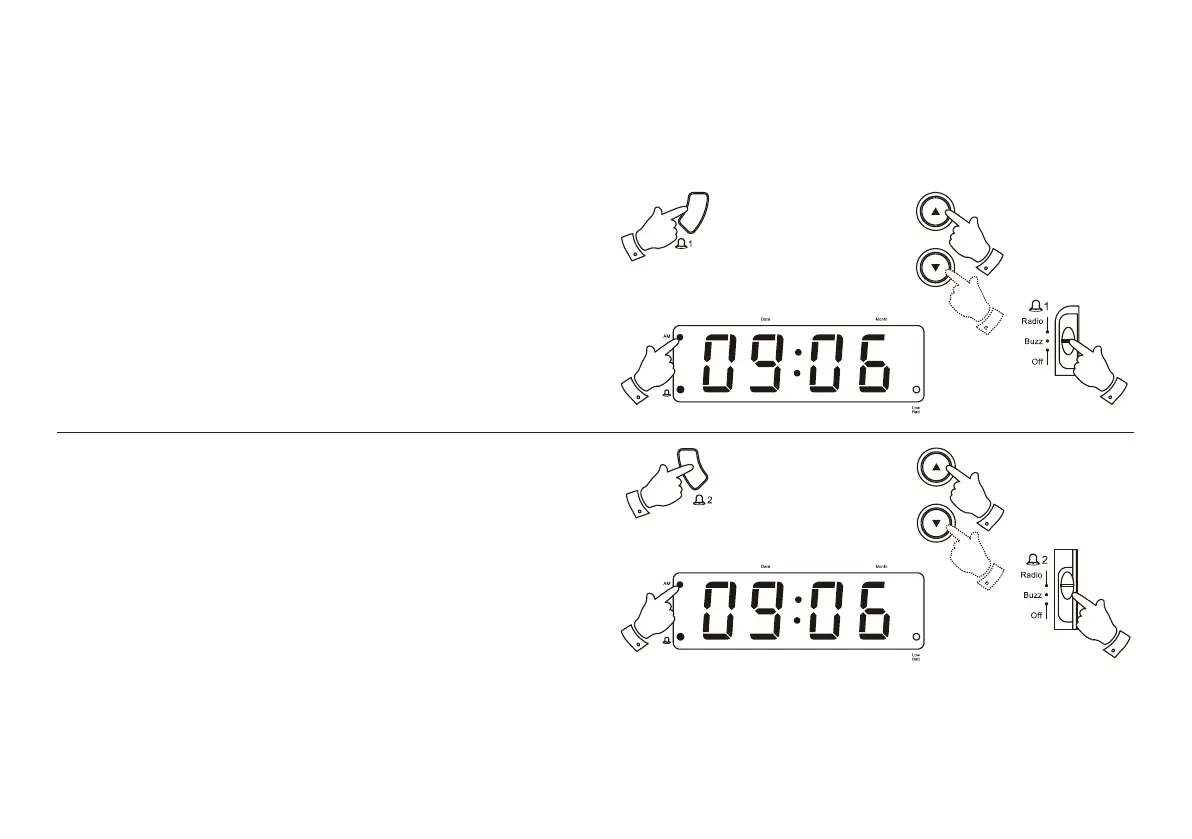
Setting alarm 1
1. Press and hold down the Alarm 1 button.
2. Whilst holding down the Alarm 1 button press the Up or Down buttons
to set the alarm time. Release the buttons when the correct alarm time
is reached. The clock uses a 12 hour display with an AM indicator.
Ensure that the correct 12 hour cycle is selected.
3. Set the Alarm 1 switch to the Buzz or Radio position.
2
1
3
2
1
2
2
3
Setting alarm 2
1. Press and hold down the Alarm 2 button.
2. Whilst holding down the Alarm 2 button press the Up or Down buttons
to set the alarm time. Release the buttons when the correct alarm time
is reached. The clock uses a 12 hour display with an AM indicator.
Ensure that the correct 12 hour cycle is selected.
3. Set the Alarm 2 switch to the Buzz or Radio position.



 To Next Page