11
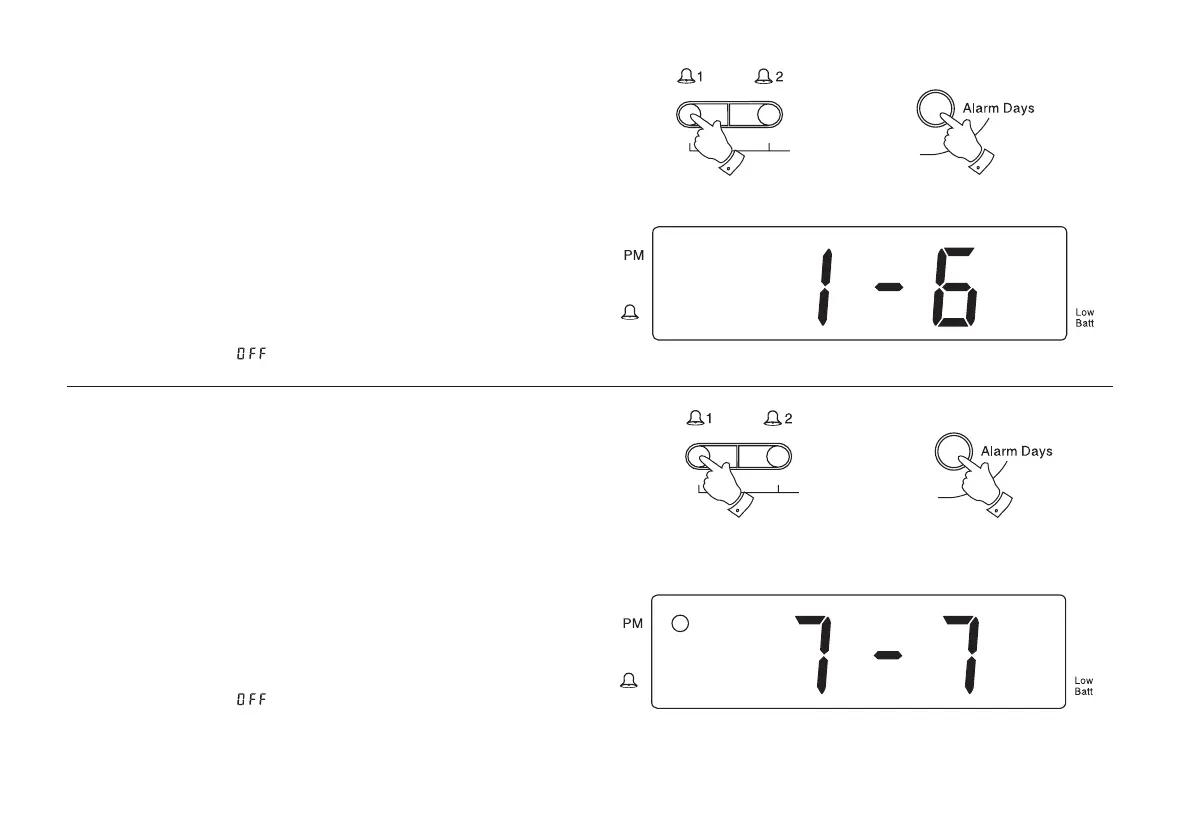
Monday to Saturday alarm
1. Press and hold down the Alarm 1 or Alarm 2 buttons (depending
on which alarm you wish to set day for).
2. Whilst holding down Alarm 1 or Alarm 2 buttons repeatedly press
and release the Alarm days button until display shows 1-6.
3. The alarm will sound at the preset time for 1 hour. To switch off the
alarm until the next day press the On/off button.
4. To switch off the alarms permanently press and hold down the
Alarm 1 or Alarm 2 button. Whilst holding down the Alarm 1 or
Alarm 2 button repeatedly press the Alarm mode button until
the display shows .
Sunday only alarm
1. Press and hold down the Alarm 1 or Alarm 2 buttons (depending
on which alarm you wish to set day for).
2. Whilst holding down Alarm 1 or Alarm 2 buttons repeatedly press
and release the Alarm days button until display shows 7-7.
3. The alarm will sound at the preset time for 1 hour. To switch off the
alarm until the next day press the On/off button.
4. To switch off the alarms permanently press and hold down the
Alarm 1 or Alarm 2 button. Whilst holding down the Alarm 1 or
Alarm 2 button repeatedly press the Alarm mode button until
the display shows .
1
2
1
2
cr9977 instruction book issue 2.PMD 3/16/2006, 2:09 PM12



 To Next Page