EasyManua.ls Logo

Roberts Stream 205 - User Manual

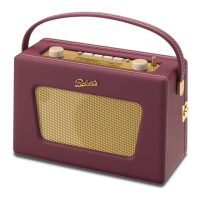
Roberts Stream 205
104 pages
Print Icon
To Next Page IconTo Next Page
Loading...
ROBERTS
Enjoy Listening
DAB / DAB+ / FM / WiFi Internet Radio with Music Player and Last.fm
Please read this manual before use
Now supports remote control from iPhone or iPod touch and Windows 7 'Play to' function

Table of Contents

Other manuals for Roberts Stream 205

Question and Answer IconNeed help?

Do you have a question about the Roberts Stream 205 and is the answer not in the manual?

Summary

Before You Can Use This Product

Battery Operation

Configuration

Plugging In and Language Selection

Guides through initial setup, connecting power, and selecting the user interface language.

Clock and Time Settings

Details how to set the clock format, auto-update options, timezone, and daylight savings.

Connecting to Your Computer Network

Instructions for establishing a WiFi or wired Ethernet connection to a computer network.

Manual Network Configuration

Steps for manually configuring network settings like IP address, DNS, SSID, and encryption.

Internet Radio

Customising Your Radio

Music Player

Accessing Your Audio Files via a UPnP Server

Explains how to set up UPnP servers like Windows Media Player for streaming.

Set up UPnP Access on a Windows PC

Detailed steps for configuring Windows Media Player for UPnP media sharing.

Last.fm

Setup a Last.fm User Account

Step-by-step guide to creating and configuring a Last.fm account on the radio.

DAB Radio

FM Radio

Clock and Alarms

Automatically Updating the Clock

How the radio clock synchronizes automatically via network, DAB, or FM.

Manually Setting the Clock

Step-by-step guide to manually setting the time, date, timezone, and daylight savings.

Setting the Alarm Clock

Detailed instructions for setting up the dual alarm functions, including source and frequency.

Information

Factory Reset

Procedure to restore the radio to its original factory default settings.

Troubleshooting

Music Player; UPnP Problems

Solutions for issues related to playing media via UPnP and Windows Media Player.

Specifications

Guarantee

Summary

Before You Can Use This Product

Battery Operation

Configuration

Plugging In and Language Selection

Guides through initial setup, connecting power, and selecting the user interface language.

Clock and Time Settings

Details how to set the clock format, auto-update options, timezone, and daylight savings.

Connecting to Your Computer Network

Instructions for establishing a WiFi or wired Ethernet connection to a computer network.

Manual Network Configuration

Steps for manually configuring network settings like IP address, DNS, SSID, and encryption.

Internet Radio

Customising Your Radio

Music Player

Accessing Your Audio Files via a UPnP Server

Explains how to set up UPnP servers like Windows Media Player for streaming.

Set up UPnP Access on a Windows PC

Detailed steps for configuring Windows Media Player for UPnP media sharing.

Last.fm

Setup a Last.fm User Account

Step-by-step guide to creating and configuring a Last.fm account on the radio.

DAB Radio

FM Radio

Clock and Alarms

Automatically Updating the Clock

How the radio clock synchronizes automatically via network, DAB, or FM.

Manually Setting the Clock

Step-by-step guide to manually setting the time, date, timezone, and daylight savings.

Setting the Alarm Clock

Detailed instructions for setting up the dual alarm functions, including source and frequency.

Information

Factory Reset

Procedure to restore the radio to its original factory default settings.

Troubleshooting

Music Player; UPnP Problems

Solutions for issues related to playing media via UPnP and Windows Media Player.

Specifications

Guarantee

Roberts Stream 205 Specifications

General IconGeneral
BrandRoberts
ModelStream 205
CategoryRadio
LanguageEnglish

Related product manuals