Step 5 Calibration
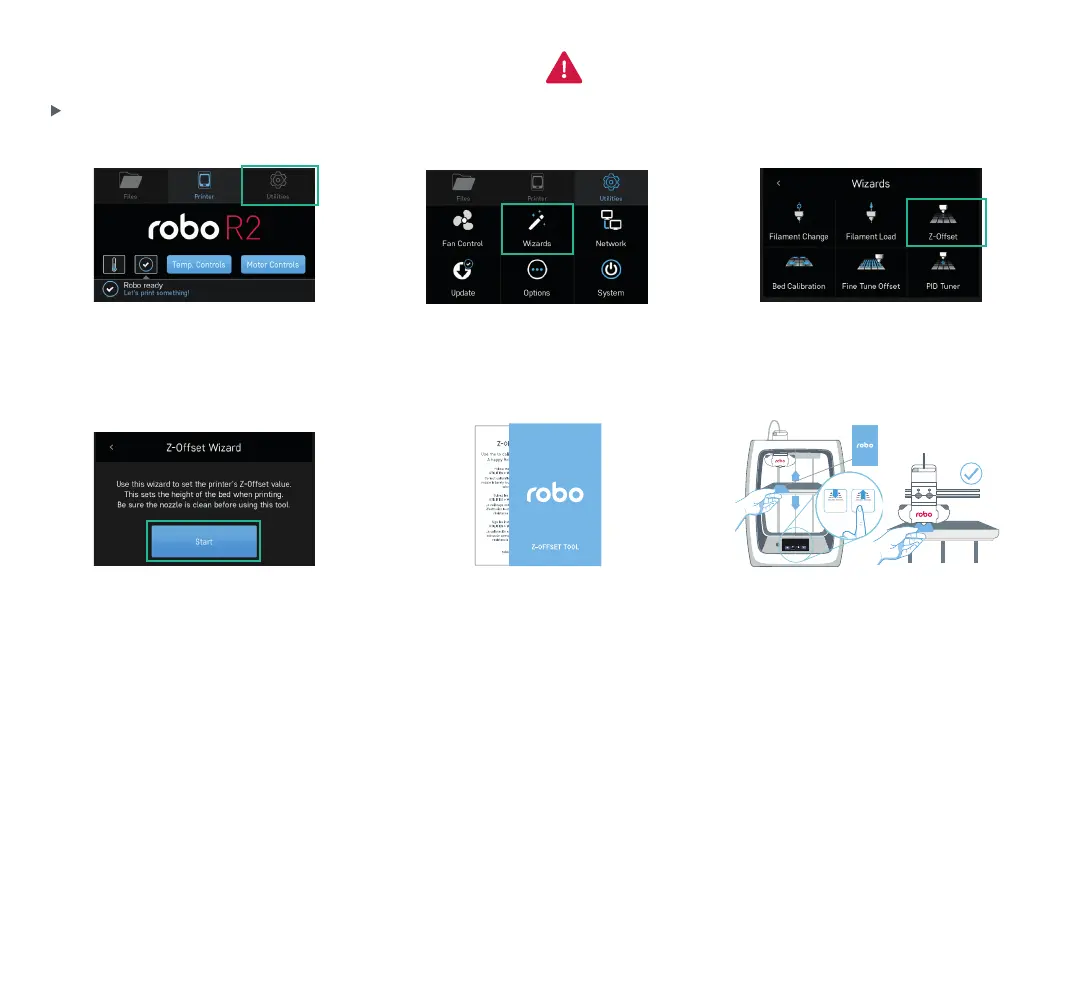
1. Select UTILITIES. 2. Select WIZARDS. 3. Select Z-OFFSET.
Note: If it feels like the Extruder Nozzle is
digging into the Z-Offset Tool, the Print Bed is
too high, so press the Z- down arrow until you
feel only slight resistance when sliding the
Z-Offset Tool under the Extruder Nozzle.
FILES PRINTER UTILITIES
No File Loaded
Extruder 1
189.1°C
Bed
56.9°C
FILES
Robo Controls Wizards Network
System
Options
Update
PRINTER UTILITIES
Filament Change
Filament Loading Z Offset Wizard
Firmware Update Slicer Wizard
Wizards
Moving Z Axis to minimum position. The wizard will
go to the next step once this is complete.
Z Offset 1/4
°
°
Z Offset 2/4
Move the Z Axis up until a piece of paper can just barely
pass between the bed and the extruder
0.1mm Z- Z+ Done
Z Offset Wizard
Use the Z Offset Wizard to properly set the home
position for the Z value of your printer.
Start
Z Offset 2/4
Move the Z Axis up until a piece of paper can just barely
pass between the bed and the extruder
Z- Z+ Done0.1mm
Z- Z+
FILES PRINTER UTILITIES
No File Loaded
Extruder 1
189.1°C
Bed
56.9°C
FILES
Robo Controls Wizards Network
System
Options
Update
PRINTER UTILITIES
Filament Change
Filament Loading Z Offset Wizard
Firmware Update Slicer Wizard
Wizards
Moving Z Axis to minimum position. The wizard will
go to the next step once this is complete.
Z Offset 1/4
°
°
Z Offset 2/4
Move the Z Axis up until a piece of paper can just barely
pass between the bed and the extruder
0.1mm Z- Z+ Done
Z Offset Wizard
Use the Z Offset Wizard to properly set the home
position for the Z value of your printer.
Start
Z Offset 2/4
Move the Z Axis up until a piece of paper can just barely
pass between the bed and the extruder
Z- Z+ Done0.1mm
Z- Z+
4. Z-OFFSET wizard sets the print bed
height when printing. Follow the steps
to complete the wizard.
Use the included Z-Offset Tool to set your
print bed height. A standard sheet of paper
will also work.
Calibrate your Z-Offset before you start printing.
Slide the Z-Offset Tool back and forth
between the Extruder Nozzle and Print Bed.
Tap the Z+ and/or Z- until Extruder Nozzle
lightly touches the top of the Z-Offset Tool.
Ensure Extruder Nozzle is clean
prior to starting calibration.
8


 To Next Page
 Loading...
