Motor Placement
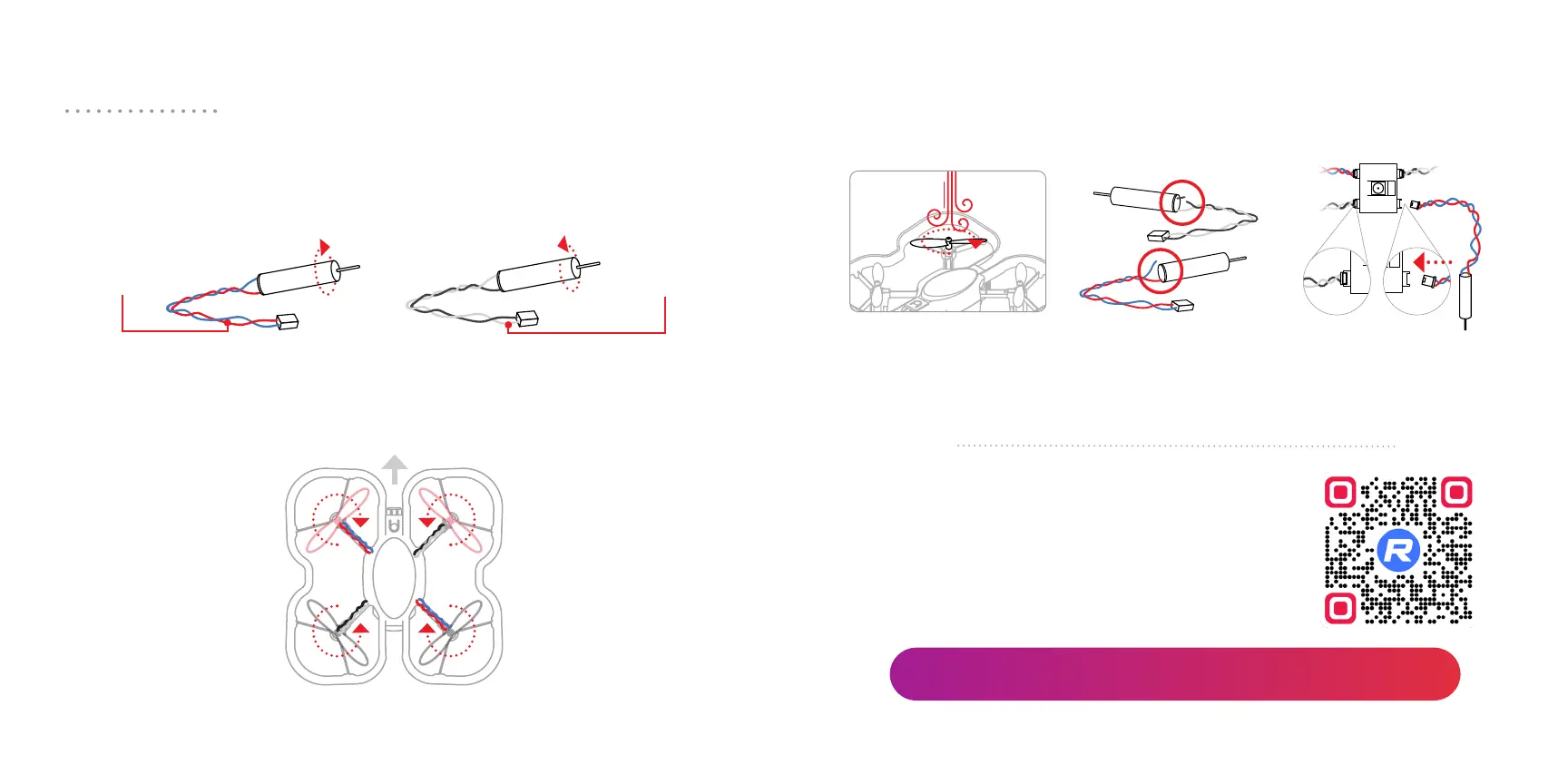
Motor placement is also important for the CoDrone EDU. Like propellers,
there are 2 types of motors, indicated by the color of the wires. Motor
directions should match propeller directions.
You can see the color of the motor wires by checking underneath the
arms of the drone frame.
Clockwise (cw) Counter-clockwise (ccw)
red / blue
wires
black / white
wires
ccw |black / white
cw | red / blue
red / blue | cw
black / white | ccw
front
Top view
If your drone has issues flying, check propellers first. If the propellers don’t
seem to be the issue, check the motors. Motor issues usually result from
hard crashes. Here are common signs that a motor should be replaced.
Replacing motors is a more involved process,
so we recommend carefully following our
motor replacement video.
Replacement motors are sold separately.
Inspecting motors
Replacing motors
Blow on the attached
propeller. Look for
diculty rotating or
wobbling during rotation.
Check for breakages
in the wiring. This can
happen from hard
crashes.
Remove the drone’s
bottom chassis. Then check
if the motor is disconnected
from the drone’s board.
robolink.com/codrone-edu-motors-guide
20 21



 To Next Page