Getting to Know Your CoDrone EDU
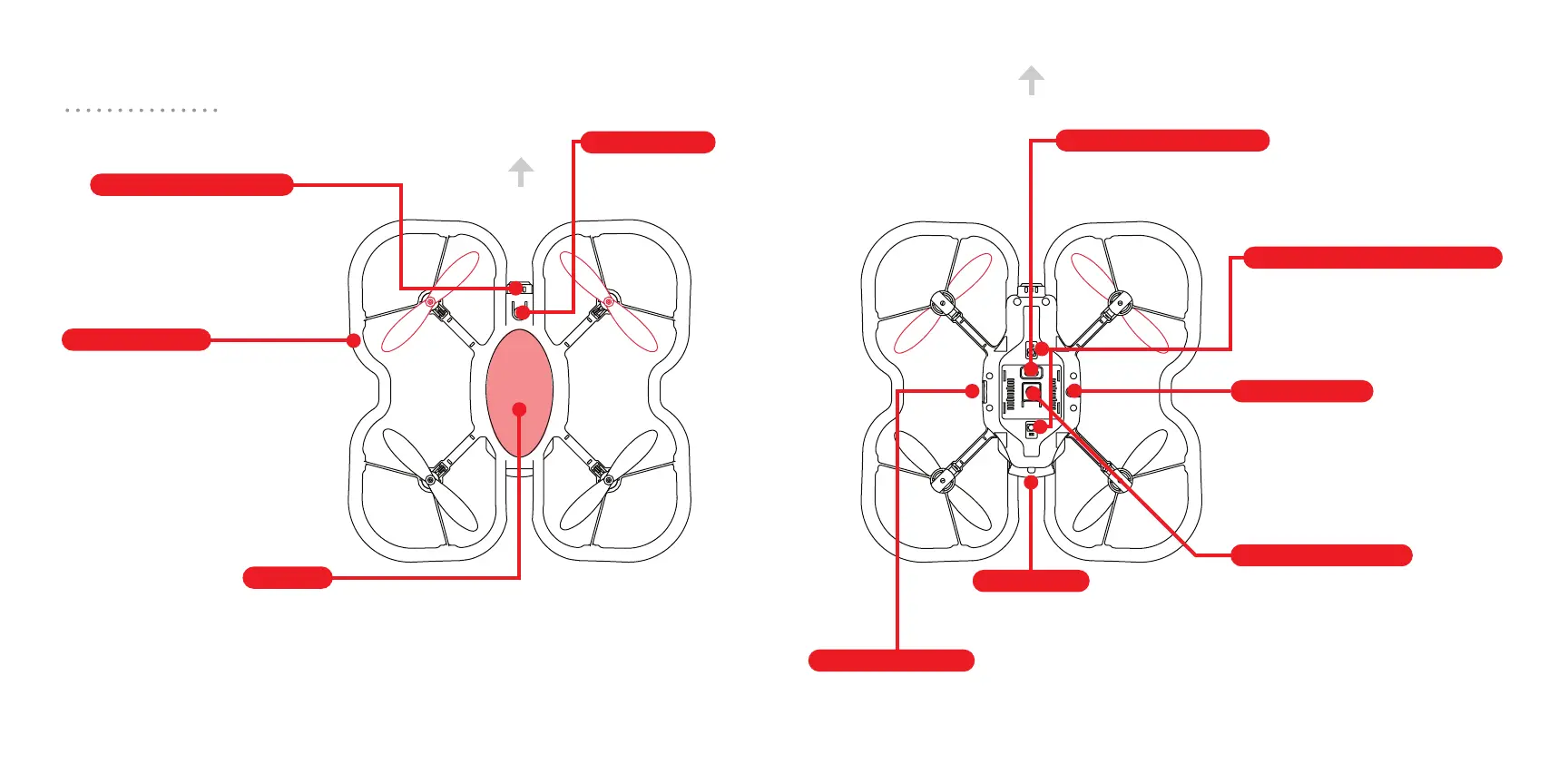
Pairing button
Front and rear color sensors
Action button
Front range sensor
Frame
Bottom range sensor
Battery slot
Optical flow sensor
LED light
Micro USB port
Top view Bottom view
front
front
Press and hold to go into
pairing mode.
(See page 14 for how to pair.)
Reads the distance from the
bottom of the drone to the nearest
surface below it up to 1.5 meters.
A programmable
button that can be
used to start an action.
Reads the distance from
the front of the drone to the
nearest surface up to 1.5
meters.
Protects the propellers and
the drone from impact. Also,
protects you and others!
Programmable LED
light that also indicates
the drone’s dierent
states.
Used for firmware updates. This port does not
charge the battery or program the drone.
Downward-facing sensor used
to estimate the drone’s x and
y positions.
Reads colors on the surface
directly beneath the drone
when landed. Deactivated
during flight.
8 9



 To Next Page