22
4. U
sing the Electric Wheelchair
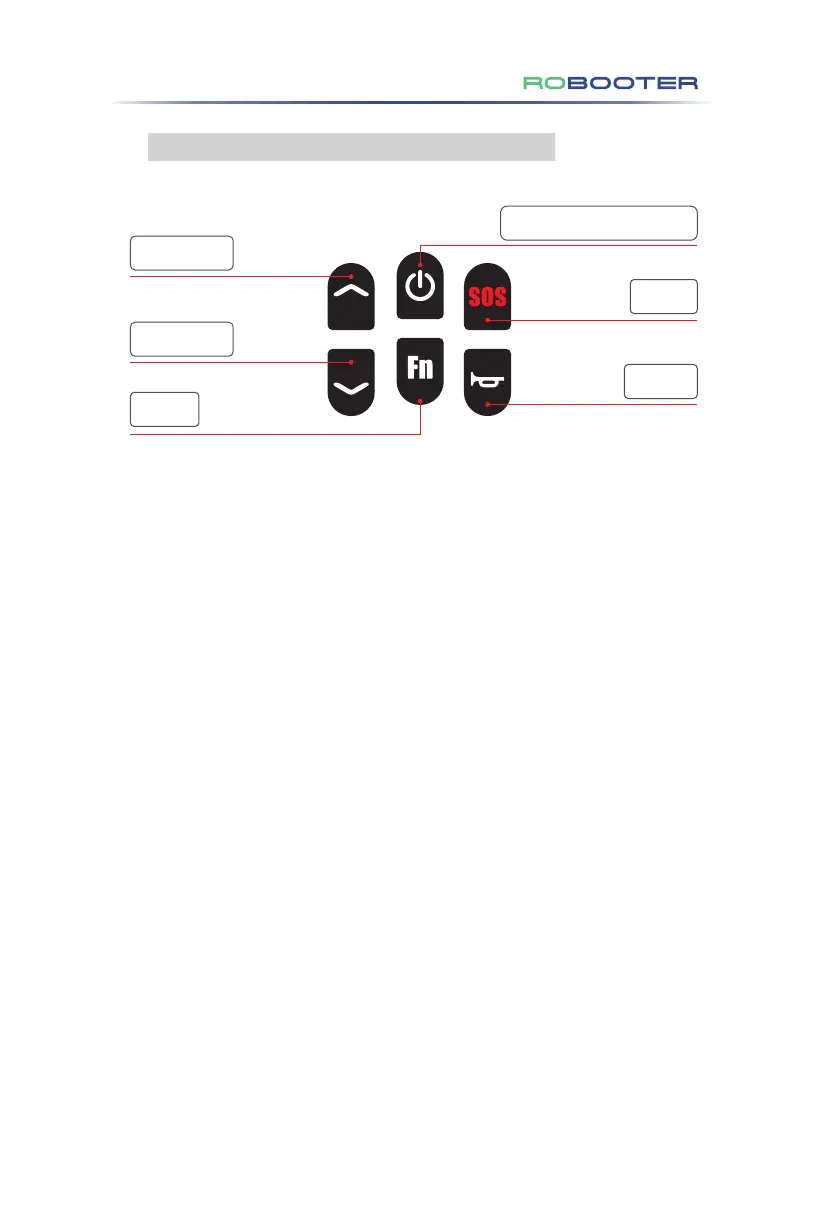
4.3.2 Function Description of the Upper Controller
Power switch key(Lock/Unlock)
Gear ︿ button
Gear ﹀ button
SOS key
Horn key
Fn Key
(1) Direction Rocker:
• Pushing the rocker on the upper controller allows you to control the electric
wheelchair's speed and direction.
(2) Power Switch Key:
• On/Off: Long press for 3 seconds to turn on or turn off the power supply.
• Lock: A quick press activates the vehicle's locking function.
• Unlock: Press again to unlock the entire vehicle. The status will then display as
unlocked.
(3) Gear ︿ Button:
• Press "︿" to increase the gear setting (Maximum: 5 gears).
(4) Gear ﹀ Button:
• Press "﹀" to decrease the gear setting (Minimum: 1 gear).
(5) Horn Key:
• A single press activates the horn, sounding it once.
(6) SOS Key:
• A long press for 3 seconds triggers the electric wheelchair's SOS alarm.
(7) Fn Key:
• Novice Mode: A single click enters the novice mode. The screen will display gears
1 & 2, alongside a NOVICE icon. This is paired with a voice prompt indicating
"Enter the novice mode." The speed is limited to the first two gears.
• General Mode: Hold the Fn key for 5 seconds to enter the General mode. Repeat
this long press to exit the General mode. In the General speed mode, the speed
of each gear is 75% of that in the Enhanced mode.
• Further details and adjustments can be made using the mobile app as described
in the APP operating instructions.
Figure 4.3.2


 To Next Page
 Loading...