
 Need help?
Do you have a question about the ROBOOTER E40 and is the answer not in the manual?
Explains warning and caution symbols, applicable range, indications, and contraindications.
Details safety measures related to electrical components and environmental factors.
Outlines environmental and operational conditions for safe product usage.
Covers precautions during operation, including driving on slopes and braking.
Provides operational guidance on mobile phone use, seat usage, speed, modifications, traffic rules, and specific warnings.
Discusses FCC compliance, Class B device standards, and EMC guidelines.
Describes the key features and operational functionalities of the electric wheelchair.
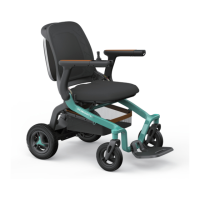
Illustrates the main components and provides dimensional information of the wheelchair.
Lists detailed technical specifications including speed, dimensions, load, and battery capacity.
Specifies recommended temperature, humidity, and environmental conditions for product storage.
Identifies and labels the major parts of the electric wheelchair with a diagram.
Provides critical guidelines and warnings for safe and proper operation of the wheelchair.
Details the procedure for expanding and folding the electric wheelchair, including safety notes.
Explains the operation and functions of the upper controller, including buttons, display, and modes.
Guides on how to operate the armrest touch lamp and its USB charging ports.
Covers switching and adjusting left/right armrest controllers for user preference.
Instructs on the disassembly, removal, and installation of the battery pack.
Describes how to enter pushing mode and the methods for charging the electric wheelchair.
Provides guidelines for daily spot checks, general cleaning, and regular maintenance.
Lists fault codes, anomaly statuses, and corresponding fault phenomena for diagnosing issues.
Details safety alerts, voice prompts, and precautions for various operational scenarios.
Informs about the product's service life and provides cleaning instructions.
Guides users through downloading and installing the Robooter mobile application.
Explains how to connect the mobile application to the electric wheelchair via Bluetooth and search for devices.
Details necessary phone permissions and app settings for optimal functionality.
Recommends security measures like password protection and app download sources.
Introduces wireless capabilities, Bluetooth technology, and its operational characteristics.
Outlines wireless security measures and addresses connectivity issues.
States RF compliance with FCC rules and lists warnings related to electromagnetic interference.
States the company's intellectual property rights and disclaimer of liability for errors.
Lists the items included in the product package.
Explains the process for reporting adverse events to the FDA via MedWatch.
Describes various symbols and markings found on the product and their meanings.

 To Next Page
 General