25
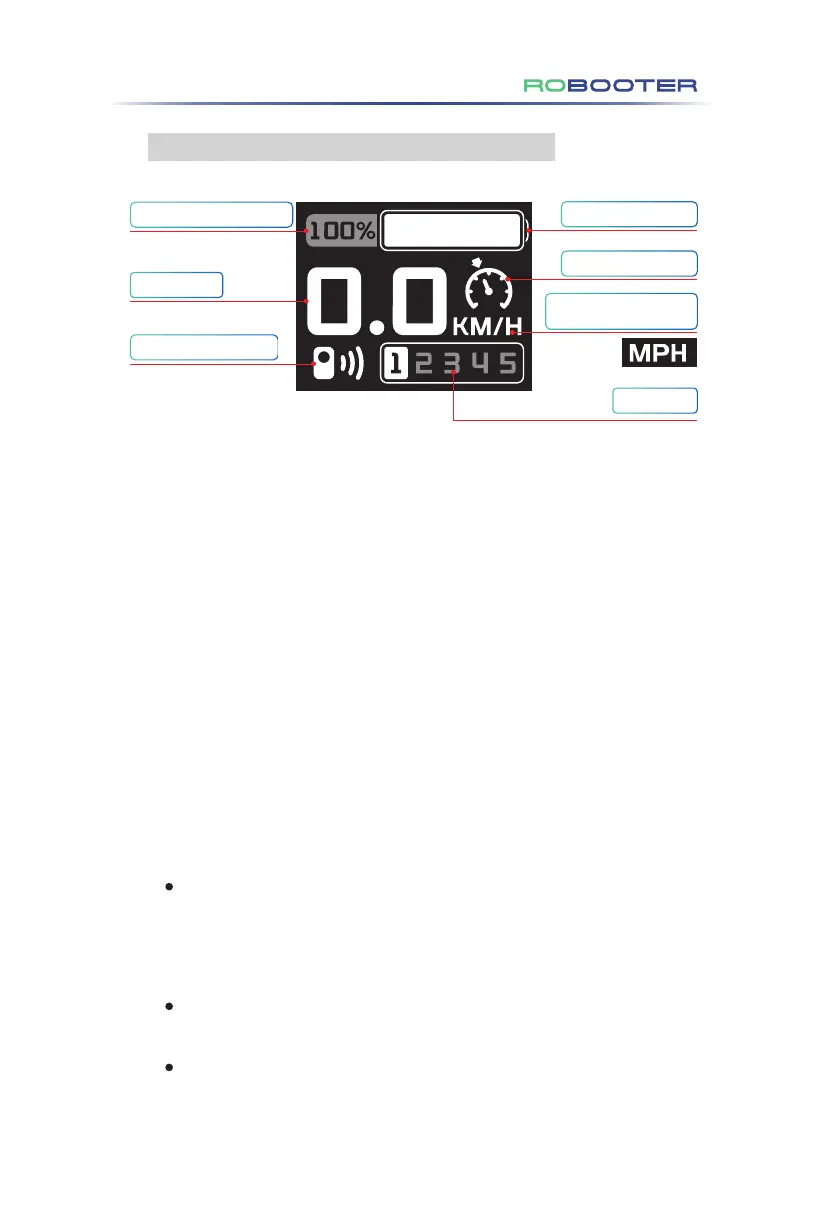
( 1 ) Battery percentage display (as shown in Figure 4.3.3.1)
The upper controller screen of Electric Wheelchair displays the battery in %.
( 2 ) Speed display (as shown in Figure 4.3.3.1)
The upper controller screen displays the Electric Wheelchair driving speed
(unit: km/h).
The precision of the displayed speed is ±5%.
( 3 ) Phone connection status (as shown in Figure 4.3.3.1)
Without Bluetooth connection, the Bluetooth indicator sign is not displayed on the
screen.
With Bluetooth connection, the Bluetooth indicator sign is displayed on the screen.
( 4 ) Battery power display (as shown in Figure 4.3.3.1)
The upper controller displays the power state in real time.
( 5 ) Cruise control display (as shown in Figure 4.3.3.1)
Press and hold the "Speed ︿" button for more than 3s to enter the cruise control
mode. The Electric Wheelchair upper controller screen displays the cruise control
icon, and the voice prompts two times. Push the joystick forward to start the cruise
control.
Press the lock key or move the joystick backward to exit the cruise control (regard-
less of driving state).
The cruise control function can only be triggered when non-locked, and cannot be
triggered in locked mode.
Figure 4.3.3.1
4.3.3 Display screen menu description
Battery percentage display
Speed display
Phone connection status
Battery power display
Cruise control display
Gear display
4.Use of the Electric Wheelchair
Metric units and imperial
units can be switched.


 To Next Page
 Loading...