P.3
BATTERY REQUIREMENTS:
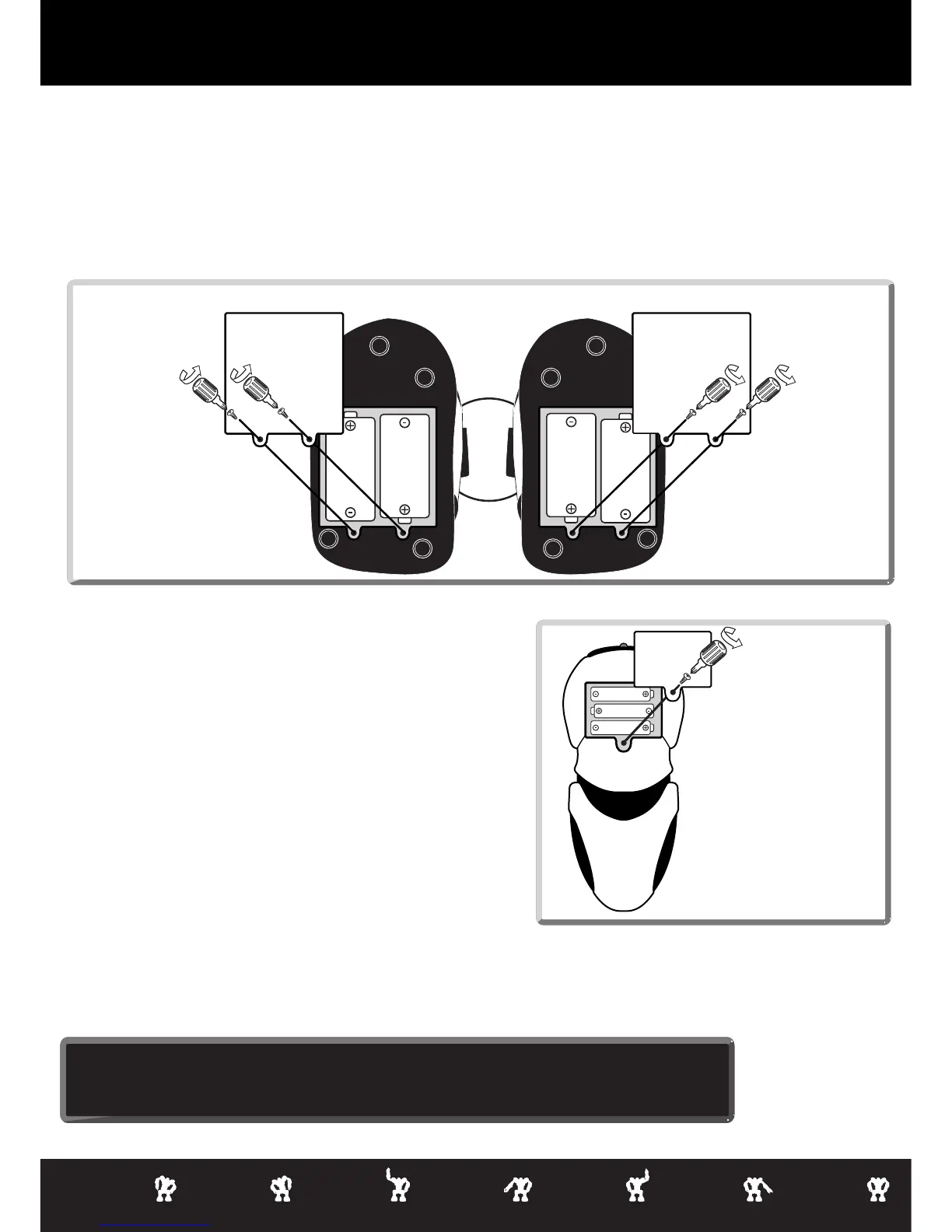
Your robot is powered by 4 x "D" size Alkaline batteries (2 batteries in each foot ).
Your remote controller is powered by 3 x "AAA" batteries.
BATTERY INSTALLATION:
• Be sure the robot power button is in the OFF position (OUT) before installing or changing batteries.
• Remove the battery covers with a Phillips/crosshead screwdriver as shown.
• Install recommended batteries as shown, making sure battery polarity is correct.
• Replace battery doors and carefully tighten all screws.
1.5V "AAA"
LR03 UM4
1.5V "AAA"
LR03 UM4
1.5V "AAA"
LR03 UM4
Remote
Control
Bottom View
Low Battery Indicators:
When Robosapien’s batteries grow weak, your Robosapien will move and walk very slowly.
- When this occurs, power robot OFF and replace all batteries.
When the remote controller's batteries grow weak, the indicator light will shine very dimly.
- When this occurs, replace all the batteries in the remote controller.
NOTE:
• Robot will just stop when battery power gets VERY low. Power off and replace all batteries.
• Some lighting or sunlight can interfere with Infra-Red signals Move the robot into shadow.
Battery Details
Base of Feet
Robosapien
IMPORTANT BATTERY INFORMATION
• Do not dispose of batteries in fire. Batteries may explode or leak.
• Do not mix used and new batteries. Replace all batteries at the same
time.
• Do not mix alkaline, standard (Carbon Zinc) or rechargeable (Nickel-
Cadmium) batteries. Only use new batteries of the same type.
• Due to small parts, it is recommended that batteries be installed or
replaced only by adults.
• Batteries must be inserted with the correct polarity or the robot will not
work.
• Dead batteries should be removed so they don't leak and damage the
battery contacts.
• Do not short circuit battery terminals or battery contacts.
• Do not try to recharge non-rechargeable batteries.
• Rechargeable batteries are not recommended for use in this robot.
1.5V
"D"
LR20
UM1
1.5V
"D"
LR20
UM1
1.5V
"D"
LR20
UM1
1.5V
"D"
LR20
UM1



 To Next Page