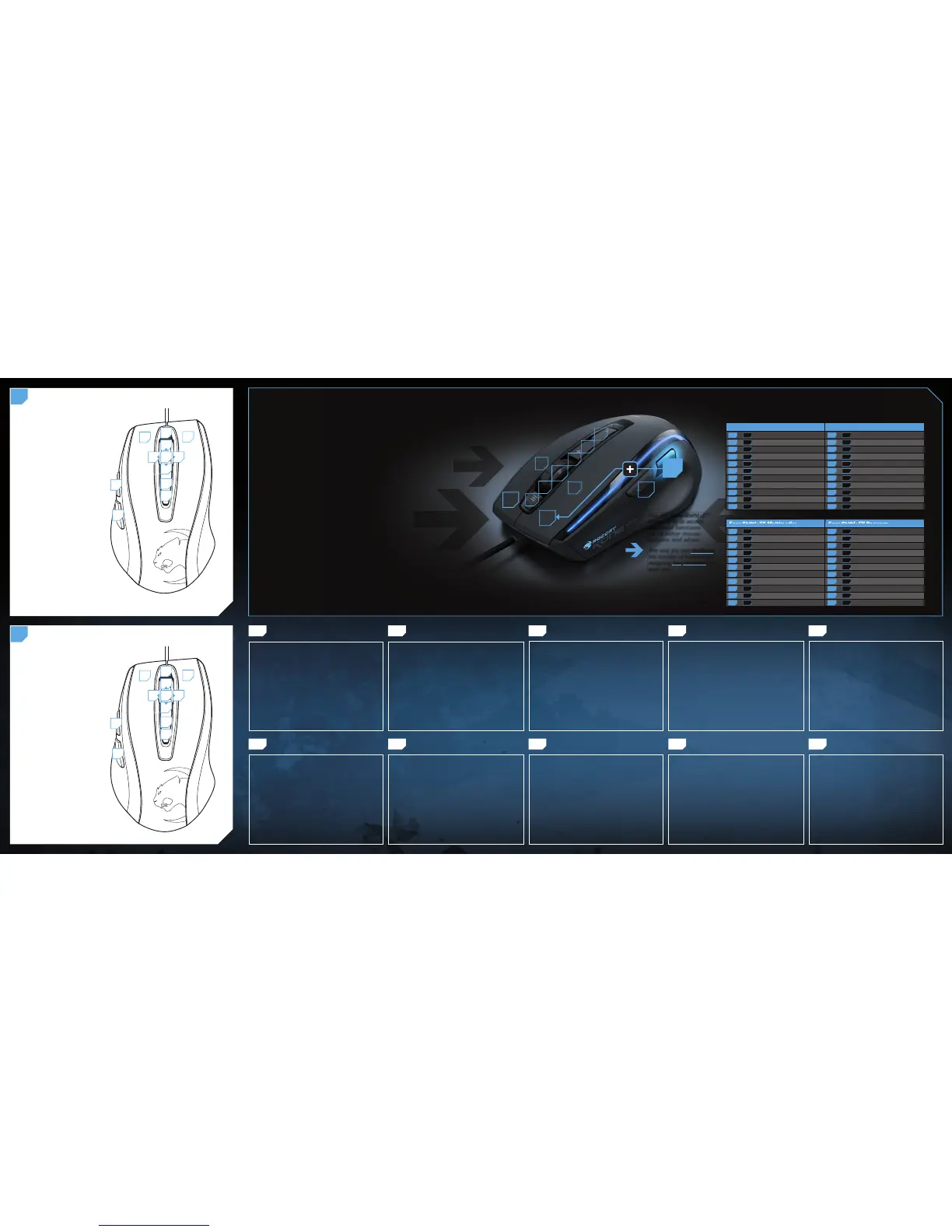
ROCCAT™ EASY-SHIFT[+]™
TECHNOLOGY
GREATLY INCREASE YOUR MOUSE FUNCTIONS
Ingenious Easy-Shift[+]™ technology lets you assign two functions
to each of your mouse buttons and the scroll wheel – putting
a huge amount of easily-wielded power right at your fi ngertips. The
Kone XTD‘s Easy-Shift[+]™ button works just like the shift key on a
keyboard. Simply hold it down and simultaneously press one of the
other mouse buttons – or the scroll wheel (including up and down) –
and you execute a second function. This incredibly handy feature
increases the number of available functions from 12 to 23.
GET EVEN MORE MACRO MIGHT
Easy-Shift[+]™ also lets you control powerful driver functions right
from your mouse – giving you quick control over things like your
multimedia options. For example, you can launch your media
player, switch music tracks and adjust volume – all with the simple
press of a mouse button or scroll of your mouse wheel. With the
Kone XTD, fl awless ergonomics and maximum functionality coexist
in perfect harmony.
(no driver installed)
DEFAULT BUTTON ASSIGNMENT: EASY-SHIFT[
+
]™
B
(no driver installed)
DEFAULT BUTTON ASSIGNMENT
A
EASY-SHIFT[+]™ EXAMPLES :
Easy-Shift[+]™ WoW: Easy-Shift[+]™ CS:
5 + 1 = Mount up 5 + 1 = Throw HE
5 + 2 = Dismount 5 + 2 = Throw fl ash
5 + 3 = Autorun 5 + 3 = Throw smoke
5 + 4 = Use trinket 5 + 4 = Show scores
5 + 6 = Your macro #1 5 + 6 = Buy CT equipment
5 + 7 = Your macro #2 5 + 7 = Buy T equipment
5 + 8 = Pet attack 5 + 8 = Primary weapon
5 + 9 = Pet follow 5 + 9 = Secondary weapon
5 + 10 = Your macro #3 5 + 10 = Team radio #1
5 + 11 = Your macro #4 5 + 11 = Team radio #2
5 + 12 = Use hearthstone 5 + 12 = Team radio #3
1 = Left mouse button
2 = Right mouse button
3 = Middle mouse button &
universal scroll
4 = Page forward (Browser)
5 = Easy-Shift[+]™ button
6 = Tilt left
7 = Tilt right
8 = Mouse wheel up
9 = Mouse wheel down
10 = DPI up
11 = DPI down
12 = Open “My computer”
(Windows)
1
2
3
4
5
10
11
12
8
9
76
5+1 = Page back (Browser)
5+2 = Page forward (Browser)
5+3 = Mute volume
5+4 = Page back (Browser)
5+5 = Disabled
5+6 = Previous track
5+7 = Next track
5+8 = Volume up
5+9 = Volume down
5+10 = Sensitivity up
5 + 11 = Sensitivity down
5+12 = Open ROCCAT™ driver
(needs to be installed)
1
2
3
4
5
10
11
12
8
9
76
1
2
3
8
9
5
4
10
11
12
6
7
FR PL PT RU
1. Verbinde den USB-Stecker der ROCCAT™ Kone XTD mit
einer freien USB-Schnittstelle.
2. Starte deinen Computer und stelle eine Verbindung mit
dem Internet her.
3. Gebe in die Adresszeile deines Webbrowsers die folgende
URL ein „www.roccat.org/support“ und drücke Enter.
4. Klicke in der linken Navigationsleiste auf den Punkt
„ROCCAT™ Kone XTD“. Lade dir auf der sich öffnenden
Seite die neueste Treiber-Software herunter.
5. Starte die Treiber-Installation und folge bitte den weiteren
Anweisungen auf dem Bildschirm.
1. Forbind ROCCAT™ Kone XTD’s USB-stik med et ledigt
USB-interface.
2. Start din computer og forbind den med Internettet.
3. Indtast følgende URL i adresselinjen af din webbrowser
„www.roccat.org/support“ og tryk så Enter.
4. Klik i venstre navigantionslinje på punkt „ROCCAT™ Kone
XTD“. Frau den åbnede side overfører du den nyeste
driversoftware.
5. Start driver -installationen og følg anvisningerne på
billedskærmen.
1. Plug the USB connector on your ROCCAT™ Kone XTD
into any free USB port.
2. Boot your computer and connect to the internet.
3. Enter ‘www.roccat.org/support’ in your browser and
hit the return key.
4. In the navigation bar on the left, go to ‘ROCCAT™ Kone
XTD’. Download the latest driver from the web page that
opens.
5. Start the driver installation process and follow the
on-screen instructions.
1. Enchufa el conector USB del ROCCAT™ Kone XTD a un
puerto libre USB.
2. Inicia tu ordenador y establece la conexión de Internet.
3. Escribe en tu navegador Web la siguiente URL:
www.roccat.org/support y pulsa Enter.
4. En la barra izquierda de navegación haz clic en el
punto “ROCCAT™ Kone XTD”. En la página que se abre
a continuación descárga el software de controlador más
actualizado.
5. Inicia la instalación del controlador y sigue las instruccio-
nes que aparecen en pantalla.
1. Liitä ROCCAT™ Kone XTD:n USB-pistoke vapaaseen
USB-liitäntään.
2. Käynnistä tietokoneesi ja luo Internet-yhteys.
3. Kirjoita verkkoselaimesi osoiteriville seuraava URL-osoite
„www.roccat.org/support“ ja paina Enter.
4. Napsauta vasemmassa navigaatiopalkissa kohtaa
„ROCCAT™ Kone XTD“. Lataa avautuvalta sivulta uusin
ajuriohjelmisto.
5. Käynnistä ajurin asennus ja noudata näytöllä näkyviä
lisäohjeita.
DE DK EN ES FI
SE
1. Relie la fi che USB de la souris ROCCAT™ Kone XTD à une
prise USB libre.
2. Démarre ton ordinateur et connecte-toi à Internet.
3. Entre dans la barre d’adresse de ton navigateur l’URL
« www.roccat.org/support » et appuie sur Enter.
4. Clique dans le menu de navigation de gauche sur
« ROCCAT™ Kone XTD ». Télécharge la dernière version
du pilote sur la page qui s’ouvre alors.
5. Lance l’installation du pilote et suis les instructions qui
s’affi chent à l’écran.
1. Podłącz wtyk USB ROCCAT™ Kone XTD do wolnego
złącza USB.
2. Uruchom komputer i nawiąż połączenie z Internetem.
3. W wierszu adresowym przeglądarki wpisz adres URL
„www.roccat.org/support“ i naciśnij Enter.
4. W lewym pasku nawigacji kliknij punkt „ROCCAT ™ Kone
XTD“.
Z nowo otwartej strony pobierz najnowsze sterowniki.
5. Rozpocznij instalację sterowników i postępuj zgodnie z
instrukcjami na ekranie.
1. Liga a fi cha USB do ROCCAT™ Kone XTD a uma interface
USB livre.
2. Inicia o teu computador e estabelece uma ligação
à internet.
3. Introduz o seguinte URL “www.roccat.org/support”
na barra de endereços do teu navegador de internet
e pressiona Enter.
4. Clica na barra de navegação à esquerda no ponto
“ROCCAT™ Kone XTD”. Na página que abre, faz o
download
do mais recente software de driver.
5. Inicia a instalação do driver e segue as instruções
seguintes no monitor.
1. Соедини USB-штекер ROCCAT™ Kone XTD со свободным
USB-портом.
2. Запусти компьютер и выйди в интернет.
3. Введи в адресной строке браузера адрес
„www.roccat.org/support“ и нажми Enter.
4. Нажми на левой навигационной панели пункт
„ROCCAT™ Kone XTD“. Загрузи с открывшейся страницы
самые последние драйвера.
5. Запусти инсталляцию драйвера и следуй дальнейшим
указаниям на экране.
1. Sätt ROCCAT™ Kone XTD USB-kontakt i en ledig
USB-port.
2. Starta datorn och koppla upp dig på Internet.
3. Skriv in följande URL i adressfältet på din webbläsare:
www.roccat.org/support. Tryck på Enter.
4. Klicka på ROCCAT™ Kone XTD i det vänstra naviga-
tionsfältet. Ladda ner den senaste programvaran med
drivrutin på den sida som öppnas.
5. Starta installationen av drivrutin och följ anvisningarna
på skärmen.
ANLEITUNG INSTRUKTIONER INSTRUCTIONS INSTRUCCIONES OHJEET
INSTRUCTIONS INSTRUKCJA
INSTRUÇÕES
ИНСТРУКЦИИ
INSTRUKTIONER



 To Previous Page
 Loading...