EasyManua.ls Logo

Rocker 400 - Troubleshooting Guide

Default Icon
24 pages
Print Icon
To Next Page IconTo Next Page
To Previous Page IconTo Previous Page
Loading...
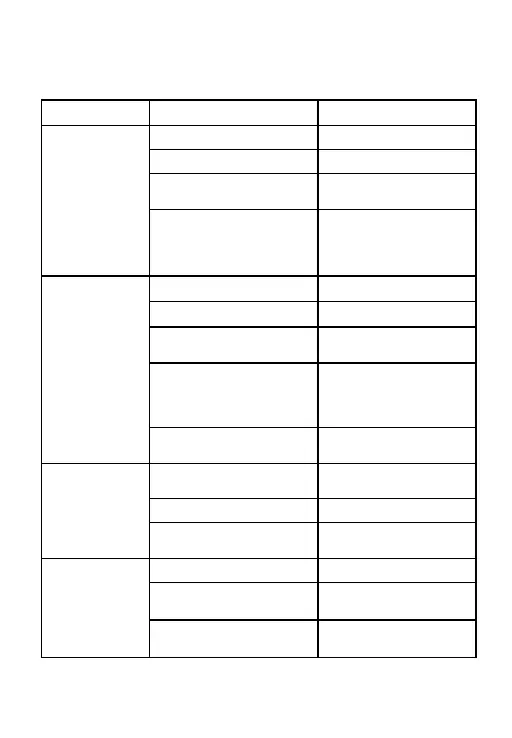
TroubIeshooMngguide
SYMPTOM
POSSI B L E CAUS E S
SOLUTIONS
No sound
No battery
Insert the battery
Dead or low battery
Replace battery
Battery improperl y
inserted
Insert battery correctly
Wax or debris in the
microph on e or receive r
Clean the instrum e nt,
remove and clean the
dome
Not loud
enough
Low battery
Replace battery
Excessive ear wax
Consult y our physician
Volume set too low
Adjust the rocker
volume control
Wax or debris in the
microph on e or receive r
Clean both microp h on e
and recei ve r with brush.
Remo ve and clean the
dome
Hearing loss change
Contact your hearing
care prof essional
Whistling,
feedback
Loose insertion of hearing
instrument
Remov e and reinsert
Excessive ear wax
Consult y our physician
Dome of improper size
Change domes of proper
size
Not clear or
distorte d
sound
Low battery
Replace battery
Hearing instrume nt
damaged
Conta ct your hearing care
professional
Hearing instrume nt settings
not optimal
Conta ct your hearing care
professional
14

Other manuals for Rocker 400

Related product manuals