10
Need help? Call 800-620-2790
RF-TVMLPT03V2 TV Wall Mount
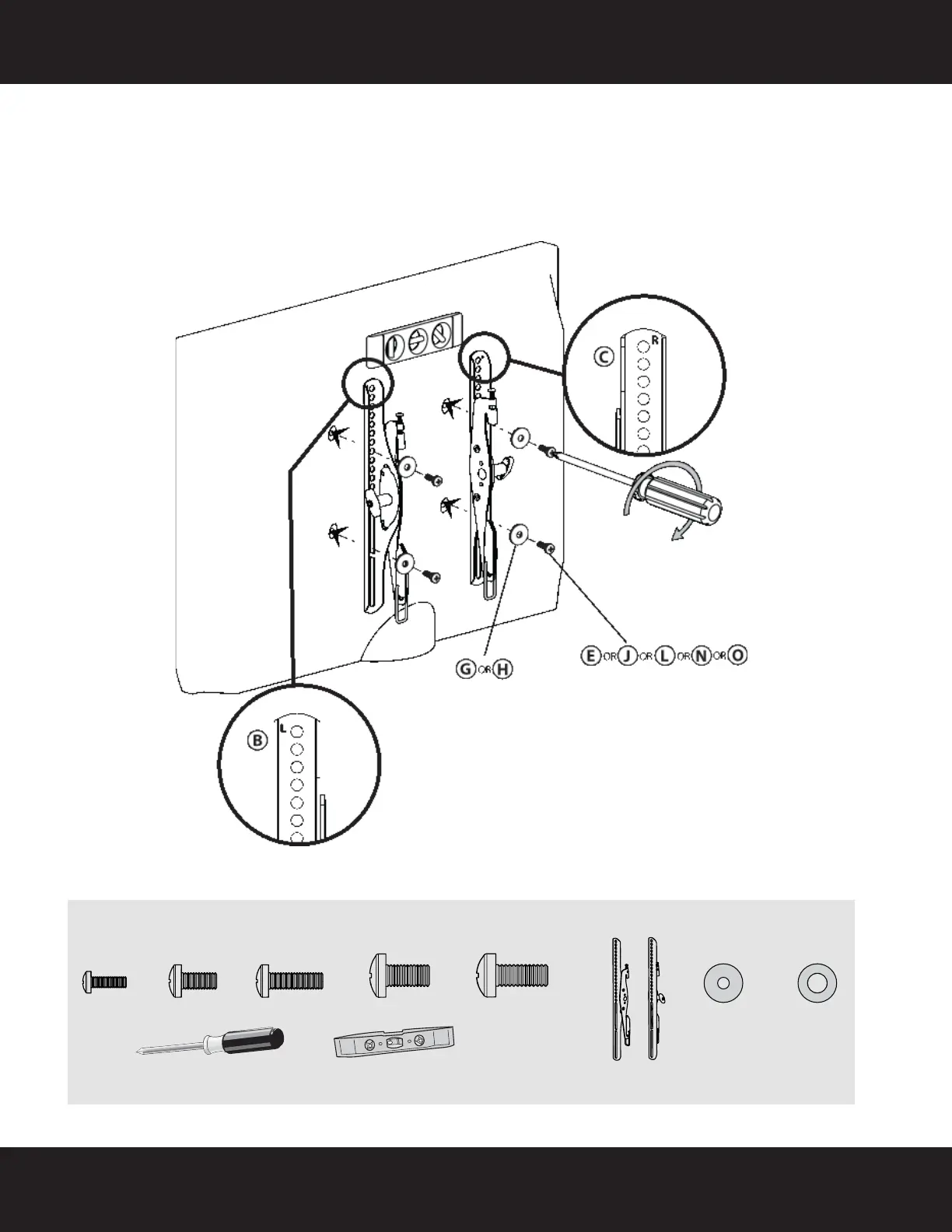
STEP 5 - Option 1: Attaching the mounting hardware to TVs with a flat back
1 Align the holes you noted on the TV brackets (B and C) with the screw holes on the back of your TV. The
brackets are marked “R” for the right bracket and “L” for the left bracket. Make sure the brackets are level.
2 Place the washers (G or H) over the holes in the TV brackets that align with the screw holes on the back of
your TV, then insert the screws (E, J, L, N, or O) through the washers.
3 Tighten the screws until they are snug against the TV bracket. Do not over tighten.
You’ll need
G (4) H (4)
E (4) J (4) L (4)
Phillips screwdriver
OROR
OR
Screws
OR
N (4)
Washers
Level
(B and C) TV Brackets
OR
O (4)
RF-TVMLPT03V2_13-0196_MAN_V2_ENG-GIFs.fm Page 10 Thursday, March 14, 2013 2:02 PM


 To Next Page