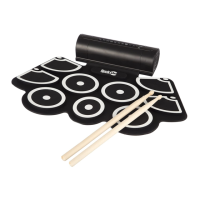
RJTTED01, Tabletop Drum Kit with Bluetooth
User Guide
Please read this user guide first before operating the unit and save it for
future reference.
Congratulations on your purchase of this RockJam Tabletop Drum kit. To get the most from your purchase, please take a few
minutes to read these instructions.
1. Safety instructions
• This product should not be exposed to water by dripping or splashing and no objects filled with liquids, such as vases,
should be placed near to the product. Do not place the unit on a wet surface.
• Do not expose the product to temperatures above 35°C and keep it out of direct sunlight.
• This product has no user-serviceable parts. Do not attempt to repair this product yourself. Only qualified service
personnel should perform servicing.
• Do not subject the plastic part of the product to harsh impacts. Do not drop the product as this may result in damage.
• Disconnect the product from the power source before cleaning. Never handle the USB cable with wet hands as this could
cause electric shock. Unplug the product when it will be unused for long periods of time.
• This product is designed for indoor use only.
• If the USB cable or power adapter needs to be replaced, ensure that the replacement complies with the manufacturer’s
specifications.
2. Battery Information
Do not dismantle, open or shred secondary cells or batteries.
Do not expose cells or batteries to heat or fire. Avoid storage in direct sunlight.
Keep batteries out of the reach of children.
Battery usage by children should be supervised. Especially keep small batteries out of reach of small children.
Seek medical advice immediately if a cell or a battery has been swallowed.
3. Preparation for use
Unpack the drum kit carefully. We recommend that you save the box and packing materials in case you wish to store the
drum kit. Before setting up the unit, verify that the following accessories are present:
CONTENTS:
• 1 x RJTTED01 Drum kit with 7 Pads
• 2 x Pedals
• 2 x Drum sticks
• 1 x USB Power adapter
• 1 x USB Power/Data cable
• 1 x 3.5mm AUX input cable
• 1 x Printed user guide
4. Power source
Unwind the USB power cable to its full length; connect one end to the USB/DC 5V input on the rear of the drum kit.
Connect the other end to the USB power adapter. Plug in the USB power adapter to a 110 - 240V power socket and
switch on.
5. Location of controls and indicators
DRUM
PERC BASS
CHORD
SONG LAMP HAND PERC
SAVE / REC PLAY / STOP
DEMO CLICK REVERB VOLUME
VOIC E KIT TEMPO
POWER
1 11 12 13 14
2 3 4 5
6 9 7 10 8 15 18 16 19 17


 To Next Page
 Need help?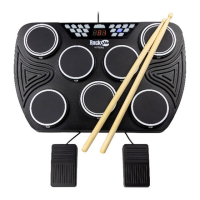

 General