44
44
Part 2
▪
Operation – Driving and Switching
Despite its numerous options, operation of the WLANmaus is simple and intuitive. A concept which had
already been successfully introduced for the Lokmaus models of the rst and second generation. The fol-
lowing shows you how to operate the WLANmaus based on practical examples. If problems occur during
operation or programming, “Tips, Information, and Shortcuts” can be found starting on page 67.
2.1 Start
After starting up the WLANmaus, the display screen shows the word “WLANMAUS” in animated
lettering. The WLANmaus then switches to drive mode and displays the rst locomotive.
2.1.1 First-time use
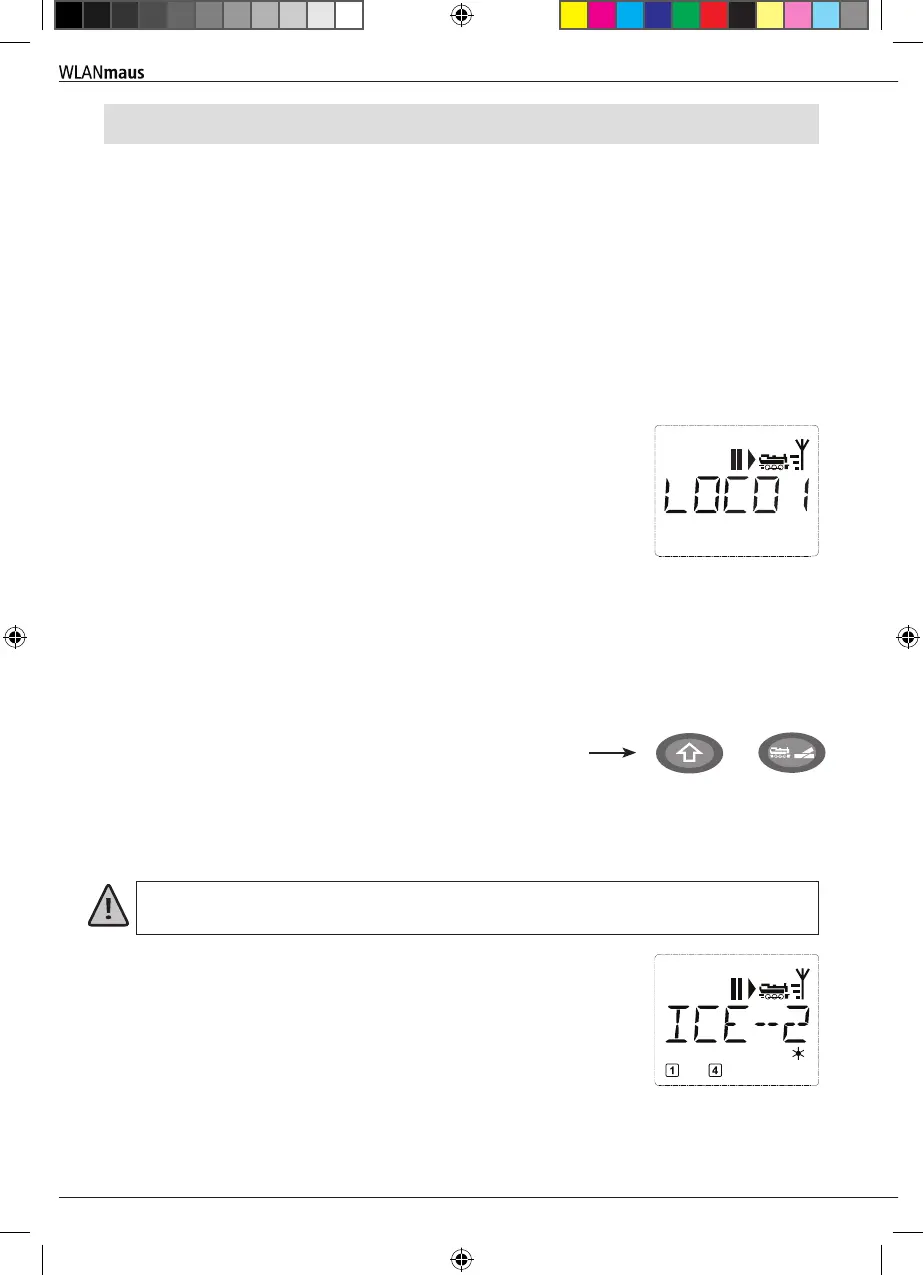
When connecting the WLANmaus for the rst time, there is only one locomotive (address 3) in the
library (“library mode” factory setting). The display screen shows the locomotive symbol, the stand-
still symbol “II” (i.e. the locomotive is stopped) together with the right
arrow and the lettering “LOCO 1” so that you can drive the locomotive
immediately.
2.1.2 An already used
If you have already used the WLANmaus, the locomotive last controlled
is displayed – regardless if you used the library or the address mode.
While scrolling with the arrow keys you see all settings of the traction
operations, i.e. drive direction, name or address of the locomotive, selected functions.
2.2 Selecting a Locomotive
The WLANmaus offers two ways of selecting a locomotive:
▪
via the library mode set at the factory: see the following Chapter 2.2.1.
▪
via the address mode, i.e. using the locomotive address directly: see Chapter 2.2.2.
Switching between library and locomotive address mode
+
2.2.1 Library mode
Locomotive library mode is a database which gives you the option of saving 100 locomotives with a
name (10 characters), locomotive address and the required speed steps. A scrolling text program inte-
grated into the WLANmaus displays all the menu names with more than 5 letters as scrolling text.
The decoder locomotive address therefore always has to be changed using “CV1” (see 2.6 “Quick-
programming” on page 52). You will be required to make the changes in the library as well.
Screen display (in this case an “ICE”-train of the second series):
▪
Locomotive name (in this case “ICE-2”) and loco symbol,
▪
Direction of travel (here: the locomotive was or is stationary, the arrow
indicates the last direction of travel)
▪
Light (in this case: the locomotive lighting is switched on),
▪
F1 and F4 (in this case: the activated locomotive functions).
Operation - Driving and Switching
8010813920.indd 44 13.07.2017 10:27:45


 To Next Page
 Loading...
