45
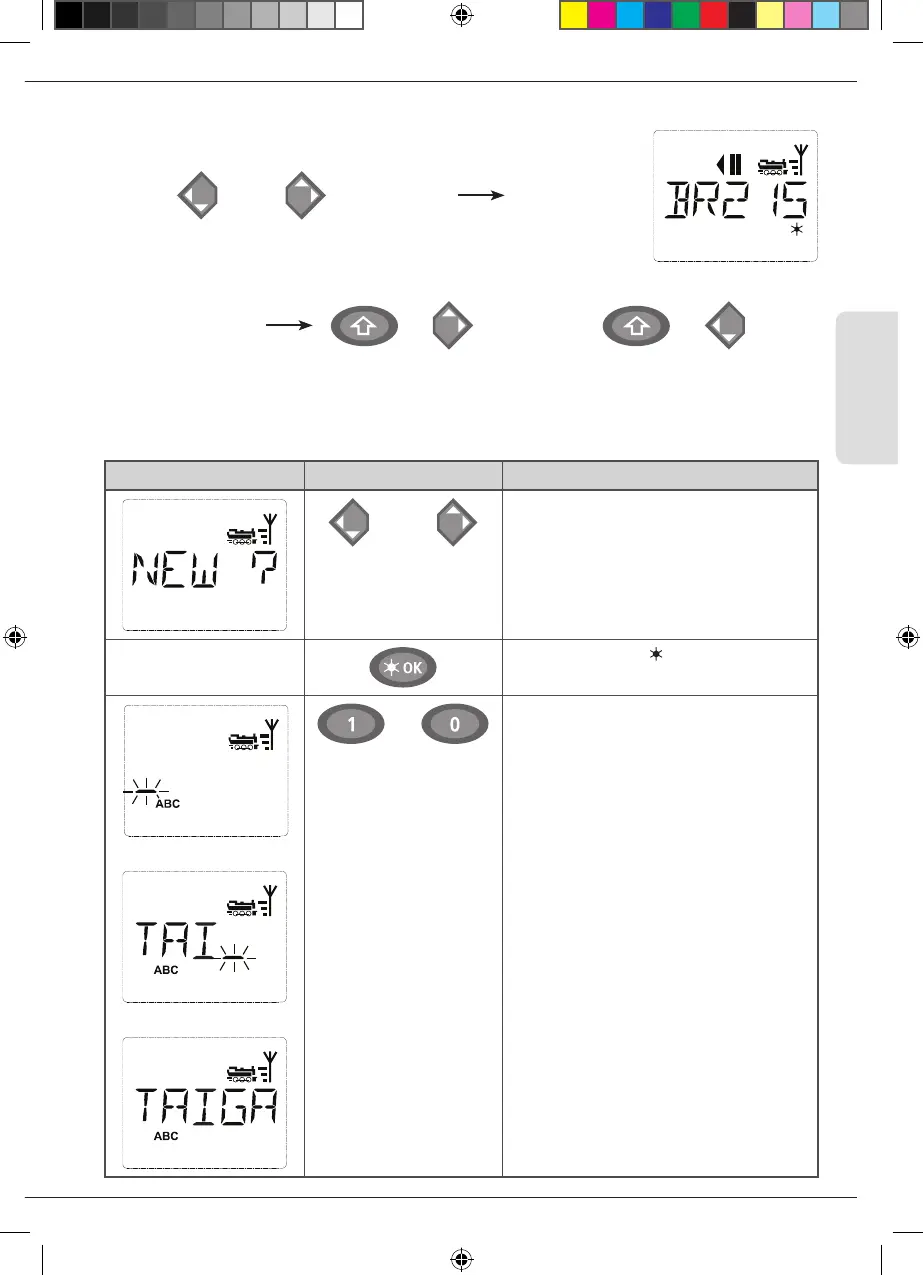
2.2.2. Entering a new locomotive
(in the example, the DR 120 series “Taigatrommel” diesel locomotive):
Calling up other locomotives already entered in the library (“scrolling”
Locomotives in the library are sorted in the order in which they were
entered. You can of course change this order:
or
++
Select locomotive
These key combinations (press keys together) move the locomotive up or down in the library. You can check
the new order for the library with the arrow keys.
/
Display Input Comment
/
You can nd the free memory slot marked
“NEW ?” by scrolling through the library
using the arrow keys.
Conrm by pressing OK-key.
…
You then enter the locomotive name. 12
characters are available. In our example we
have abbreviated “Taigatrommel” to
“TAIGATROMM.”
The rst character is displayed with a ash-
ing cursor.
YThe “0“ button is a “0“ when pressed
again, a space is displayed after it has been
pressed twice. The cursor ashes and freezes
briey after the correct character has been
entered before jumping to the next charac
-
ter place.
To enter a space, press the “0” key once,
to get the “0”, press the key twice. Special
characters (see page 40) can be entered by
repeatedly pressing the “1”or ”0” key. Cor-
rect input errors by using the left arrow key
to move back one or more spaces.
Operation - Driving and Switching
8010813920.indd 45 13.07.2017 10:27:45


 To Next Page
 Loading...
