Content:
Rocpro P33 Quick Installation
USB-C to USB Type-A
Cable
USB-C to USB-C
Cable
i
Minimum System Requirements
Connect your Rocpro P33 Portable drive to a computer that meets the following oprating system:
Windows 7 or higher
Mac OS X 10.7 or higher
Note: For optimal performance, connect Rocpro P33 Mobile External drive to a USB-C host port
on your computer. To achieve full interface bandwidth, you can also connect this device to a
USB 3.0 port on a computer. Connecting the Rocpro P33 Mobile Drive to a USB 2.0 port reduces
performance to USB 2.0 transfer rates.
Connecting the Drive
1. Turn ON your computer and wait until it fully boots up to load all programs.
2. Before connecting the Rocstor P33 portable drive, conrm the USB port on your computer.
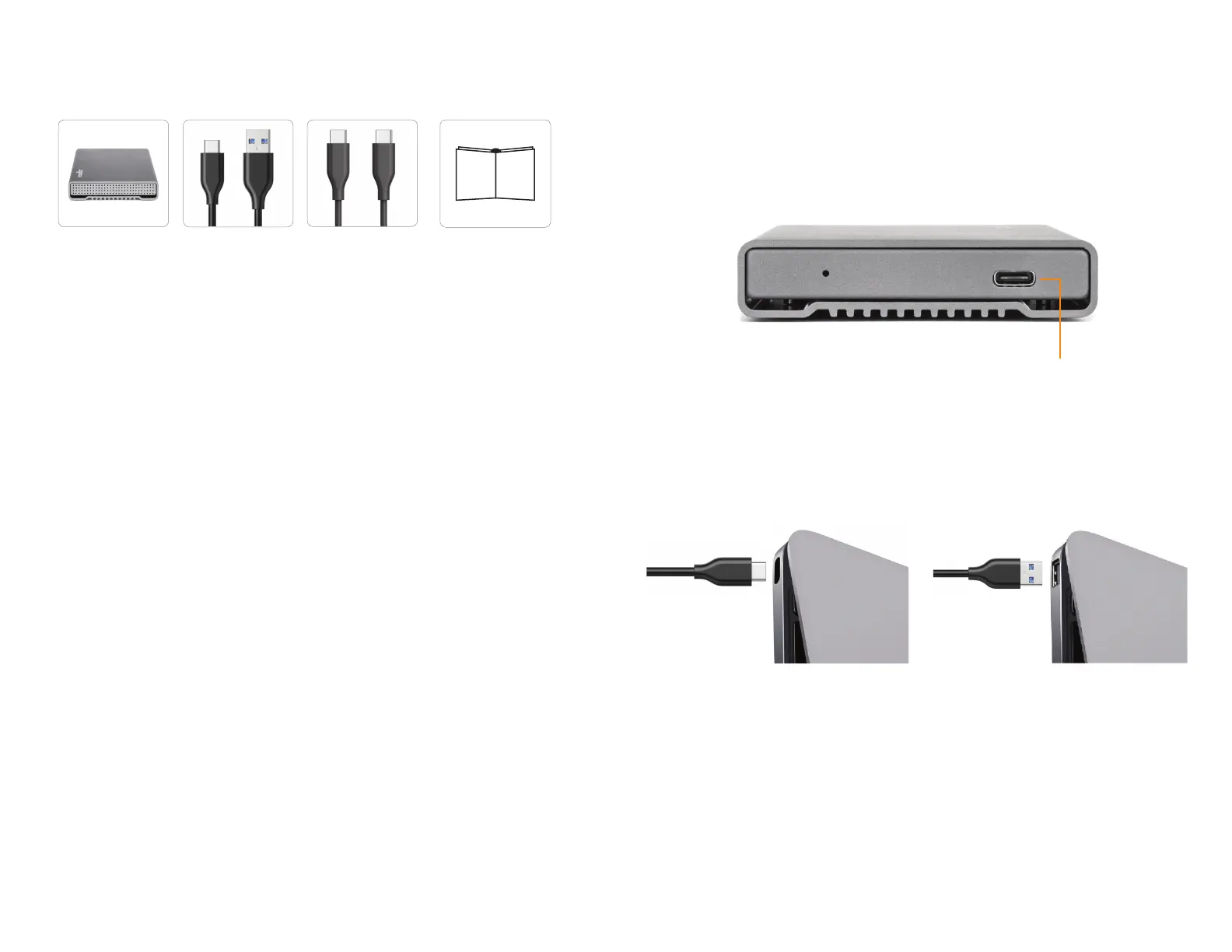
Your Rocstor P33 device is shipped with two cables:
USB-C–to–USB-C: use this cable if your computer has a USB-C port.
USB-C–to–USB 3.0/2.0 Type A: use this cable if your computer does not have USB-C port.
USB 3.1 Gen 2 Type-C 10Gb/s
3. Using only one interface cable at a time, select the interface port you wish to use on your computer.
When using USB-C to USB-C Cable, connect one end of the USB-C cable to the appropriate USB-C on
your computer and then the other end to the USB-C port on the Rocpro P33 device. When using USB-C
cable to USB Type-A cable, connect one end of the USB Type-A cable to the USB port on your host
computer and then the other end to the USB-C port on the Rocpro P33 drive.
4. The Hard drive is preformatted for Plug-and-Play operation. After a few seconds a Rocstor HD icon will
show on “My Computer” folder under the Windows OS. Under the Mac OS, the Rocpro HD will appear on
the “Desktop.”
5. Click (double click) on the Rocstor HD icon to access the drive.
6. When done using a Rocstor external hard drive, and would like to disconnect the drive
from a computer, properly eject it. This is essential, as disconnecting or powering o a drive without
safely ejecting it rst can potentially cause data loss or even damage to the drive.
* You may also refer to the Rocstor website to view or download a full version of the Rocpro P33 manual.
www.rocstor.com












 To Previous Page