EasyManua.ls Logo

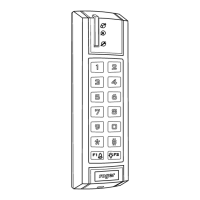
Roger SL2000F - User Manual

Roger SL2000F
12 pages
Print Icon
To Next Page IconTo Next Page
Loading...
Electronic Code Lock
SL2000F and SL2000F-VP v2.0
Rev.F
Question and Answer IconNeed help?

Do you have a question about the Roger SL2000F and is the answer not in the manual?

Summary

Introduction

Functional Description

REL1 and OUT1 Outputs

Details about the REL1 and OUT1 output configuration and signaling.

Door Lock Mode (Momentary)

Explains the momentary control signal for devices like door strikes.

Status Mode (Latch)

Describes the bistable control for systems like alarm zones.

OUT2 Output

Details the fixed function of OUT2 for Door Bell and Door Alarm signals.

Exit Button Input

Door Contact Input

LED SYSTEM Input

Option 1: Timed Lock-out

Option 2: Disable USER Codes When in Armed Mode

Arming and Disarming

Codes

MASTER Code

The MASTER code is used to switch the SL2000 between Armed and Disarmed modes.

INSTALLER Code

The INSTALLER code is required to enter the Installer Programming mode.

USER Codes

These codes are used solely to trigger the Door Lock (momentary) output.

Commands

Programming The USER Codes

Configuring the SL2000 (Memory Reset)

Meaning of the configuration parameters: C1-C10

Explains the meaning and programming of configuration parameters C1 through C10.

Example

Provides an example of entering configuration digits during Memory Reset.

Default Codes

Lists the default MASTER, INSTALLER, and USER codes after a Memory Reset.

Installation

Provides guidance on mounting and installing the SL2000 code lock.

Technical Specification

Connection assignments

Details the terminal numbers, wire colors, and descriptions for connections.

Ordering Information

Lists the available product models and their descriptions.
Product History

Summary

Introduction

Functional Description

REL1 and OUT1 Outputs

Details about the REL1 and OUT1 output configuration and signaling.

Door Lock Mode (Momentary)

Explains the momentary control signal for devices like door strikes.

Status Mode (Latch)

Describes the bistable control for systems like alarm zones.

OUT2 Output

Details the fixed function of OUT2 for Door Bell and Door Alarm signals.

Exit Button Input

Door Contact Input

LED SYSTEM Input

Option 1: Timed Lock-out

Option 2: Disable USER Codes When in Armed Mode

Arming and Disarming

Codes

MASTER Code

The MASTER code is used to switch the SL2000 between Armed and Disarmed modes.

INSTALLER Code

The INSTALLER code is required to enter the Installer Programming mode.

USER Codes

These codes are used solely to trigger the Door Lock (momentary) output.

Commands

Programming The USER Codes

Configuring the SL2000 (Memory Reset)

Meaning of the configuration parameters: C1-C10

Explains the meaning and programming of configuration parameters C1 through C10.

Example

Provides an example of entering configuration digits during Memory Reset.

Default Codes

Lists the default MASTER, INSTALLER, and USER codes after a Memory Reset.

Installation

Provides guidance on mounting and installing the SL2000 code lock.

Technical Specification

Connection assignments

Details the terminal numbers, wire colors, and descriptions for connections.

Ordering Information

Lists the available product models and their descriptions.

Product History

Roger SL2000F Specifications

General IconGeneral
BrandRoger
ModelSL2000F
CategoryLocks
LanguageEnglish