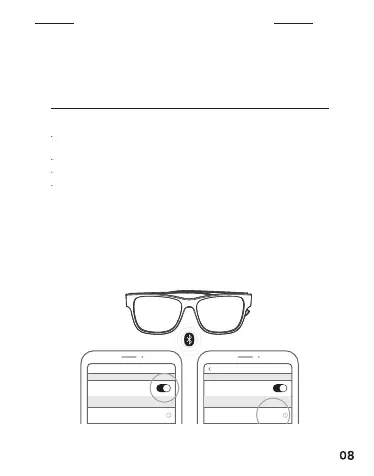
CONNECT USING THE BLUETOOTH MENU ON
YOUR MOBILE DEVICE
BLUETOOTH CONNECTIONS
NOTE:
The Bluetooth feature is usually found in the
Settings - Connections menu.
You can connect and play audio from only one device at a time.
The device must be within range (30 ft or 9 m) and powered on.
When connecting other models of ROKiT EYE Q products, please
ignore the previously connected Bluetooth first and then reconnect.
1. With the frames powered on, enable the Bluetooth feature on your
device.
2. Select ROKiT Eye Q from the Bluetooth devices list and tap connect.
Bluetooth
Bluetooth
Rokit Eye Q Rokit Eye Q
MY DEVICES
No Connected
Connected
MY DEVICES
Bluetooth
Bluetooth


 To Next Page