STEP 2: Connect to TV
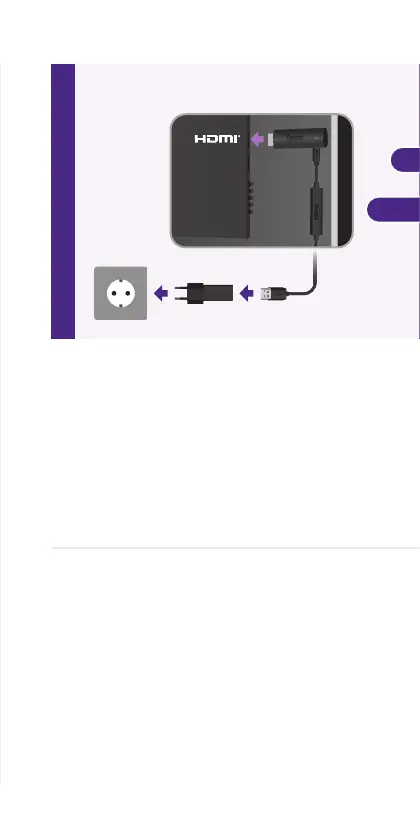
For the best streaming experience, use
the included USB power cable and power
adaptor to connect your streaming player to
a wall outlet. Or use the included USB power
cable to connect to the USB port on your TV.
Then, plug your streaming player into an
HDMI port on your TV.
SCHRITT 2: An das Fernsehgerät
anschließen
Für ein optimales Streaming-Erlebnis
verwende das mitgelieferte USB-Stromkabel
und das Netzteil um deinen Streaming Player
an eine Steckdose anzuschließen. Oder verbinde
das USB-Stromkabel mit einem USB-Anschluss
deines Fernsehgeräts.
Schließe deinen Streaming-Player danach
an einen der HDMI Anschlüsse deines
Fernsehers an.
2
OR
ALTERNATIV
Back of TV | Rückseite des Fernsehers



 To Next Page