Need help?
Do you have a question about the Roku Streaming Stick 4K Plus and is the answer not in the manual?
Plug the USB power cable into your streaming player and coil the cable.
Connect the streaming player to your TV via HDMI and a power source.
Use your TV remote to select the correct input source for the streaming player.
Pair the Roku remote by pressing and holding the pairing button until the status light blinks.
Follow on-screen prompts to complete setup and activate your streaming player.
Instructions on how to charge the Roku remote using a USB cable and adapter.
Plug headphones into the remote for private listening; TV audio will mute automatically.
Use voice commands or the mobile app to locate a lost remote.
Quickly launch channels or playlists by setting personal shortcut buttons.
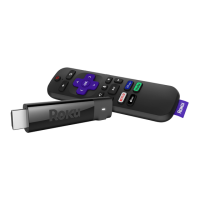
The Roku Streaming Stick 4K+ is a compact and powerful streaming player designed to deliver an enhanced entertainment experience on your television. This device allows you to access a vast array of streaming content, including movies, TV shows, live TV, and music, all from the comfort of your home. Its small form factor makes it incredibly portable and discreet, easily plugging directly into an HDMI port on your TV.
At its core, the Roku Streaming Stick 4K+ functions as a gateway to digital entertainment. Once connected to your TV and a Wi-Fi network, it transforms your television into a smart TV, providing access to thousands of channels and apps. The device supports 4K resolution, offering crisp, clear visuals, and HDR (High Dynamic Range) for vibrant colors and improved contrast, ensuring a high-quality viewing experience for compatible content. The "4K+" in its name signifies its advanced capabilities, including a long-range Wi-Fi® receiver integrated into the USB power cable, which helps maintain a strong and stable connection even in areas with weaker Wi-Fi signals. This enhanced Wi-Fi performance is crucial for smooth 4K streaming, reducing buffering and ensuring a seamless viewing experience.
Setting up the Roku Streaming Stick 4K+ is designed to be straightforward. The process begins by connecting the USB power cable to the streaming player itself. It's recommended to keep the power cable coiled in its velcro wrap for neatness and to potentially optimize the Wi-Fi receiver's performance. Next, you connect the streaming player to your TV. For optimal performance and to ensure sufficient power, it is advised to use the included USB power cable and power adaptor to connect the streaming player to a wall outlet. However, if your TV has a USB port that provides enough power, you can also connect the USB power cable directly to the TV's USB port. A helpful indicator is a red light on the streaming player; if you see one, it means the TV's USB port isn't supplying enough power, and you should switch to the wall adaptor. After connecting the hardware, you'll use your TV remote to select the correct HDMI input (source) where the Roku Streaming Stick 4K+ is plugged in.
A key feature of the Roku Streaming Stick 4K+ is its advanced remote, which is more than just a simple controller. This remote is designed for convenience and enhanced interaction. It includes standard navigation buttons (up, down, left, right, OK), playback controls (play/pause, fast forward, rewind, instant replay), and dedicated channel shortcut buttons for quick access to popular streaming services. The remote also features a microphone for voice commands, allowing for hands-free control of your streaming experience. You can use voice commands to launch channels, search for content, control playback, and even adjust TV settings like turning it on or off and changing the volume. The remote also has a "Push-to-talk voice" option, where you press and hold a button to issue commands, offering flexibility in how you interact with the device.
One of the standout usage features of the remote is its private listening capability. By plugging headphones into the remote's headphone jack, you can enjoy your content without disturbing others. When headphones are connected, your TV's audio will automatically mute, providing a personal and immersive listening experience. This is particularly useful for late-night viewing or in shared living spaces. The remote also includes a "Lost remote finder" feature, which can be activated by saying "Hey Roku, where's my remote?" or by using the free Roku mobile app. This feature helps you locate a misplaced remote by making it emit an audible signal.
The remote itself is rechargeable, which is a significant maintenance feature. It comes with a USB charging cable, and you can plug this cable into the remote and any standard USB power adaptor (like a phone charger) to recharge it. The remote has a status light that indicates its charging status, stopping blinking once fully charged. You'll also receive an on-screen message on your TV when it's time to recharge the remote, ensuring you're always aware of its battery level.
To fully utilize the Roku Streaming Stick 4K+, you'll need to create a Roku account. This account is essential for streaming content, adding channels, managing subscriptions, and renting or buying movies. While setting up a payment method is optional, it simplifies transactions for rentals, purchases, and free trials, with the assurance that no charges will be made without your authorization. Roku emphasizes that it never charges for activation support, reinforcing its commitment to user-friendly service.
The on-screen setup process guides you through linking your streaming player to your Roku account, which can be done using a computer or smartphone. This activation step is crucial for unlocking the full potential of the device.
In summary, the Roku Streaming Stick 4K+ is a user-friendly, high-performance streaming device that offers a comprehensive entertainment solution. Its compact design, advanced Wi-Fi capabilities, intuitive voice-controlled remote with private listening and remote finder features, and straightforward setup process make it an excellent choice for anyone looking to upgrade their TV viewing experience. The rechargeable remote and clear on-screen prompts for maintenance further enhance its usability, ensuring a seamless and enjoyable streaming journey.
 General
| Connectivity | HDMI |
|---|---|
| Wireless Technology | 802.11ac dual-band MIMO |
| Model | 3821R |
| Processor | Quad-core |
| Dimensions | 3.7 x 0.8 x 0.5 inches |
| Weight | 0.9 ounces |
| Resolution | 4K UHD |
| Voice Control | Yes, via Roku Voice Remote Pro |
| Remote Features | Voice control, lost remote finder |
| Ports | HDMI |
| Bluetooth | Yes |
| Compatibility | HD and 4K UHD TVs with HDMI |
| Content | Thousands of channels and apps including Netflix, Hulu, Disney+, etc. |
| Mobile App | Yes, Roku mobile app for iOS and Android |
| Subscription | Subscriptions may be required for some content |

 To Next Page