EasyManua.ls Logo

Roland 5500 - Panel Descriptions; Front Panel Controls; Additional Front Panel Controls; Rear Panel Connections

Roland 5500
14 pages
Print Icon
To Next Page IconTo Next Page
To Previous Page IconTo Previous Page
Loading...
@
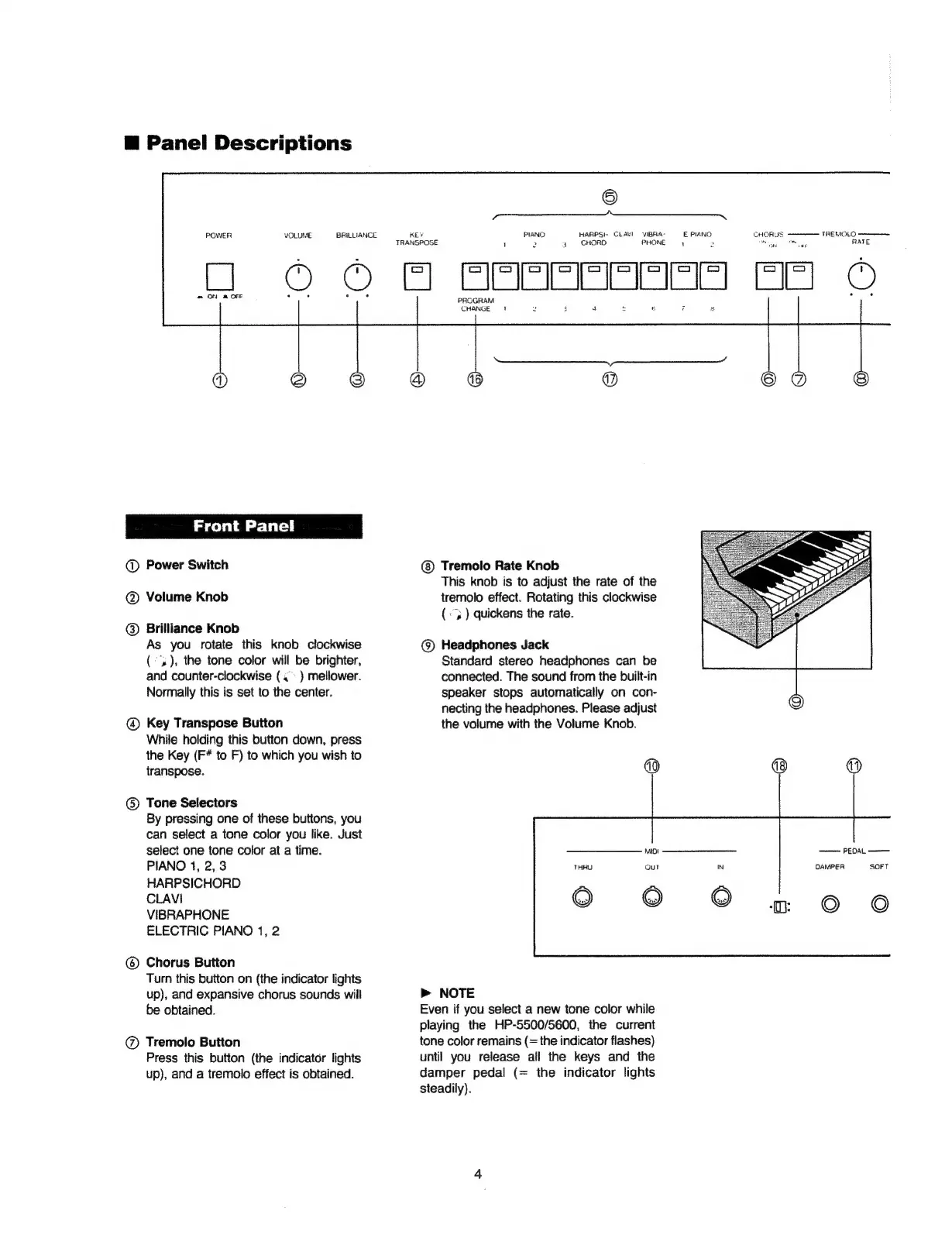
Panel
Descriptions
m=
ON
&
OFF
Front
Panel
@
Power
Switch
@
Volume
Knob
@
Brilliance
Knob
As
you
rotate
this
knob
clockwise
(),
the
tone
color
will
be
brighter,
and
counter-clockwise
(.
)
mellower.
Normally
this
is
set
to
the
center.
@
Key
Transpose
Button
While
holding
this
button
down,
press
the
Key
(F*
to
F)
to
which
you
wish
to
transpose.
@
Tone
Selectors
By
pressing
one
of
these
buttons,
you
can
select
a
tone
color
you
like.
Just
select
one
tone
color
at
a
time.
PIANO
1,
2,
3
HARPSICHORD
CLAVI
VIBRAPHONE
ELECTRIC
PIANO
1,
2
@
Chorus
Button
Turn
this
button
on
(the
indicator
lights
up),
and
expansive
chorus
sounds
will
be
obtained.
@
Tremolo
Button
Press
this
button
(the
indicator
lights
up),
and
a
tremoio
effect
is
obtained.
POWER
VOLUME
BRILLIANCE
KEY
TRANSPOSE
.
(O2@
Gl
PIANG
HARPSI-
CLANI
VIBRA-
PROGRAM
>
4
CHORD
PHONE
CHANGE
i
ey
Tremolo
Rate
Knob
This
knob
is
to
adjust
the
rate
of
the
tremolo
effect.
Rotating
this
clockwise
(«3
)
quickens
the
rate.
@)
Headphones
Jack
Standard
stereo
headphones
can
be
connected.
The
sound
from
the
built-in
speaker
stops
automatically
on
con-
necting
the
headphones.
Please
adjust
the
volume
with
the
Volume
Knob.
@
NOTE
Even
if
you
select
a
new
tone
color
while
playing
the
HP-5500/5600,
the
current
tone
color
remains
(=
the
indicator
flashes)
until
you
release
all
the
keys
and
the
damper
pedal
(=
the
indicator
lights
steadily).
PAPERS
©