©2012 Roland Corporation U.S. www.RolandUS.com TBS279
®ÂØÒňÎ
®
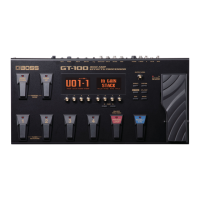
GT-100 Amp Effects Processor
2
Using EZ TONE
1 Start with any patch.
2 Press EZ TONE.
You can create an entirely new patch, customize the current COSM amp sound, or
customize an OD/DS stomp box pedal sound.
3 Turn Knob 4 to highlight “PATCH CREATE,” “AMP CUSTOM,” or “OD/DS CUSTOM.”
4 Turn Knob 5 to choose a basic tone or type.
Tip: In the Patch Create screen, you can press PAGE 4 to reveal a tone grid. Turn Knobs 5
and 6 to move the cursor horizontally and vertically around the grid, and then dial in the
desired tone. Turn Knob 8 to adjust the ambience.
5 When you’re finished with EZ Tone, press EXIT.
Editing a Patch
Within a GT-100 patch, any effect and/or amp model can be edited to sound exactly the
way you want. Here’s how to do this.
1 Press the EFFECT button.
2 Turn Knob 4 to select an effect.
3 Once the desired effect is highlighted:
• Turn Knob 3 to toggle the effect on or off.
• Turn Knob 1 to change its location in the effects chain.
• Turn Knobs 5 through 8 to adjust the parameters of that effect.
Tip: Press PAGE 3 or 4 to reveal more parameters.
Writing Patches
Once you’ve edited a patch, you can store it in any of the 200 User patch locations.
1 Press WRITE.
2 Turn Knob 5 to choose a User patch memory location from U01-1 to U50-4.
3 Press WRITE again to finish saving your patch.
Using the GT-100’s Phrase Looper
1 Select the patch you want to use as you record your loop.
2 Press and hold the PHRASE LOOP pedal for at least 2 seconds until its red LED
flashes, and then release the pedal.
3 When you’re ready to record, press and release the PHRASE LOOP pedal—”REC”
appears briefly on the screen to indicate that the GT-100 is recording.
Note: You can record for up to 38 seconds.
4 When you’re finished recording, press and release PHRASE LOOP again—”PLAY”
appears briefly on the screen. Playback of your loop begins immediately. You can
now play or practice over your loop without adding to it.
5 When you’re ready to record, or “overdub,” press and release PHRASE LOOP again—
“DUB” appears briefly on the screen.
6 Press and release PHRASE LOOP again to stop overdubbing. You can repeat the
overdubbing process as many times as you wish.
7 To stop looping, press the pedal twice in quick succession—“STOP” appears briefly
on the screen.
8 In its current state, the Phrase Looper is now ready to record a new loop. If you’re
done looping, press and hold PHRASE LOOP for at least two seconds to turn the
Phrase Looper off.
Using the GT-100’s Accel Features
The GT-100 has a new, unique feature called “Accel.” When it’s turned on, you can use
the ACCEL/CTL pedal to apply the S-Bend, Laser Beam, Ring Mod, Twist, Warp, and
Feedbacker specialty effects. There are several Preset patches that utilize these effects.
Here are a few examples.
1 Press EXIT a few times to return to the Play screen.
2 For a Warp Accel effect, select Patch P50-4 ACCEL WARP.
3 While you play, press and hold the ACCEL/CTL pedal to activate the Warp effect.
4 For a Laser Beam effect, select patch P50-2 ACCEL LSR BEAM.
5 For a Twist effect, select Patch P49.


 To Previous Page
 Loading...