EasyManua.ls Logo

Roland Cube-60 - User Manual

Roland Cube-60
4 pages
Print Icon
To Next Page IconTo Next Page
Loading...
CUBE
cUBE-Goe
Gi
WRE¢RABEED
INSTRUCTIONS
Roland
Please
read
this
manual
carefully
for
proper
operation
of
this
unit.

Other manuals for Roland Cube-60

Question and Answer IconNeed help?

Do you have a question about the Roland Cube-60 and is the answer not in the manual?

Summary

Product Features and Connections

Product Features

Highlights the CUBE-60 Keyboard's portable, full-range, two-way speaker system and dual-channel input capabilities.

Connection Overview

Diagram illustrating connections for headphones, effectors, tape recorders, and keyboards to the unit.

Controls and Functions Overview

Control Panel Layout

Details the controls on the front panel, including input jacks, volume, tone controls, reverb, and pilot lamp.

Rear Panel Connections

Explains the functions of rear panel jacks: REC-OUT, PRE-OUT/MAIN-IN, HEADPHONE, and EXT. SPEAKER.

Troubleshooting Guide

Cautions and Specifications

Important Cautions

Provides safety warnings regarding noise interference, handling, environment, cleaning, and fuse replacement.

Technical Specifications

Lists output power, speaker details, input/output jacks, controls, power consumption, dimensions, and weight.

Overview

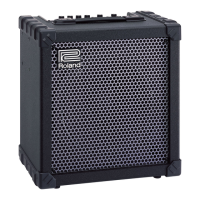
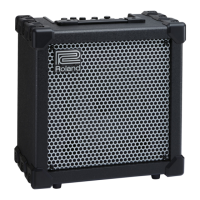
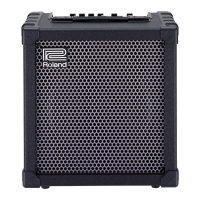
The Roland CUBE-60 Keyboard amplifier is a portable, full-range, two-way speaker system designed to deliver a powerful sound with extremely well-balanced frequency characteristics. This amplifier is specifically engineered for keyboard instruments, offering a robust and versatile solution for musicians.

Function Description:

The primary function of the CUBE-60 Keyboard is to amplify and process audio signals from keyboard instruments. It features two independent input channels, allowing for the simultaneous connection and performance of two keyboard instruments. Each channel is equipped with an input attenuator, which provides a wide dynamic range, enabling the acceptance of input signals of varying magnitudes without causing clipping or distortion. This ensures that the amplifier can handle a broad spectrum of keyboard outputs, from subtle to powerful, while maintaining signal integrity.

A key feature of the CUBE-60 is its incorporated Reverb system. Each channel has an independent ON/OFF switch for the Reverb effect, allowing users to apply reverberation selectively to one or both input signals based on their musical requirements. The overall depth of the reverberation can be controlled via a dedicated Reverb control knob, providing flexibility in shaping the sound.

The amplifier also includes a comprehensive tone control section, consisting of Treble, Middle, and Bass controls. These allow users to precisely sculpt the tonal characteristics of their sound, adapting it to different instruments, musical styles, or acoustic environments.

For connectivity, the CUBE-60 offers a variety of useful jacks located on the rear panel. These include Pre-out/Main-in jacks, which are versatile for connecting external effects devices or linking to other amplifiers. The Pre-out jack captures the entire sound of the pre-amp and can be matched to a power amp (like a Roland SPA-120), a mixing board, or another CUBE amp for linked arrangements. The Main-in jack serves as the input point to the power amp stage, allowing for a low-noise internal connection when an effect device is placed between the Send and Main-in jacks, preventing overloading. Additionally, there are Rec-out jacks (mono) for recording purposes, a Headphone jack for private listening, and an Ext. speaker jack for connecting an external speaker system (with a minimum impedance of 8 ohms).

Usage Features:

The CUBE-60 is designed for ease of use and versatility in various performance and practice scenarios.

  • Dual Input Channels: With two input jacks, musicians can connect two keyboard instruments simultaneously, making it ideal for multi-instrumentalists or collaborative performances. The independent volume controls for each channel allow for precise mixing to achieve the desired balance.
  • Input Attenuator: The "PULL ATT. ON" feature on the volume knobs acts as an input attenuator, instantly decreasing the input signal by 15dB. This is particularly useful when dealing with high-output instruments to prevent clipping and ensure a clean signal.
  • Reverb Control: The independent Reverb ON/OFF switches for each channel, along with the master Reverb depth control, provide creative flexibility. Users can add spaciousness and depth to their sound, enhancing the overall musical expression.
  • Tone Shaping: The Treble, Middle, and Bass controls enable comprehensive tone shaping, allowing musicians to fine-tune their sound to suit different genres, instruments, or personal preferences.
  • Monitoring and Recording: The Headphone jack allows for silent practice, as connecting headphones automatically mutes the internal speaker. The mono Rec-out jacks facilitate direct connection to tape recorders or other recording devices, making it convenient for capturing performances or practice sessions.
  • External Connectivity: The Pre-out/Main-in jacks offer advanced connectivity options. They can be used to insert external effects processors (like echo units) into the signal chain, or to expand the system by linking to other power amplifiers or mixing boards. The Ext. speaker jack provides the option to connect an additional speaker for increased sound projection or to create a wider stereo image (when used with another amplifier).
  • Pilot Lamp: A pilot lamp indicates when the power switch is turned on, providing a clear visual confirmation that the unit is operational.

Maintenance Features:

Proper maintenance ensures the longevity and optimal performance of the CUBE-60.

  • Power-Up/Down Procedure: Always set all volume controls to "0" before turning the power switch ON or OFF. This prevents sudden loud noises or potential damage to the speaker due to unacceptable load.
  • Cable Connection Sequence: When connecting an instrument to the amplifier, always connect the instrument first, then connect to the amplifier. When disconnecting, observe the reverse sequence: disconnect from the amplifier first, then from the instrument. This minimizes the risk of electrical surges or pops.
  • Environmental Considerations: Avoid using the amplifier in locations with high humidity or excessive dust, as these conditions can lead to malfunctions and damage.
  • Physical Handling: The amplifier should be handled with care to avoid strong shocks. It is also recommended not to move the amplifier while it is operating to prevent internal damage.
  • Cleaning: For cleaning the amplifier, use a neutral detergent. Do not use thinners, as they can damage the finish or components.
  • Fuse Replacement: In case of a blown fuse, it is crucial to use the specific fuse type recommended by the manufacturer for replacement. Using an incorrect fuse can lead to electrical hazards or damage to the unit.
  • Troubleshooting Guide: The manual provides a troubleshooting table to help users diagnose common issues such as no power, no sound, or distorted sound. This guide offers practical steps to check for simple problems like improper cable connections, incorrect volume settings, or an activated attenuator, before seeking professional service.
  • Interference Avoidance: To prevent noise interference, avoid placing the amplifier near neon or fluorescent lamps. If interference occurs, relocate the amplifier or the interfering light source.

By following these guidelines, users can ensure the reliable and long-lasting operation of their Roland CUBE-60 Keyboard amplifier.

Roland Cube-60 Specifications

General IconGeneral
Power Output60 watts
Speaker Size12 inches
EffectsReverb, Delay, Chorus, Flanger, Phaser, Tremolo
Equalizer3-band (Bass, Middle, Treble)
TypeGuitar Amplifier
TechnologySolid-state
OutputsLine out
Inputs1/4" Instrument Input, Auxiliary Input

Related product manuals