EasyManua.ls Logo

Roland E-35 - Sound Effects Pads

Roland E-35
95 pages
Print Icon
To Next Page IconTo Next Page
To Previous Page IconTo Previous Page
Loading...
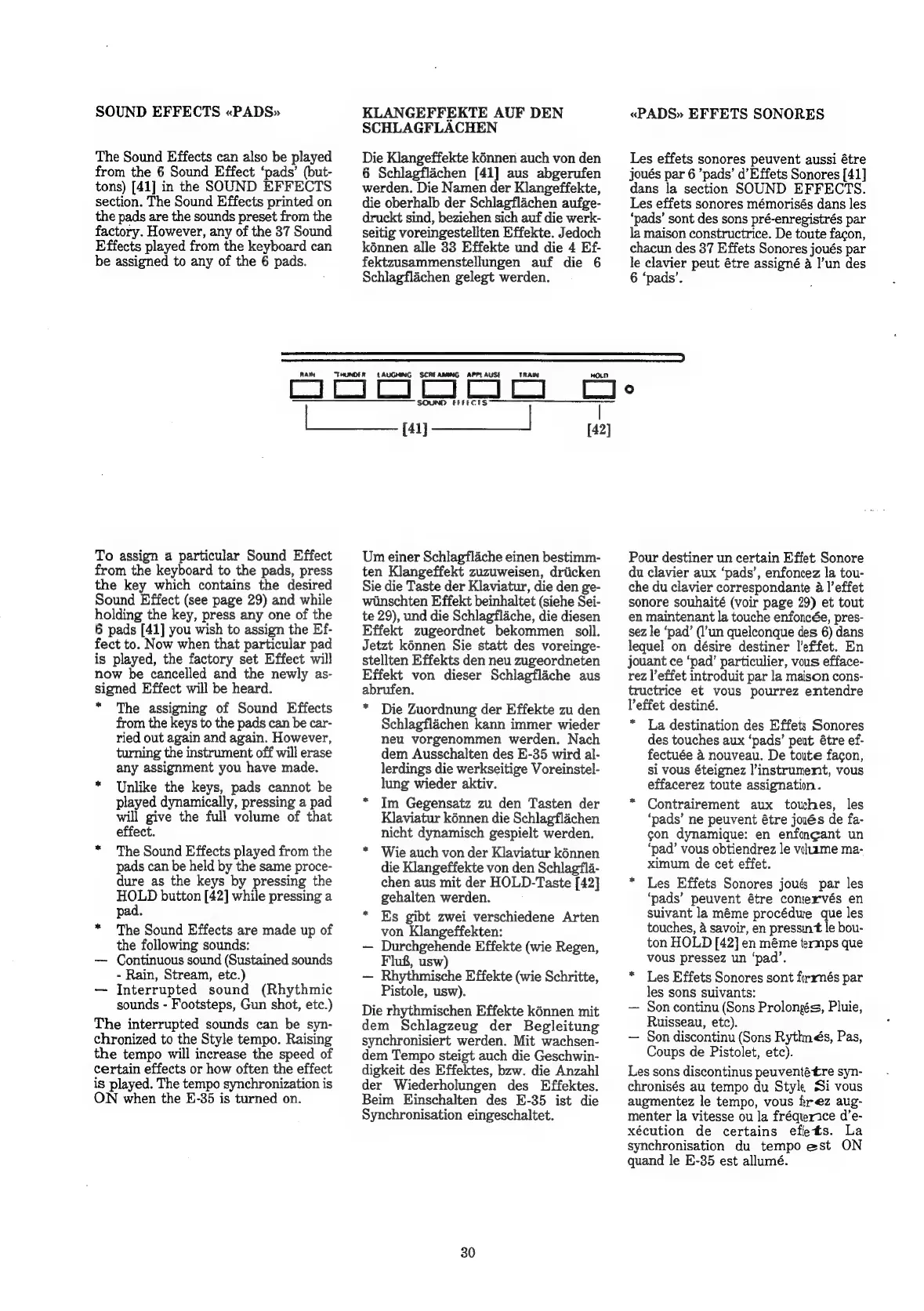
SOUND
EFFECTS
«PADS»
The
Sound
Effects
can
also
be
played
from
the
6
Sound
Effect
‘pads’
(but-
tons)
[41]
in
the
SOUND
EFFECTS
section.
The
Sound
Effects
printed
on
the
pads
are
the
sounds
preset
from
the
factory.
However,
any
of
the
37
Sound
Effects
played
from
the
keyboard
can
be
assigned
to
any
of
the
6
pads.
KLANGEFFEKTE
AUF
DEN
SCHLAGFLACHEN
Die
Klangeffekte
kénnen
auch
von
den
6
Schlagflachen
[41]
aus
abgerufen
werden.
Die
Namen
der
Klangeffekte,
die
oberhalb
der
Schlagflachen
aufge-
druckt
sind,
beziehen
sich
auf
die
werk-
seitig
voreingestellten
Effekte.
Jedoch
kénnen
alle
33
Effekte
und
die
4
Ef-
fektzusammenstellungen
auf
die
6
Schlagflachen
gelegt
werden.
«PADS»
EFFETS
SONORES
Les
effets
sonores
peuvent
aussi
étre
jJoués
par
6
’pads’
d’Effets
Sonores
[41]
dans
la
section
SOUND
EFFECTS.
Les
effets
sonores
mémorisés
dans
les
‘pads’
sont
des
sons
pré-enregistrés
par
la
maison
constructrice.
De
toute
facon,
chacun
des
37
Effets
Sonores
joués
par
le
clavier
peut
étre
assigné
a
l’un
des
6
‘pads’.
RAIN
“THUNDER
LAUGHING
SCREAMING
TRAIN
ES]
BE
eo
tae
Ge
ig
ees
To
assign
a
particular
Sound
Effect
from
the
keyboard
to
the
pads,
press
the
key
which
contains
the
desired
Sound
Effect
(see
page
29)
and
while
holding
the
key,
press
any
one
of
the
6
pads
[41]
you
wish
to
assign
the
Ef-
fect
to.
Now
when
that
particular
pad
is
played,
the
factory
set
Effect
will
now
be
cancelled
and
the
newly
as-
signed
Effect
will
be
heard.
*
The
assigning
of
Sound
Effects
from
the
keys
to
the
pads
can
be
car-
ried
out
again
and
again.
However,
turning
the
instrument
off
will
erase
any
assignment
you
have
made.
*
Unlike
the
keys,
pads
cannot
be
played
dynamically,
pressing
a
pad
will
give
the
full
volume
of
that
effect.
*
The
Sound
Effects
played
from
the
pads
can
be
held
by
the
same
proce-
dure
as
the
keys
by
pressing
the
HOLD
button
[42]
while
pressing
a
pad.
*
The
Sound
Effects
are
made
up
of
the
following
sounds:
Continuous
sound
(Sustained
sounds
-
Rain,
Stream,
etc.)
Interrupted
sound
(Rhythmic
sounds
-
Footsteps,
Gun
shot,
etc.)
The
interrupted
sounds
can
be
syn-
chronized
to
the
Style
tempo.
Raising
the
tempo
will
increase
the
speed
of
certain
effects
or
how
often
the
effect
is
played.
The
tempo
synchronization
is
ON
when
the
E-35
is
turned
on.
~~
CCC
SSO
ERP
ECTS
Um
einer
Schlagflaiche
einen
bestimm-
ten
Klangeffekt
zuzuweisen,
driicken
Sie die
Taste
der
Klaviatur,
die
den
ge-
wiinschten
Effekt
beinhaltet
(siehe
Sei-
te
29),
und
die
Schlagflache,
die
diesen
Effekt
zugeordnet
bekommen
soll.
Jetzt
kénnen
Sie
statt
des
voreinge-
stellten
Effekts
den
neu
zugeordneten
Effekt
von
dieser
Schlagflache
aus
abrufen.
*
Die
Zuordnung
der
Effekte
zu
den
Schlagflachen
kann
immer
wieder
neu
vorgenommen
werden.
Nach
dem
Ausschalten
des
E-35
wird
al-
lerdings
die
werkseitige
Voreinstel-
lung
wieder
aktiv.
*
Im
Gegensatz
zu
den
Tasten
der
Klaviatur
kénnen
die
Schlagflachen
nicht
dynamisch
gespielt
werden.
Wie
auch
von
der
Klaviatur
kénnen
die
Klangeffekte
von
den
Schlag?fla-
chen
aus
mit
der
HOLD-Taste
[42]
gehalten
werden.
Es
gibt
zwei
verschiedene
Arten
von
Klangeffekten:
Durchgehende
Effekte
(wie
Regen,
Flug,
usw)
Rhythmische
Effekte
(wie
Schritte,
Pistole,
usw).
Die
rhythmischen
Effekte
kénnen
mit
dem
Schlagzeug
der
Begleitung
synchronisiert
werden.
Mit
wachsen-
dem
Tempo
steigt
auch
die
Geschwin-
digkeit
des
Effektes,
bzw.
die
Anzahl
der
Wiederholungen
des
Effektes.
Beim
Hinschalten
des
E-35
ist
die
Synchronisation
eingeschaltet.
30
[42]
Pour
destiner
un
certain
Effet
Sonore
du
clavier
aux
‘pads’,
enfoncez
la
tou-
che
du
clavier
correspondante
a
|’effet
sonore
souhaité
(voir
page
29)
et
tout
en
maintenant
la
touche
enfoncée,
pres-
sez
le
‘pad’
(l’un
quelconque
des
6)
dans
lequel
on
désire
destiner
l’effet.
En
jouant
ce
‘pad’
particulier,
vous
efface-
rez
l’effet
introduit
par
la
maison
cons-
tructrice
et
vous
pourrez
entendre
lVeffet
destiné.
*
La
destination
des
Effets
Sonores
des
touches
aux
‘pads’
peut
étre
ef-
fectuée
4
nouveau.
De
toute
facon,
si
vous
éteignez
instrument,
vous
effacerez
toute
assignation.
Contrairement
aux
touches,
les
‘pads’
ne
peuvent
étre
joués
de
fa-
con
dynamique:
en
enfongant
un
‘pad’
vous
obtiendrez
le
viltame
ma-
ximum
de
cet
effet.
Les
Effets
Sonores
joué
par
les
‘pads’
peuvent
étre
comervés
en
suivant
la
méme
procédure
que
les
touches,
&
savoir,
en
pressint
le
bou-
ton
HOLD
[42]
en
méme
termps
que
vous
pressez
un
‘pad’.
Les
Effets
Sonores
sont
firrmés
par
les
sons
suivants:
Son
continu
(Sons
Prolongs,
Pluie,
Ruisseau,
etc).
Son
discontinu
(Sons
Rythnés,
Pas,
Coups
de
Pistolet,
etc).
Les
sons
discontinus
peuventétre
syn-
chronisés
au
tempo
du
Style
Si
vous
augmentez
le
tempo,
vous
rez
aug-
menter
la
vitesse
ou
la
fréqurice
d’e-
xécution
de
certains
eflets.
La
synchronisation
du
tempo
est
ON
quand
le
E-35
est
allumé.

Related product manuals