EasyManua.ls Logo

Roland GC-408 - Setting Examples

Roland GC-408
10 pages
Print Icon
To Next Page IconTo Next Page
To Previous Page IconTo Previous Page
Loading...
Example
of
connecting
external
Stack
connection
with
a
GC-408S
effects
to
the
GC-408
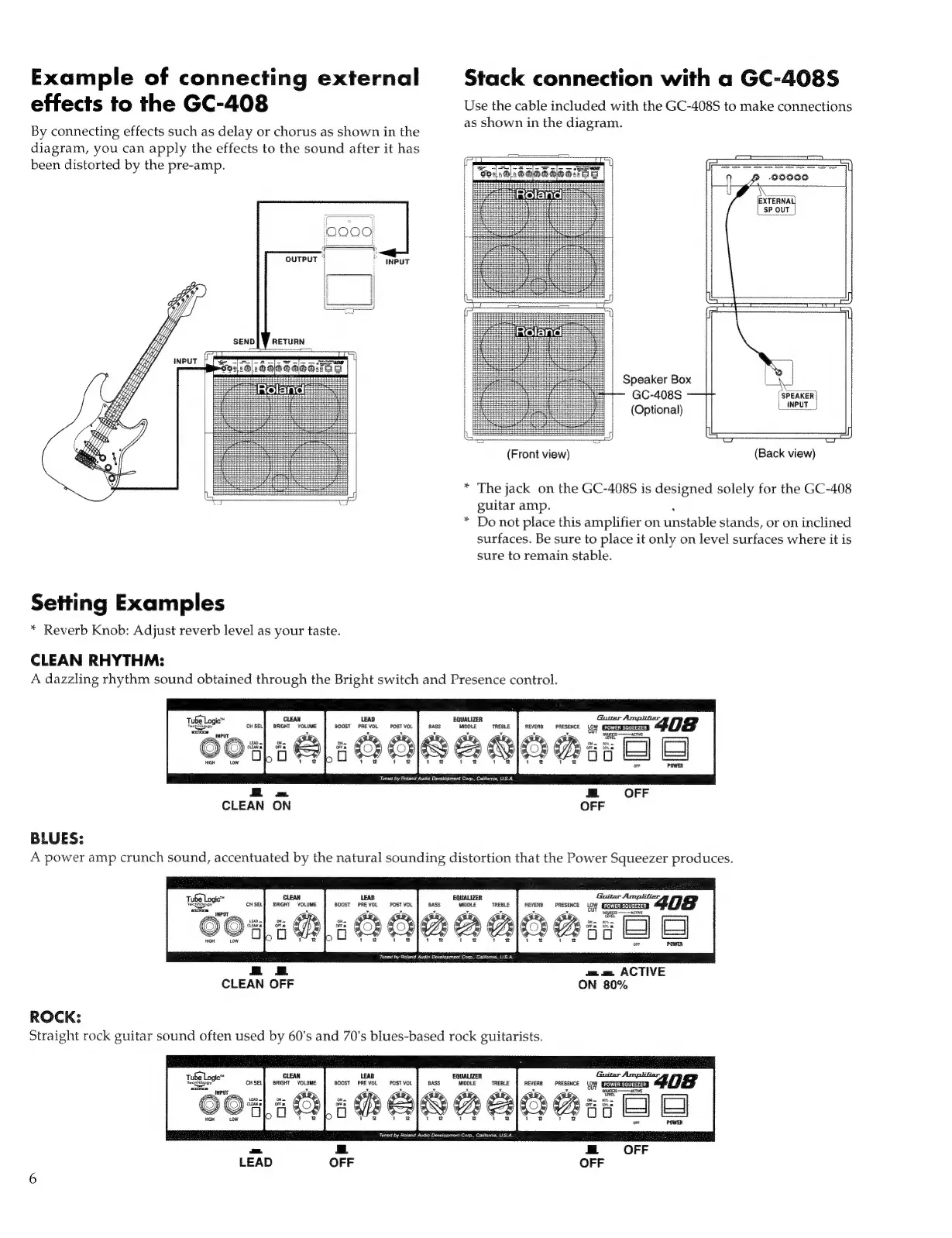
Use
the
cable
included
with
the
GC-408S
to
make
connections
, .
as
shown
in
the
diagram.
By
connecting
effects
such
as
delay
or
chorus
as
shown
in
the
8
diagram,
you
can
apply
the
effects
to
the
sound
after
it
has
been
distorted
by
the
pre-amp.
[Fe
7
0000
Pewee
OUTPUT
1
|
>
|
Speaker
Box
a
<=—
GC-408S
Ni
i
(Optional)
(INPUT
i
5
k=
(Front
view)
(Back
view)
*
The
jack
on
the
GC-408S
is
designed
solely
for
the
GC-408
guitar
amp.
*
Do
not
place
this
amplifier
on
unstable
stands,
or
on
inclined
surfaces.
Be
sure
to
place
it
only
on
level
surfaces
where
it
is
sure
to
remain
stable.
Setting
Examples
*
Reverb
Knob:
Adjust
reverb
level
as
your
taste.
CLEAN
RHYTHM:
A
dazzling
rhythm
sound
obtained
through
the
Bright
switch
and
Presence
control.
LEAD
BOOST
PREVOL
O
POST
VOL
‘Tuned
by
Roland
Audio
Development
Corp.,
California,
USA
CLEAN
ON
BLUES:
A
power
amp
crunch
sound,
accentuated
by
the
natural
sounding
distortion
that
the
Power
Squeezer
produces.
BOOST
mev
A
noer,
voL
a
il
=
m.
e.
ACTIVE
CLEAN
OFF
ON
80%
Tuned
by
Roland
Audio
Dovelopment
Corp.,
Califonia,
US.A.
ROCK:
Straight
rock
guitar
sound
often
used
by
60's
and
70's
blues-based
rock
guitarists.
tube
Logic”
Tween
CH
SEL
san
You
Boost
metal
POST
VOL
REVERB
PRESENCE
gi
uma
A
anan
SQUEEZE
——
ETE
METERNE
Tüned
by
Roland
Audio
Development
Corp.,
Calitomi
=
LEAD
OFF
OFF

Other manuals for Roland GC-408

Related product manuals