EasyManua.ls Logo

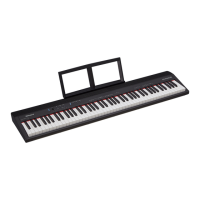
Roland GO:PIANO88 - User Manual

Roland GO:PIANO88
16 pages
Print Icon
To Next Page IconTo Next Page
Loading...

Other manuals for Roland GO:PIANO88

Questions and Answers

  • B
    bgrayJul 28, 2025
    What to do if the speakers on my Roland Musical Instrument do not produce sound?
    • M
      Melissa ShortJul 28, 2025
      If the speakers on your Roland Musical Instrument aren't producing sound when you play, first, ensure the master volume isn't set too low. Secondly, check if headphones are plugged into the PHONES jack, as this may be muting the speakers.
  • A
    Andrew StewartAug 1, 2025
    Why is there noise when I use a mobile phone near my Roland Musical Instrument?
    • V
      Veronica RobinsonAug 2, 2025
      If you experience interference when using a mobile phone close to your Roland Musical Instrument, this may be due to the phone's proximity. To resolve this, either turn off the mobile phone or increase the distance between it and the instrument.
  • B
    Brandon JohnsonAug 6, 2025
    How to fix a Roland Musical Instrument that is not recognized when connecting to a computer?
    • L
      Lauren AndersonAug 7, 2025
      If your Roland Musical Instrument isn't being recognized when connected to a computer, verify that the USB cable is securely connected. If the issue persists, try using a different USB port on your computer. This instrument should function as plug and play, typically without needing a driver installation.
  • P
    Patricia WilliamsAug 11, 2025
    Why does my Roland Musical Instrument shut down after a period of time?
    • J
      Jordan NormanAug 11, 2025
      Your Roland Musical Instrument may be shutting down automatically due to the auto power off function, which turns off the instrument after a set period of inactivity. To adjust this feature, please refer to the Auto Power Off section in this manual.
  • A
    Andrew MeyerAug 16, 2025
    What to do if the pedal does not respond on my Roland Musical Instrument?
    • W
      williamslarryAug 17, 2025
      If the pedal is not responding with your Roland Musical Instrument, make sure the pedal cable is firmly connected.
  • M
    Michael TaylorAug 21, 2025
    Why do the speakers on my Roland Musical Instrument produce a pop sound when turned on or off?
    • P
      phernandezAug 21, 2025
      The pop sound from the speakers of your Roland Musical Instrument when turning the power on or off is normal and not a cause for concern.

Summary

Panel Description

Front Panel

Details the layout and components of the instrument's front panel, including buttons and keys.

Rear Panel

Describes the rear panel connections and ports for power, audio, and peripherals.

Setup

Connecting to Power Supply

Instructions for powering the instrument using the AC adapter or batteries.

Setting the Music Rest

Guide to attaching the included music rest to the instrument.

Connections

Connecting a Pair of Headphones

How to connect stereo headphones and manage the Phones Sense function.

Connecting an Audio Equipment

Steps for connecting the instrument to external audio devices via the PHONES/OUTPUT jack.

Connecting a Pedal

Instructions for connecting the sustain pedal to the SUSTAIN jack.

Connecting a Computer

Guide to connecting the instrument to a computer via USB for MIDI data transfer.

Turning the Power On or Off

Adjusting the Master Volume

Playing Demo Songs

Tones

Selecting a Tone

How to choose a preset tone from the available options.

Layering Two Tones

Instructions for activating Dual mode to layer two different tones simultaneously.

Key Touch

Explanation of the Key Touch feature and its sensitivity settings.

Reverb

Metronome

Tempo

Transpose

Master Tuning

Twin Piano

Bluetooth

MIDI Out

Auto Power Off

Troubleshooting

Specifications

Appendices

Tone List

A list of all available preset tones on the instrument.

Demo List

A list of the demo songs included with the instrument.

List of Operations (Button + Key)

Details specific button and key combinations for various functions.

MIDI Implementation Chart

Technical details on MIDI transmission and reception for the instrument.

Roland GO:PIANO88 Specifications

General IconGeneral
Pedal jackYes
Sound effectsReverberation
Tones quantity4
RMS rated power10 W
Speaker diameter1.5 mm
Number of speakers2
Metronome tempo range30 - 280 bpm
Maximum polyphony (notes)128
Bluetooth version4.0
Headphone outputs1
USB connector typeMicro-USB B
Tuning frequency415.3 - 466.2 Hz
Demo songs quantity10
Tune adjustment range-6 - 5 cent(s)
Power source typeBattery, DC
Keys quantity88 keys
Product colorBlack
Weight and Dimensions IconWeight and Dimensions
Depth291 mm
Width1283 mm
Height87 mm
Weight7000 g

Related product manuals