EasyManua.ls Logo

Roland HP103 - User Manual

Roland HP103
56 pages
Print Icon
To Next Page IconTo Next Page
Loading...
Owner’s Manual
Thank you, and congratulations on your choice of the Roland Digital Piano HP103.
Main Features
Piano Sounds with Rich Resonance and Wide-ranging Expressiveness
The stereo sampling piano sound generator realistically reproduces even the sound
of the hammers striking the strings, producing the tones of a high-quality concert
grand piano. Maximum polyphony of 64 notes ensures that you can use the pedal
freely without running out of notes.
In addition, this instrument features a “Grand Sound” speaker system, and
simulates the full, three-dimensional nature of a concert grand piano (Grand Space),
which together help to deliver a sound with even greater clarity and power
(Dynamic Emphasis).
Pursuing the Playing Feel of a Grand Piano
This instrument features a progressive hammer action keyboard, which duplicates
the touch of a grand piano, with a heavier touch in the lower register, and a lighter
touch in the upper register.
The pedal is designed for good-feeling response, and allows subtle performance
nuances to be expressed.
Comfortable for Use with Headphones
Special effects applied to the sound when headphones are used make listening
through headphones comfortable, not fatiguing. And in addition to an indicator on
the front panel that lights up when you connect a pair of headphones, the HP103 also
provides a convenient hook where you can keep your headphones when they’re not
in use.
A Variety of Helpful Practice Features and Built-in Piano Songs
A metronome function and “two-track recorder,” the built-in songs for a collection
of scores (60 songs included), and other features let you experience piano lessons in
ways possible only with a digital piano.
Before using this unit, carefully read the sections entitled: “IMPORTANT SAFETY
INSTRUCTIONS” (p. 2), “USING THE UNIT SAFELY” (p. 3, 4), and “IMPORTANT NOTES” (p.
5, 6). These sections provide important information concerning the proper operation of the unit.
Additionally, in order to feel assured that you have gained a good grasp of every feature provided
by your new unit, Owner’s manual should be read in its entirety. The manual should be saved and
kept on hand as a convenient reference.
Copyright © 2004 ROLAND CORPORATION
All rights reserved. No part of this publication may be reproduced in
any form without the written permission of ROLAND CORPORATION.
HP103_e.book 1 ページ 2005年3月24日 木曜日 午後4時58分

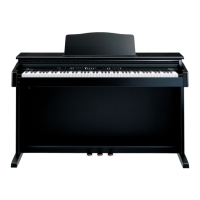
Table of Contents

Questions and Answers

  • C
    Christopher Jones DDSSep 3, 2025
    Why doesn't the tone change on my Roland HP103?
    • C
      Curtis WeaverSep 3, 2025
      If the tone of your Roland HP103 Musical Instrument doesn’t change, the panel or tone might be locked. Turn the power off, then back on. Also, check if the panel or the tone is locked.
  • Z
    zsuttonSep 1, 2025
    What to do if tempo of recorded song is off on Roland Musical Instrument?
    • N
      nguyencharlesSep 1, 2025
      If the tempo of your recorded song or metronome is off on your Roland HP103 Musical Instrument, and you record additional material without erasing the previously recorded song, the song will be recorded at the first-recorded tempo. Erase the previously recorded song before you re-record.
  • J
    Joseph RuizAug 30, 2025
    Why is the tempo off on my Roland HP103 Musical Instrument?
    • S
      Susan ColemanAug 31, 2025
      If the tempo of your recorded song or metronome is off on your Roland HP103 Musical Instrument and you select an internal song in which the tempo changes during the song and then record, the tempo will change in the same way for the performances. The tempo of the metronome will also change in the same way.
  • W
    William HarrisAug 29, 2025
    What to do if I can't record on my Roland HP103 Musical Instrument?
    • S
      Steven MyersAug 29, 2025
      If you are unable to record on your Roland HP103 Musical Instrument, ensure that one of the track buttons for recording has been selected.
  • N
    Nathan ShawAug 27, 2025
    How to fix a rattling pedal on my Roland HP103?
    • P
      Patrick PenaAug 28, 2025
      If your Roland HP103 Musical Instrument pedal rattles, adjust the adjuster underneath the pedal so that it presses firmly against the floor surface.
  • L
    Lydia JohnsonAug 26, 2025
    Why doesn't my Roland HP103 power on?
    • J
      Jenny OwensAug 26, 2025
      If your Roland HP103 Musical Instrument is not turning on, check if the power cord is correctly connected and plugged in.
  • D
    Daniel StevensonAug 25, 2025
    How to make the pedal work on my Roland HP103?
    • M
      mmitchellAug 25, 2025
      To make sure that depressing a pedal has an effect on your Roland HP103 Musical Instrument, verify that the pedal is correctly connected. Ensure the pedal cord is securely connected to the pedal jack on the rear of the unit.
  • A
    andrewmurrayAug 22, 2025
    What to do if there is no sound on my Roland HP103?
    • I
      Ian GarciaAug 22, 2025
      If no sound comes from your Roland HP103 Musical Instrument, check if headphones are plugged in. When headphones are connected, the keyboard’s speaker stops playing. Also, check for plugs remaining connected to the Phones jack.

Summary

Main Features

Piano Sound Quality

Describes the realistic piano sound and polyphony for expressive playing.

Grand Piano Playing Feel

Details the progressive hammer action keyboard and pedal response for authentic touch.

Important Safety Instructions

General Safety Warnings and Precautions

Covers essential safety rules for operation, handling, and environmental precautions.

Important Notes

Power Supply Management

Guidelines for connecting and managing the unit's power supply.

Panel Descriptions

Front Panel Controls Overview

Detailed explanation of buttons, knobs, and indicators on the front panel.

Rear Panel Connections

Identifies and explains the rear panel jacks and connectors.

Getting Started: Initial Setup

Connecting Essential Peripherals

Instructions for connecting pedal cord, power cord, and setting up music rest.

Powering the Unit On and Off

Step-by-step process for turning the piano on and off safely.

Chapter 1: Enjoying Internal Songs and Demos

Playing Internal Songs

How to play back internal songs, including continuous and single song playback.

Chapter 2: Performance

Selecting Tones and Variations

How to choose tone groups and variation tones for performance.

Adjusting Keyboard Touch (Key Touch)

Guide to changing the keyboard's touch sensitivity settings.

Adding Depth to Sound (Grand Space)

Explanation of the Grand Space function for adding sonic depth.

Transposing Keyboard Pitch (Transpose)

How to transpose the keyboard's pitch for easier playing or vocal accompaniment.

Playing Two Sounds Together (Dual Play)

Guide to layering two tones simultaneously and adjusting their volume balance.

Playing Different Tones (Split Play)

How to divide the keyboard and play different tones in each section.

Chapter 4: Recording Your Performance

Recording a New Song

Step-by-step guide to recording your own keyboard performance.

Recording Along with a Song

How to record performances while playing along with internal songs.

Selecting and Recording Tracks Separately

Recording left and right hands on separate tracks.

Troubleshooting

Error Messages and Other Messages

Easy Operation List

Main Specifications

Roland HP103 Specifications

General IconGeneral
TypeDigital Piano
Number of Keys88
Key ActionHammer Action
Polyphony64 voices
EffectsReverb, Chorus
Recorder1 track, 1 song
Pedals3 (Damper, Soft, Sostenuto)
Speakers2 x 12 cm
Speaker Power20W x 2
ConnectivityMIDI In/Out
KeyboardProgressive Hammer Action Keyboard
Touch Sensitivity3 levels, fixed
SoundsPiano, Electric Piano, Strings
Headphones1/4" stereo phone jack
Included AccessoriesPower cord, Music rest

Related product manuals