EasyManua.ls Logo

Roland HP101 - User Manual

Roland HP101
40 pages
Print Icon
To Next Page IconTo Next Page
Loading...
Owner’s Manual
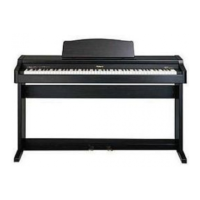
Thank you, and congratulations on your choice of the Roland Digital Piano HP101.
Main Features
Piano Sounds with Rich Resonance and Wide-ranging Expressiveness
The stereo sampling piano sound generator realistically reproduces even the sound
of the hammers striking the strings, producing the tones of a high-quality concert
grand piano. Maximum polyphony of 64 notes ensures that you can use the pedal
freely without running out of notes.
Keyboard and Three Pedals Faithfully Reproduce That True Grand
Piano Feel
This instrument features a compact progressive hammer action keyboard, which
duplicates the touch of a grand piano, with a heavier touch in the lower register, and
a lighter touch in the upper register.
The three pedals are designed for good-feeling response, and allows subtle
performance nuances to be expressed.
Luxurious Wood-Grain Design
Featuring an elegant, wood-grain cabinet, the compact design of this fine instrument
ensures it uses a minimum of space.
In addition to a sliding keyboard lid, the HP101 also features a convenient
headphone hook where you can hang your headphones when they are not in use.
Before using this unit, carefully read the sections entitled: “IMPORTANT SAFETY
INSTRUCTIONS” (p. 2), “USING THE UNIT SAFELY” (p. 3, 4), and “IMPORTANT NOTES” (p.
5). These sections provide important information concerning the proper operation of the unit.
Additionally, in order to feel assured that you have gained a good grasp of every feature provided
by your new unit, Owner’s manual should be read in its entirety. The manual should be saved and
kept on hand as a convenient reference.
Copyright © 2004 ROLAND CORPORATION
All rights reserved. No part of this publication may be reproduced in
any form without the written permission of ROLAND CORPORATION.
HP101_e.book 1 ページ 2004年8月31日 火曜日 午後2時11分


Table of Contents

Questions and Answers

  • D
    Deborah SuarezAug 19, 2025
    How to fix tuning or pitch issues on my Roland Musical Instrument?
    • J
      Joshua HallAug 19, 2025
      If the tuning or pitch of your Roland Musical Instrument is off, check if you have set Transpose. Also, verify that the settings for “Temperament”, “Stretch Tuning”, and “Master Tuning” are correct.
  • R
    ronald04Aug 21, 2025
    What to do if no sound is heard on my Roland Musical Instrument?
    • M
      Michael CarneyAug 21, 2025
      If you're not getting any sound from your Roland Musical Instrument, there are a few things to check: * Ensure the volume isn't turned all the way down. * Make sure headphones or plugs are not connected to the Phones jack, as this will prevent sound from playing through the speakers. * Verify that Local Control is set to “On,” because when it is set to OFF, the keyboard won't produce any sound. * Check if V-LINK is switched on, as this will prevent sound from the twelve keys on the left end of the keyboard.
  • B
    Brian CallahanAug 23, 2025
    What to do if the power doesn’t come on for my Roland Musical Instrument?
    • S
      Sharon HendersonAug 25, 2025
      If your Roland Musical Instrument isn't powering on, make sure the power cord is properly connected and plugged into the outlet.
  • M
    Madeline WeaverAug 26, 2025
    Why does the bass range sound odd or have a vibrating resonance on my Roland Musical Instrument?
    • R
      Ryan Blackwell MDAug 26, 2025
      If you're experiencing an odd sound or vibrating resonance in the bass range of your Roland Musical Instrument when listening through speakers, it might be due to the instrument causing other objects to resonate, especially at loud volumes or with increased bass. Try these steps to reduce the resonance: * Position the speakers 10–15 cm away from walls and other surfaces. * Lower the volume. * Move the speakers away from objects that are resonating.
  • J
    john28Aug 27, 2025
    How to troubleshoot a high-pitched whine from my Roland Musical Instrument?
    • L
      Larry ChangAug 28, 2025
      If you hear a high-pitched whine from your Roland Musical Instrument through headphones, it could be due to the piano tones having a strong high-end component, which sounds like metallic reverberation, especially with heavy reverb. You might be able to reduce the whine by decreasing the amount of reverb applied to the sound.
  • S
    Scott SalasAug 29, 2025
    What to do if I hear sounds twice when playing my Roland Musical Instrument?
    • R
      robert99Aug 29, 2025
      If you're hearing doubled sounds when playing your Roland Musical Instrument, check if the HP101 is in Dual play. Also, if connected to an external sequencer, set the HP101 to Local OFF mode, or disable the MIDI Thru feature on the sequencer.
  • J
    James MillerSep 1, 2025
    What to do if the button doesn’t work on my Roland Musical Instrument?
    • A
      Alyssa BowmanSep 1, 2025
      If a button isn’t working on your Roland Musical Instrument, the panel might be locked. Try turning the power off and then back on.
  • S
    smithkevinSep 3, 2025
    What to do if the tone doesn’t change on my Roland Musical Instrument?
    • V
      vincentgordonSep 3, 2025
      If the tone doesn’t change on your Roland Musical Instrument, the panel might be locked. Turn the power off, then back on.
  • K
    Kimberly FisherSep 5, 2025
    What to do if depressing a pedal has no effect on my Roland Musical Instrument?
    • M
      Michael NewtonSep 5, 2025
      If depressing a pedal has no effect on your Roland Musical Instrument, make sure the pedal cord is securely connected to the pedal jack on the bottom of the unit, at the rear.
  • J
    Joseph MahoneySep 7, 2025
    What to do if the volume level of an instrument connected to Input jacks is too low on my Roland Musical Instrument?
    • D
      dkellySep 7, 2025
      If the volume level of an instrument connected to the input jacks of your Roland Musical Instrument is too low, check if you are using a connection cable that contains a resistor. Use a connection cable that does not contain a resistor.

Summary

Main Features

Important Safety Instructions

Using the Unit Safely

Important Notes

Power Supply Considerations

Important details regarding connecting the unit to a power source and its implications.

Panel Descriptions

Control Panel Layout

Details the buttons and controls on the main control panel of the HP101.

Rear Panel Connections

Identifies the various jacks and connectors found on the rear panel of the unit.

Before You Start Playing

Initial Setup and Connections

Guides on connecting pedals, power cord, lid, and music rest for initial use.

Headphones and Volume Control

Instructions for connecting headphones, using the hook, and adjusting volume.

Pedal Functions and Adjuster

Explains pedal operations and how to adjust the unit's base for stability.

Chapter 2. Performance

Using Different Sounds

How to select and perform with the 14 different internal tones available.

Applying Sound Effects

Instructions for adding reverb and adjusting its depth for enhanced sound.

Chapter 3. Changing Various Settings

Chapter 4. Connecting External Devices

MIDI Connectivity

Basics of MIDI, device connection, and send channel settings.

Local Control Settings

How to switch Local Control On and Off for MIDI synchronization.

Troubleshooting

Main Specifications

Roland HP101 Specifications

General IconGeneral
BrandRoland
ModelHP101
CategoryMusical Instrument
LanguageEnglish

Related product manuals