EasyManua.ls Logo

Roland HP101 - User Manual

Roland HP101
40 pages
Print Icon
To Next Page IconTo Next Page
Loading...
Owner’s Manual
Thank you, and congratulations on your choice of the Roland Digital Piano HP101.
Main Features
Piano Sounds with Rich Resonance and Wide-ranging Expressiveness
The stereo sampling piano sound generator realistically reproduces even the sound
of the hammers striking the strings, producing the tones of a high-quality concert
grand piano. Maximum polyphony of 64 notes ensures that you can use the pedal
freely without running out of notes.
Keyboard and Three Pedals Faithfully Reproduce That True Grand
Piano Feel
This instrument features a compact progressive hammer action keyboard, which
duplicates the touch of a grand piano, with a heavier touch in the lower register, and
a lighter touch in the upper register.
The three pedals are designed for good-feeling response, and allows subtle
performance nuances to be expressed.
Luxurious Wood-Grain Design
Featuring an elegant, wood-grain cabinet, the compact design of this fine instrument
ensures it uses a minimum of space.
In addition to a sliding keyboard lid, the HP101 also features a convenient
headphone hook where you can hang your headphones when they are not in use.
Before using this unit, carefully read the sections entitled: “IMPORTANT SAFETY
INSTRUCTIONS” (p. 2), “USING THE UNIT SAFELY” (p. 3, 4), and “IMPORTANT NOTES” (p.
5). These sections provide important information concerning the proper operation of the unit.
Additionally, in order to feel assured that you have gained a good grasp of every feature provided
by your new unit, Owner’s manual should be read in its entirety. The manual should be saved and
kept on hand as a convenient reference.
Copyright © 2004 ROLAND CORPORATION
All rights reserved. No part of this publication may be reproduced in
any form without the written permission of ROLAND CORPORATION.
HP101_e.book 1 ページ 2004年8月31日 火曜日 午後2時11分

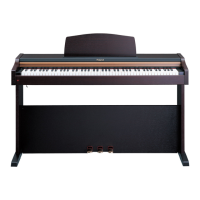
Table of Contents

Questions and Answers

  • W
    wparkerSep 9, 2025
    Why does the sound change abruptly in the upper range of my Roland Musical Instrument?
    • C
      Caroline SanchezSep 9, 2025
      On Roland pianos, the sound in the upper octaves continues to ring, similar to an acoustic piano. The range that is unaffected by the damper pedal will change depending on the Key Transpose setting on the HP101.
  • B
    Brian AdamsSep 12, 2025
    What to do if no sound is heard when a MIDI instrument is connected to my Roland Musical Instrument?
    • S
      Steven FriedmanSep 12, 2025
      If you're not hearing sound when a MIDI instrument is connected to your Roland Musical Instrument, ensure all devices are switched on, the MIDI cables are correctly connected, and the MIDI channel matches the connected instrument.
  • D
    David BanksSep 13, 2025
    Why are not all played notes sounded on my Roland Musical Instrument?
    • L
      Laura SanchezSep 14, 2025
      The Roland HP101 can only play a maximum of 64 notes simultaneously. Frequent use of the damper pedal, especially when playing along with a song, may result in too many notes being played at once, causing some notes to drop out.
  • D
    Dorothy KelleySep 16, 2025
    How to stop the pedal from rattling on my Roland Musical Instrument?
    • D
      Danielle WilsonSep 16, 2025
      To stop the pedal from rattling on your Roland Musical Instrument, adjust the adjuster underneath the pedal so that it presses firmly against the floor surface.

Summary

Main Features

Important Safety Instructions

Using the Unit Safely

Important Notes

Power Supply Considerations

Important details regarding connecting the unit to a power source and its implications.

Panel Descriptions

Control Panel Layout

Details the buttons and controls on the main control panel of the HP101.

Rear Panel Connections

Identifies the various jacks and connectors found on the rear panel of the unit.

Before You Start Playing

Initial Setup and Connections

Guides on connecting pedals, power cord, lid, and music rest for initial use.

Headphones and Volume Control

Instructions for connecting headphones, using the hook, and adjusting volume.

Pedal Functions and Adjuster

Explains pedal operations and how to adjust the unit's base for stability.

Chapter 2. Performance

Using Different Sounds

How to select and perform with the 14 different internal tones available.

Applying Sound Effects

Instructions for adding reverb and adjusting its depth for enhanced sound.

Chapter 3. Changing Various Settings

Chapter 4. Connecting External Devices

MIDI Connectivity

Basics of MIDI, device connection, and send channel settings.

Local Control Settings

How to switch Local Control On and Off for MIDI synchronization.

Troubleshooting

Main Specifications

Roland HP101 Specifications

General IconGeneral
BrandRoland
ModelHP101
CategoryMusical Instrument
LanguageEnglish

Related product manuals