Calibration Procedure
This calibration is very easy to do. All that you need is a digital voltmeter capable of reading DC with an
accuracy of 1mV. It is highly recommended to connect the voltmeter to a 1/8” plug. (best done by sacrificing a
cable with 1/8” plug at one end and using alligator clips to connect the voltmeter). Use 1/4” plug if NOVA-MOD
was done :) A guitar
tuner or frequency counter is also needed.
1. Remove back panel of synth.
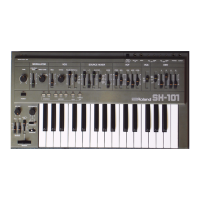
2. Adjust SH-101 knobs as follows.
Tune Pot in center position
VCO Mod slider at 0
Range at 8’
Pulse width at 0
Pulse waveform off
Ramp waveform at Max.
Sub-Osc waveform at 0
Noise at 0
Freq. at Max.
Res. at 0
Env at 0
Mod at 0
Kybd at Max.
VCA at Gate
Portamento at Off
Transpose at M
Volume at 10
VCO/VCF/MOD bender assignments at 0
3. Connect voltmeter to CV output jack. Measure DC voltage
4. Power up SH-101 while holding LOAD and KEY TRANSPOSE buttons down. (These LEDS should stay lit)
5. Voltmeter will now read approx. 0.000V. Adjust VR-2 on Synth Board to achieve 0.000V.
6. Press PLAY button.
7. Voltmeter will now read approx. 2.750V. Adjust VR-1 on Synth Board to achieve 2.750V.
8. Press ARPEGGIO DOWN button.
9. Voltmeter will now read approx. 2.500V. Adjust VR-3 on Synth Board to achieve 2.500V
10. Repeat steps 5-9 until all measurements are within 1mV. (note, you can press the LOAD button to return to
the
state required for step 5 rather than re-powering.
11. De-power the Synth.
12. Re-power the synth and connect a guitar tuner or frequency counter to its output.
13. Alternate playing the lowest key (F3) and highest key (F5). while looking at the tuner/counter.
14. Adjust VR-6 until both notes are exactly 2 octaves apart. VR-6 adjusts the frequency spacing (width)
between the
two notes. It should be exactly 2 octaves however VR-6 can make it greater or less that this amount. If you
have



 To Next Page