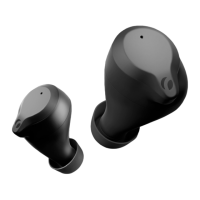
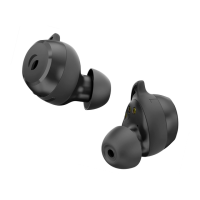
Connect for the rst timeConnect for the rst time
A manual connection must be made when the A manual connection must be made when the
earbuds have not been connected to a Bluetooth earbuds have not been connected to a Bluetooth
device before.device before.
1. 1. Take both earbuds out of the charging case.Take both earbuds out of the charging case.
2. 2. Both earbuds will automatically turn on Both earbuds will automatically turn on
(ascending tone) and will pair with each other.(ascending tone) and will pair with each other.
3. 3. Open the Bluetooth settings on your device and Open the Bluetooth settings on your device and
activate Bluetooth.activate Bluetooth.
4. 4. Wait until Rolfstone Riva appears and select it. Wait until Rolfstone Riva appears and select it.
The earbuds are ready for use.The earbuds are ready for use.
More information and instruction videos can be More information and instruction videos can be
found on www.rolfstone.com/en/faqfound on www.rolfstone.com/en/faq
Automatically reconnect
Automatically reconnect
The earbuds will automatically reconnect to
The earbuds will automatically reconnect to
the last connected device. On the previously
the last connected device. On the previously
connected device:
•
Bluetooth must be enabled.
Bluetooth must be enabled.
•
Rolfstone Riva needs to be in the list of
Rolfstone Riva needs to be in the list of
devices.
1.
Take both earbuds out of the charging case.
Take both earbuds out of the charging case.
2.
Both earbuds will automatically turn on
Both earbuds will automatically turn on
(ascending tone) and will pair with each other.
(ascending tone) and will pair with each other.
3.
Hereafter the earbuds will search for a known
Hereafter the earbuds will search for a known
Bluetooth device and automatically connect to
Bluetooth device and automatically connect to
it.
More information and instruction videos can be
More information and instruction videos can be
found on www.rolfstone.com/en/faq
found on www.rolfstone.com/en/faq
EN 6
Connect for the rst time
Connect for the rst time
A manual connection must be made when the
A manual connection must be made when the
earbuds have not been connected to a Bluetooth
earbuds have not been connected to a Bluetooth
device before.
1.
Take both earbuds out of the charging case.
Take both earbuds out of the charging case.
2.
Both earbuds will automatically turn on
Both earbuds will automatically turn on
(ascending tone) and will pair with each other.
(ascending tone) and will pair with each other.
3.
Open the Bluetooth settings on your device and
Open the Bluetooth settings on your device and
activate Bluetooth.
4.
Wait until Rolfstone Riva appears and select it.
Wait until Rolfstone Riva appears and select it.
The earbuds are ready for use.
The earbuds are ready for use.
More information and instruction videos can be
More information and instruction videos can be
found on www.rolfstone.com/en/faq
found on www.rolfstone.com/en/faq
EN 5


 To Next Page
 Loading...