The power button is located on the front panel of the Lightpad Block. Press this button to turn it
on, press and hold for approximately 3 seconds to turn the Lightpad Block off. While on,
pressing this button repeatedly toggles between Bluetooth pairing mode on and off.
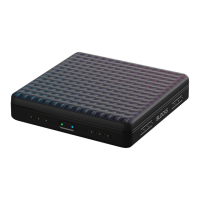
The Lightpad Surface
The Lightpad surface features a 15 x 15 LED matrix comprised of individual cells (225) and
covered with laser etched silicone which enables users to create multidimensional or 5D Touch
performances.
The Lightpad Surface is made of silicone which is purposely engineered to withstand repetitive
pressure inputs from fingers and hands while providing passive haptic feedback to the input
gestures. The surface has been specially treated to provide soft touch and reduce surface friction
for lateral gestures.
Mode Button
The Mode button is on the left side panel of the Lightpad Block and cycles the Instruments. The
secondary use for the Mode button is to cycle through the various configurations of the 15×15
LED grid when connected to 3rd party software applications.
DNA Connectors
The Lightpad Block features 8 DNA connectors. These six-pin connectors magnetically connect
multiple Blocks and also transmit power and data between the Blocks.
USB-C Port
The Lightpad Block features a USB-C connector for charging the device and for a MIDI-over-
USB connection between BLOCKS and a computer. More information about the battery and
charging the Lightpad Block are listed below.
Battery Indicator
The Power LED on the Power / Bluetooth button also indicates the current battery status of the
Lightpad Block and when the Lightpad Block is being charged. The Power LED will display
green when fully charged, yellow when partially charged and red when the charge is below 20%.
Additional Battery Info
The Lightpad Block features a 2000mAh Li-po (Lithium polymer) battery with a nominal
discharge voltage of 3.7 volts. Protection is provided for overvoltage, overcharge, over
discharge, and short circuit. The battery is capable of powering the Lightpad Block for over four
hours when fully charged. Using USB 3 charger, the battery will charge nominally within four
hours. If additional Blocks are connected the charging time will increase accordingly, as the
current is shared between all connected Blocks.


 To Next Page
 Loading...