50
• 1 transport chair package
• 2 adjustable footrests with Allen key
• 2 armrests
• 1 bag
• 1 user manual
• 1 pump for the pneumatic tires (with the Rollz Motion Performance)
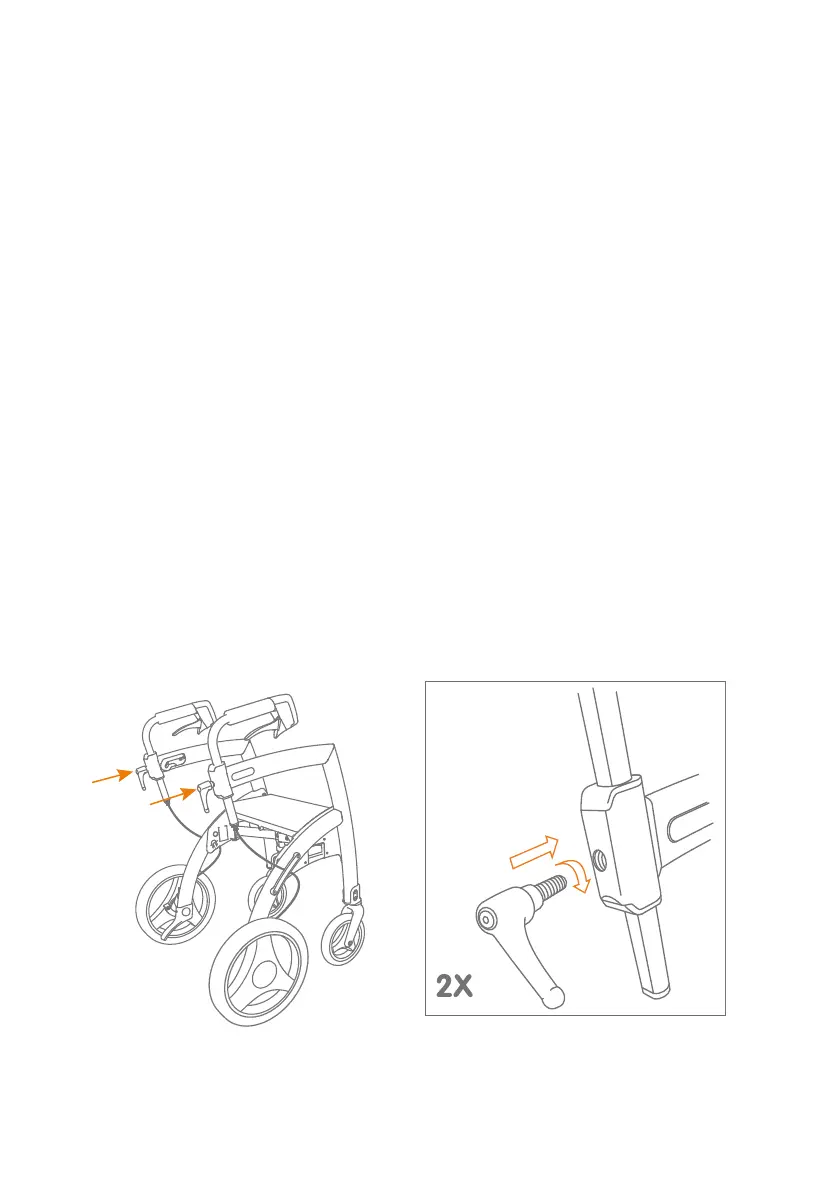
Screw in the adjustment handles
Before you can use the rollator, the two adjustment handles must be screwed in.
You will find these packed with the seat cushion. The adjustment handles can be
used to fix the direction of the handles and to set them at the correct height.
a. Screw in both adjustment handles to the maximum (Figure 1 and 2).
b. Place the adjustment handles vertically, pointing straight down. This can be
done by gently pulling the adjustment handles outwards and turning them
into the correct position. Release the handles when the position is reached.
c. The correct height of the handles can be set as explained in Adjusting
height for correct posture.
Figure 2: Screw in the adjustment
handles clockwise.
Figure 1: Screw in two adjustment handles
before you use the Rollz Motion.


 To Next Page