Need help?
Do you have a question about the Rombouts Xpress Office and is the answer not in the manual?
Lift the machine and remove protective plastic cover.
Place machine in location, fill tank, connect to power.
Overview of buttons and their functions on the control pad.
Steps to make coffee using predefined volumes.
Instructions for dispensing hot water.
Explanation of the automatic power-saving mode.
Minor issues to resolve before brewing coffee, like low water or full bin.
Temporary alerts such as descaling, cleaning, or Brita filter replacement.
Critical errors like brewing unit issues or heating problems requiring professional help.
Steps to resolve jammed coffee pods.
Setting volumes for Espresso, Coffee, and Long Coffee.
Setting the volume for hot water dispensing.
Selecting the display language for the machine.
Adjusting the display screen brightness.
Setting the desired coffee brewing temperature.
Setting the desired hot water temperature.
Managing Brita filter usage and reset.
Instructions for performing cleaning and descaling cycles.
Viewing and resetting various operational counters.
 General
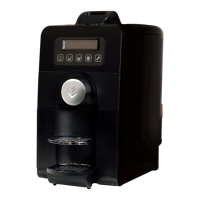
| Product Type | Coffee Maker |
|---|---|
| Brand | Rombouts |
| Model | Xpress Office |
| Type | Pod Coffee Machine |
| Power | 1400 watts |
| Voltage | 220-240V |
| Material | Plastic |
| Color | Black |
| Special Features | Removable drip tray |

 To Next Page