27
open/close) to turn the machine ON. Wait until the machine reaches the required temperature (the white light
stays ON steady).
Check that the handle (no. 2) is lowered.
THE POD FAILS TO EJECT
Check that the pod basket is empty.
Raise or lower the handle to eject the pod (several times if necessary).
NO COFFEE IS SERVED
Check the level of water in the tank.
THE WHITE LIGHT FAILS TO COME ON
Check that the machine is plugged in.
THE WHITE LIGHT FLASHES RAPIDLY (UNLESS PROGRAMMING MODE IS SELECTED)
Check that the water tank (no. 7) is in position.
CLEANING
Turn the coffee machine off and allow to cool in full before cleaning.
Clean the body of the coffee machine, the water tank (no. 7), the pod basket (no. 9) and the strainer with a
sponge on a frequent and regular basis and leave to dry.
Reminder: Never immerse the machine in water to clean. Never place the machine or its accessories in a
dishwasher.
DISMANTLING THE COFFEE UNIT
It may be necessary to clean the unit if a pod is trapped.
To clean the unit, stop and unplug the machine, set the machine switch
(no. 8) to the O position, remove the machine cover (see photos) and
release the unit by pulling the bolt towards you.
Rotate the unit anti-clockwise.
Reverse this procedure to ret the unit.
Important: if you forget to t the bolt in the unit, you will not be able to close
the cover, and the safety device will prevent you from retting the cover
(no. 1).
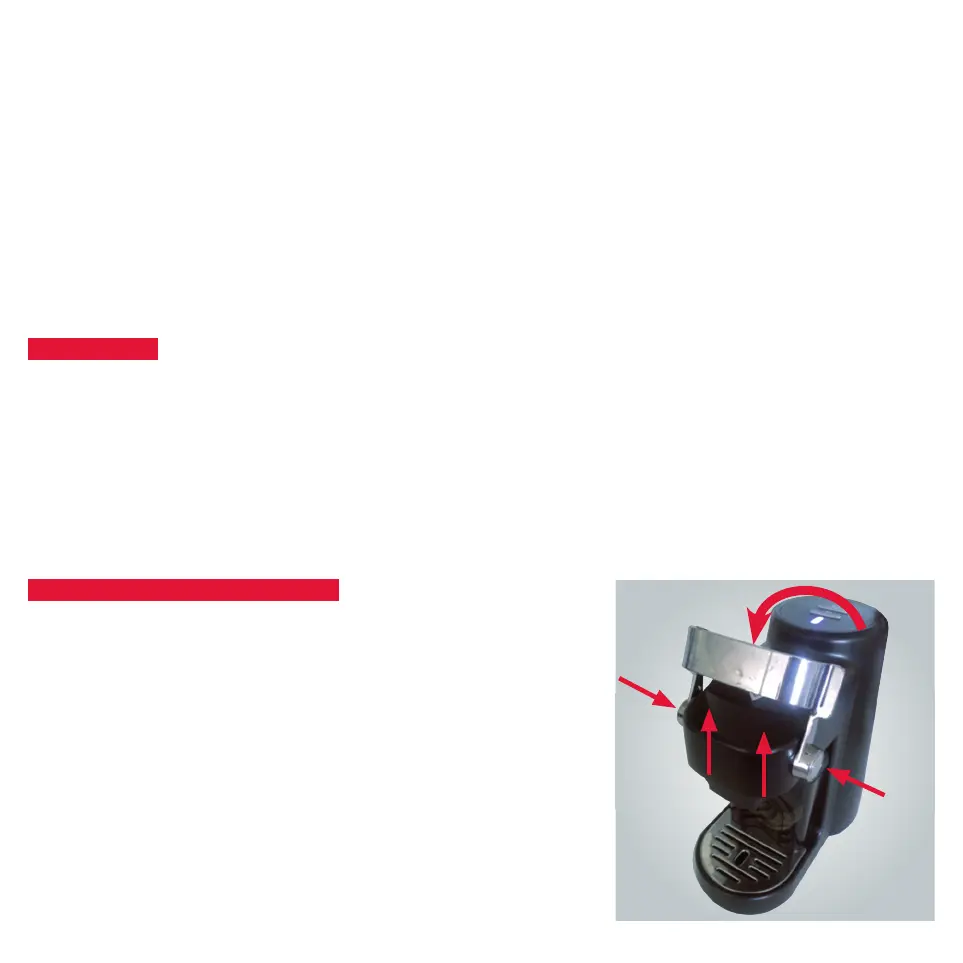
TO REMOVE THE MACHINE COVER:
Raise the handle (no. 2) to maximum, while pressing the two silver-plated
handle discs simultaneously, pull the cover (no. 1) upwards


 To Next Page