
 Need help?
Do you have a question about the Romet R700 and is the answer not in the manual?
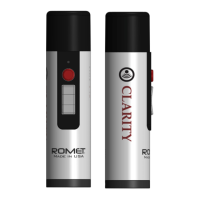
Identification of key physical components of the Romet Clarity device, including head, buttons, and connectors.
Instructions for basic operation, including charging the device and turning it on.
Guidance on locating the optimal neck position for clear sound transmission with the electrolarynx.
Important safety precautions including avoiding water, disassembly, third-party chargers, and stoma insertion.
Emphasizes that the device is for personal use only due to hygiene and health considerations.
The Romet Clarity is a digital electronic larynx, Model # R700, designed to assist laryngectomees in speaking. It is a CLASS I medical device, registered with the USA FDA under registration number 3007615474. The device utilizes "Elevated Digital Technology" to produce mechanical vibrations that simulate human speech.
The Romet Clarity device generates mechanical vibrations at a low sound frequency, ranging from 60-195 Hz. When applied to the neck, these vibrations create a trembling in the oral cavity, similar to that produced by the human voice. By combining the starting and stopping of these sound vibrations with oral articulation, users can create comprehensible human speech. A key feature of the Romet Clarity is its "One configurable Pitch button," allowing users to customize their speech pitch.
The Romet Clarity device consists of several main components: a Top Head, an LED Light, an Activator Tone Button, and a Control Panel with (+) and (-) buttons. On the bottom, it features an on/off slide switch and a USB cable connector.
To begin using the device, it must be fully charged. Charging is indicated by a red LED on the panel when the activator tone button is pressed. The device is charged via a provided USB cable connected to a USB port on the bottom of the device, with the other end plugged into the included USB International charger (5V 2A, with EU Wall adapter) and then into an electrical wall socket. Green and red LEDs on the bottom illuminate during charging; the red light extinguishes when fully charged. The device will not operate while charging as a safety measure.
After charging, the device is turned on by sliding the switch on the bottom from OFF to ON, which briefly illuminates a multicolor LED green. Speaking is initiated by pressing the Activator Tone button.
A crucial step in learning to use the electrolarynx is finding the "sweet spot" on the neck. This is the location where the sound transmits through the neck tissue and into the oral cavity with the most clarity. Users are advised to experiment with different positions, pressing the device firmly against the neck tissue, to find the optimal spot for sound transmission.
Initial practice should focus on making basic sounds, starting with single vowels and over-articulating each sound. Gradually, users can progress to short words, sentences, and conversation. Learning to speak with an electrolarynx requires time, practice, and patience, similar to learning a musical instrument.
The volume can be adjusted by pressing the (+) or (-) buttons on the control panel. When the maximum or minimum volume is reached, the LED will turn red to indicate this limit.
To adjust the pitch, users simultaneously press and release both the (-) volume button and the red activation button. The device will enter "Pitch setup mode," emitting a continuous sound. While buzzing, the pitch can be increased or decreased using the (+) or (-) buttons. Once the desired pitch is found, pressing the round activator button sets it as the standard pitch for future use.
When the device is ON, pressing the Activator Button to speak will illuminate an LED. A green light indicates a full charge (100%), while a red light signifies that the battery is below 25%. The red light will continue to glow after each button press as a reminder to charge. When the battery is critically low, the device will stop producing sound, and the LED will blink red after each talk button press, preventing battery damage. It is recommended to charge the device when the indicator LED turns red to maintain battery life. If the battery cannot hold a charge for more than one hour of use, it may be nearing the end of its life cycle, and users should contact their distributor or Romet.
The Romet Clarity device should be cleaned at least once every 24 hours due to its constant contact with skin.
For safe storage, the device and its accessories should be kept in their original box, in a dark and dry place, at temperatures between -20°C to +45°C.
All Romet devices come with a limited 2-year warranty from the date of purchase. This warranty covers defects in material or workmanship under normal use, as per the User Manual. The warranty is voided by attempts to open or repair the device, extensive shock damage (e.g., dropping), or liquid damage (e.g., submerging in water or chemicals). During the warranty period, Romet will repair or replace defective products or parts free of charge. The warranty does not cover issues caused by negligence, improper maintenance, modification, or damage from natural disasters, theft, or loss. Shipping charges for sending the device to Romet are the customer's responsibility, while return shipping is covered by the company.
The WEEE symbol indicates that the device should not be mixed with general household waste. For proper treatment, recovery, and recycling, it should be taken to designated collection points or returned to the retailer upon purchasing a new equivalent product. This helps conserve resources and prevent negative environmental and health impacts. Professional users in the EU should contact their dealer or supplier for EEE disposal information. For countries outside the EU, local authorities or dealers should be consulted for correct disposal methods.
 General
| Brand | Romet |
|---|---|
| Model | R700 |
| Category | Medical Equipment |
| Language | English |

 To Next Page
