2
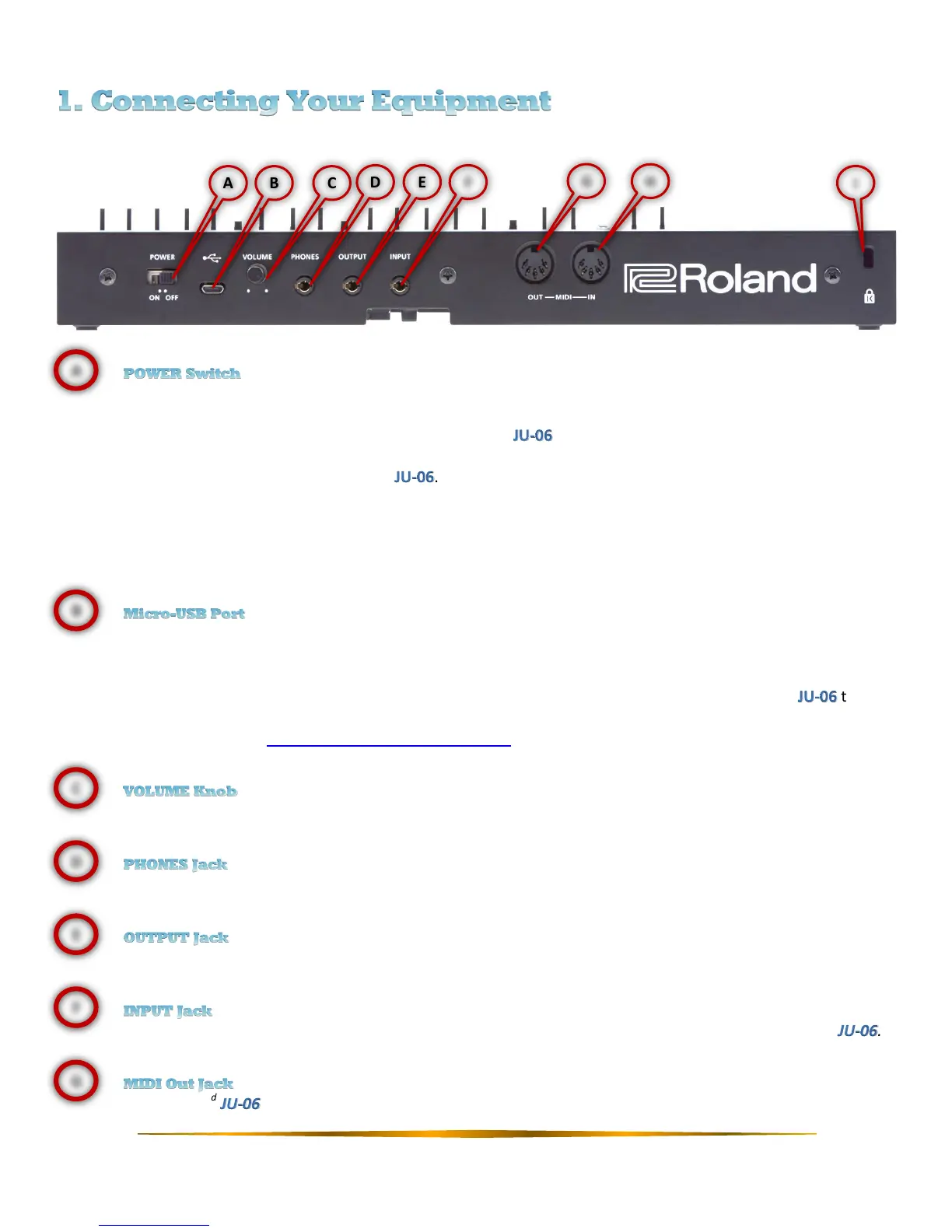
Turns on the unit’s power.
▫ After you’ve made connections correctly, turn on the first and then the connected system. Powering
on in any other order could cause a malfunction or damage. When turning the power off, turn off the
connected system first and then the .
▫ The unit has a protection citcuit that causes a short delay between powering the unit on, and normal
operation of the unit.
▫ Lower the volume before turning the unit on or off. Even with the volume turned down, you may hear
sound when switching the unit on/off. This is normal and does not indicate a malfunction.
Allows you to connect the unit to an external power source or computer via a USB 2.0 (A-microB) cable.
Use a commercially available USB 2.0 cable (A-microB) to connect this port to your computer. It can be used to
transfer MIDI and audio data over USB. The USB driver needs to be installed when connecting the to your
computer, and can be downloaded from the Roland website. For details, refer to the Readme.htm file included
in the download from http://www.roland.com/support/.
Adjusts the output volume of the unit.
Connect headphones or equivalent monitoring equipment.
Connect an external amplifier, monitors, or mixer.
Connect an external audio device. Sound will be routed through the headphone and output jacks of the .
Connect a 2
nd
unit to increase polyphony using Chain Mode.



 To Next Page
 Loading...