EasyManua.ls Logo

Rongta Technology RP310 - Cleaning the Printer; Cleaning the Printer Head; Cleaning the Sensor

Rongta Technology RP310
16 pages
Print Icon
To Next Page IconTo Next Page
To Previous Page IconTo Previous Page
Loading...
Vlil.Cleaning
the
Printer
8.1
Cleaning
the
Printer
Head
Clean
the
print
head
when
one
of
the
following
conditions
occurs
to
the
printer:
(1)
Printing
is
not
clear.
(2)
A
vertical
column
of
the
printed
page
is
not
clear.
(3)
The paper
feeding
noise
is
high.
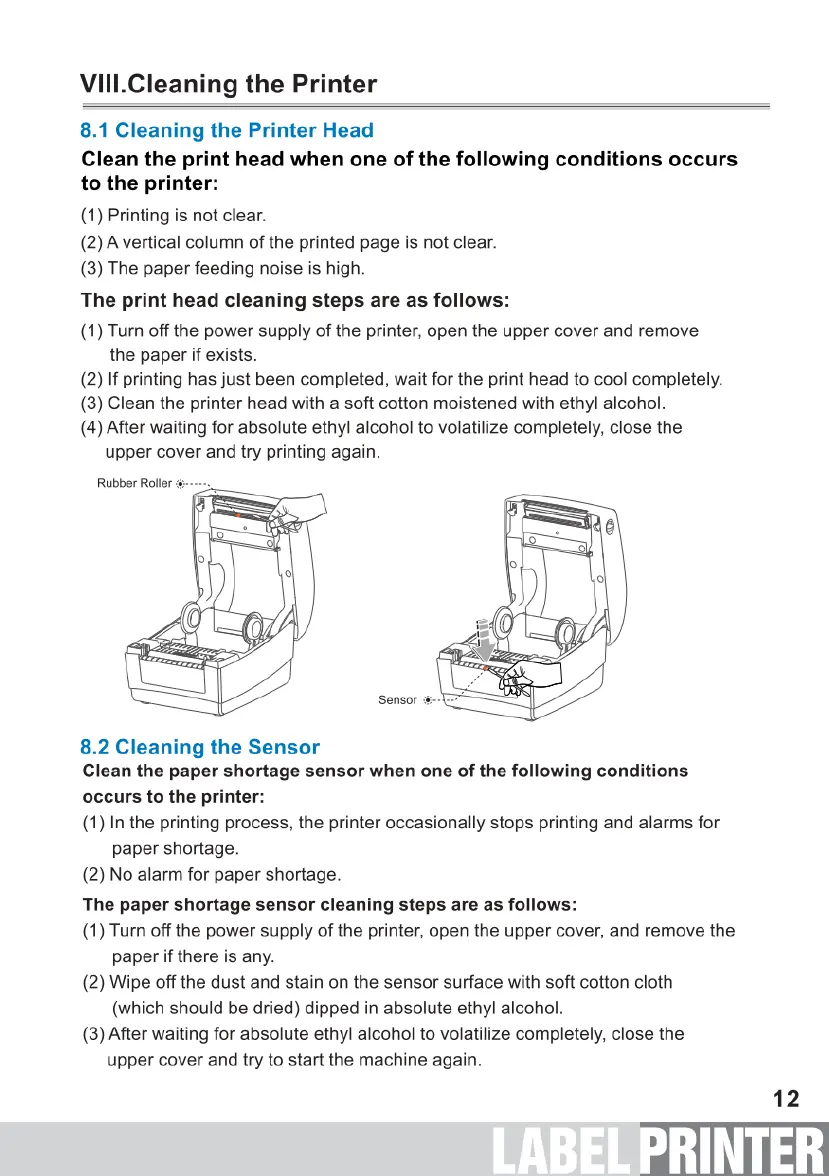
The
print
head
cleaning
steps
are
as
follows:
(1)
Turn
off
the
power
supply
of
the
printer,
open
the
upper
cover
and
remove
the
paper
if
exists.
(2)
If
printing
has
just
been
completed,
wait
for
the
print
head
to
cool
completely.
(3)
Clean
the
printer
head
with
a
soft
cotton
moistened
with
ethyl
alcohol.
(4)
After
waiting
for
absolute
ethyl
alcohol
to
volatilize
completely,
close
the
upper
cover
and
try
printing
again.
Rubber
Roller
8.2
Cleaning
the
Sensor
Clean
the
paper
shortage
sensor
when
one
of
the
following
conditions
occurs
to
the
printer:
(1)
In
the
printing
process,
the
printer
occasionally
stops
printing
and
alarms
for
paper
shortage.
(2)
No
alarm
for
paper
shortage.
The
paper
shortage
sensor
cleaning
steps
are
as
follows:
(1)
Turn
off
the
power
supply
of
the
printer,
open
the
upper
cover,
and
remove
the
paper
if
there
is
any.
(2)
Wipe
off
the
dust
and
stain
on
the
sensor
surface
with
soft
cotton
cloth
(which
should
be
dried)
dipped
in
absolute
ethyl
alcohol.
(3)
After
waiting
for
absolute
ethyl
alcohol
to
volatilize
completely,
close
the
upper
cover
and
try
to
start
the
machine
again.
12
PRINTER

Related product manuals